Blue Theme Orange Theme Green Theme Red Theme
 
Discover the top 5 tips for understanding .NET Interop
Home | Forums | Videos | Advertise | Certifications | Downloads | Blogs | Interviews | Jobs | Beginners | Training
 | Consulting  
Submit an Article Submit a Blog 
 Jump to
Skip Navigation Links
TechnologyExpand Technology
WebsiteExpand Website
Team Foundation Server Hosting
Search :       Advanced Search »
Home » Visual C# » Enhanced Required Field Validator with an Image property

Enhanced Required Field Validator with an Image property

This article shows an enhanced Required Field Validator control with an ImageUrl property. When the control being validated is left blank, the proposed validator flags it with an Image.

Page Views : 19961
Downloads : 465
Rating :
 Rate it
Level : Intermediate
   Print Read/Post comments Post a comment  Similar Articles  
   Email to a friend  Bookmark  Author's other articles  
Download Files:
Enhanced Validator Solution.zip
 
 
6 Months Free & No Setup Fees ASP.NET Hosting!
Become a Sponsor
Discover the top 5 tips for understanding .NET Interop
Become a Sponsor
 Tag Cloud
 Latest Jobs
More ... 
 Latest Interview Questions
More ... 

Introduction:

Required Field Validator is being used from the initial version of ASP.NET and is a part of the standard validator controls in ASP.NET 2.0. When the validator is invalid, the required field is flagged with the literal in the "Text" property.  The current article proposes an additional Image property that can be used to flag the required field.

Proposed Solution:

The control inherits the Required Field Validator, adds a new property ImageUrl and overrides the "Render" and "RegisterValidatorDeclarations" methods. The listing in Figure 1 shows the newly added property.
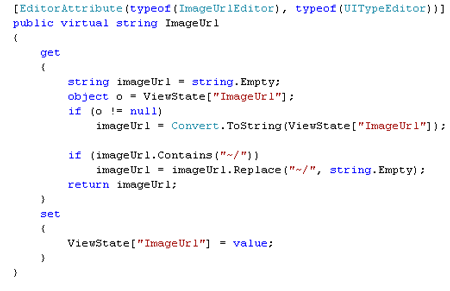
Figure 1: ImageUrl Propeperty

There is an EditorAttribute for the property, which describes the type of editor used in the Visual Studio design mode while modifying the value of ImageUrl property. EditorAttribute has four different overloads and in the current context, the article uses the "type" of the editor needed and the base type. The ImageUrlEditor type gives us the GUI interface needed to locate an image in the file system. The attribute is optional and is included because it is easier to choose the location of the image using a visual interface. Figure 2 shows the designer view with this attribute as opposed to a standard view seen on other properties (for example: Initialvalue). 
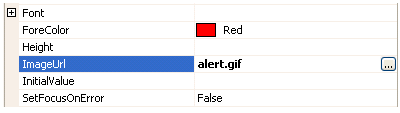
Figure 2: Designer support for the Image Url property

When the ellipses is clicked the interface for choosing the image is presented as shown in Figure 3. This interface is the standard one used for selecting images across multiple webcontrols.
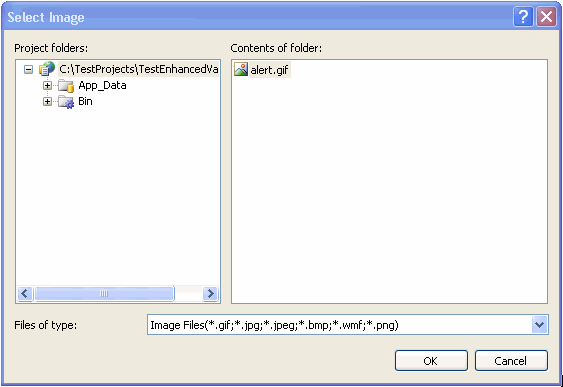
Figure 3: User Interface to select the Image

The ImageUrl value is used within the overridden Render block. The code is shown here in Figure 4. The overridden Render method defines the rendering of the control and also provides the client side script hook up needed for it to work with the JavaScript framework (formerly WebUIValidation.js) shipped with .NET 2.0.  
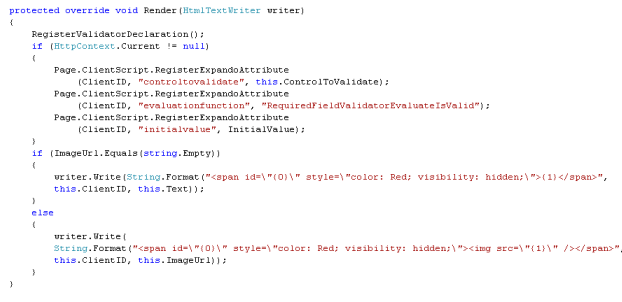
Figure 4: Overridden Render Block

The first call is to the RegisterValidatorDeclaration method listed in Figure 5.

Figure 5: RegisterValidatorDeclaration

When a page is submitted using a Button in an aspx page, the JavaScript framework looks for all the validators available on the page and evaluates them. For the current control to participate in the Page Validation process, we need to register it in the global JS variable "Page_Validators", which is done in the above method. The next three lines shows the properties of a standard Required Field Validator added as Expando Attributes. There is an advantage of using Expando attributes as opposed to adding attributes in the overridden AddAttributesToRender. One of the main advantages is that the attributes needed for the Validation process are rendered as JS variables JavaScript DOM. That way the client side source code is XHTML compliant, cleaner, and easier to read. In this example the DOM is rendered as shown in Figure 6. As we can see, the rendering code (HTML) is well separated from the additional attributes.  
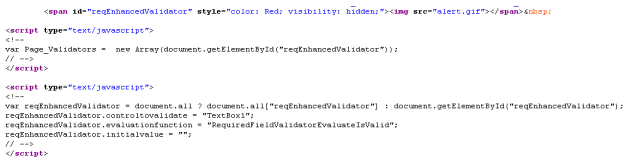
Figure 6: DOM rendering of the Expando Attributes

It is seen that these attributes are conditionally rendered depending on the value of HttpContext.Current. That expando attributes need to be rendered only at runtime and not in the design mode. The value is null when viewing the control on the VS editor design mode and the rendering is skipped during that time.

The next set of lines in Figure 4 show the actual rendering feature. If the user of the control does not set the ImageUrl, the default behavior is to show the Text property to flag the required field. If the ImageUrl is set, an <img> is embedded as part of the span tag to show an Image when the ControlToValidate does not have a value. Since an HTML img is used, the ImageUrl property checks for "~/" (which is  introduced when using a ImageUrlEditor for selecting the Image file) and removes it.

Demo:

The attached example shows the validator In action. The example consists of a TextBox, a Button, and the the Enhanced Required Validator. When the button is clicked without entering any text, the error is flagged either though the Text or an Image depending on the case.

Figure 7: TextBox flagged either through Text or ImageUrl

Conclusion:

The control provides a flexible way to flag an error with either the default Text or an Image which is set through ImageUrl. As the saying goes "A picture is worth thousand words", if we can communicate the significance of a field to the user through an Image, then why not !

Comment Request!
Thank you for reading this post. Please post your feedback, question, or comments about this post Here.
Login to add your contents and source code to this article
 [Top] Rate this article
 
 About the author
 
Deepak Raghavan
Deepak has been involved with web based technologies for the past 6 years and currently works as a Sr. .NET Developer/Architect in Minneapolis. His interests lie in the upcoming Microsoft technologies, SOA, DSL, Software Factories, Agile and XP to name a few. He holds a Masters degree in Electrical Engineering and MCAD.NET certification.
Looking for C# Consulting?
C# Consulting is founded in 2002 by the founders of C# Corner. Unlike a traditional consulting company, our consultants are well-known experts in .NET and many of them are MVPs, authors, and trainers. We specialize in Microsoft .NET development and utilize Agile Development and Extreme Programming practices to provide fast pace quick turnaround results. Our software development model is a mix of Agile Development, traditional SDLC, and Waterfall models.
Click here to learn more about C# Consulting.
 
Introducing MaxV - one click. infinite control. Hyper-V Hosting from MaximumASP.
Finally – a virtual platform that delivers next-generation Windows Server 2008 Hyper-V virtualization technology from a managed hosting partner you can truly depend on. Visit www.maximumasp.com/max for a FREE 30 day trial. Hurry offer ends soon. Climb aboard the MaxV platform and take advantage of High Availability, Intelligent Monitoring, Recurrent Backups, and Scalability – with no hassle or hidden fees. As a managed hosting partner focused solely on Microsoft technologies since 2000, MaximumASP is uniquely qualified to provide the superior support that our business is built on. Unparalleled expertise with Microsoft technologies lead to working directly with Microsoft as first to offer IIS 7 and SQL 2008 betas in a hosted environment; partnering in the Go Live Program for Hyper-V; and product co-launches built on WS 2008 with Hyper-V technology.
Dynamic PDF
ceTE software specializes in components for dynamic PDF generation and manipulation. The DynamicPDF™ product line allows you to dynamically generate PDF documents, merge PDF documents and new content to existing PDF documents from within your applications.
Discover the top 5 tips for understanding .NET
Ricky Leeks presents the top 5 tips for understanding .NET Interoperability. Learn more.
Nevron Chart for .NET 2010.1 Now Available
The leading .NET charting control now features PDF, Flash and Silverlight export, visualization of large datasets and more. Deliver true charting functionality to your BI, Scorecard, Presentation or Scientific apps. Download evaluation now.
ASP.NET 4 Hosting
Get 2 Months Free of ASP.NET Hosting for Only $4.95/month! Receive FREE MS SQL and MySQL Databases Including ASP.NET 4/3.5, MVC 3.0, Silverlight 4, Windows 2008/IIS 7.0 Plus FREE IIS 7 Modules. Host UNLIMITED ASP.NET Web Sites – Click Here!
 
 Post a Feedback, Comment, or Question about this article
Subject:
Comment:
Nevron Chart
Become a Sponsor
 Comments
problem with master page by Praveen On August 22, 2007
hey deepak your article is good but it does't work when you use master page on that page.
Reply | Email | Modify 
Re: problem with master page by Deepak On August 28, 2007
Hey Praveen, Thanks for the heads-up. I will take a look at it and see where the problem lies. Thanks, Deepak.
Reply | Email | Modify 
Unable to run with master page by a On November 29, 2007
Hi Deepak Any finding regarding running this control with master page?
Reply | Email | Modify 
Re: Unable to run with master page by Deepak On January 1, 2008
Can you pls email me the bug?
Reply | Email | Modify 
Easier way by Pavel On October 9, 2008
Hi guys, I think this will solve your problems: http://donchevp.blogspot.com/2008/05/asprequiredfieldvalidator-or-any-asp.html If you have a big project and want to change all the required field, or other validators in few minutes, you may read this too: http://donchevp.blogspot.com/2008/05/asprequiredfieldvalidator-or-any-asp.html Hope it is not too late! Cheers!
Reply | Email | Modify 
Reply by Santosh On July 6, 2009
Good job ? But does not work if you disable javascript ,I Have checked .
Reply | Email | Modify 
6 Months Free & No Setup Fees ASP.NET Hosting!
 © 2012  contents copyright of their authors. Rest everything copyright Mindcracker. All rights reserved.