|
|
|
|
|
Home
»
XAML
»
Color Animation In Silverlight 3
|
|
|
Author Rank:
|
|
Technologies:
.NET 3.0 and 3.5, Expression Blend, Silverlight, XAML,Visual C# .NET
|
|
Total downloads :
|
22
|
|
Total page views :
|
1768
|
|
Rating :
|
|
0/5
|
|
This article has been rated :
|
0 times
|
|
|
|
|
Download
Files:
|
|
|
|
|
|
|
|
|
|
|
Similar ArticlesMost ReadTop RatedLatest
|
|
Related EbooksTop Videos
|
|
|
Description
|
|
The Complete Visual C# Programmer's Guide, written by the authors of C# Corner, covers most of the major components that make up C# and the .NETenvironment including Windows Forms, ADO.NET, GDI+, Web Services, and Security. The book is geared toward the beginner to intermediate programmers.
|
|
|
|
|
|
|
|
|
|
|
|
|
Introduction
My last article was based on Double Animation in Silverlight3 through code behind. In this article we will try the similar thing but with Color Animation.
Creating a Simple Silverlight Application
Open up Blend 3 and Create a new Silverlight Application.
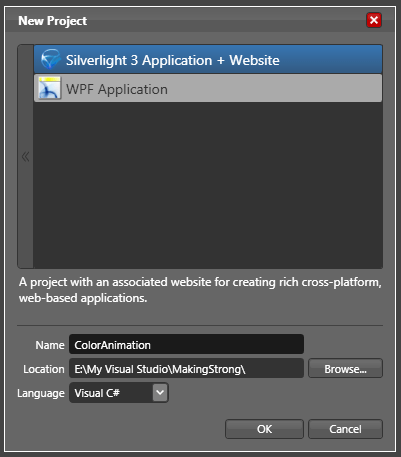
The following animations can be done in Blend3 without even touching the C# code behind.
-
Create an Ellipse. Name it as MyEllipse.
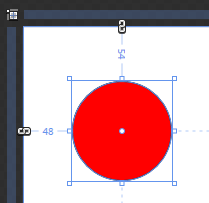
Create a storyboard called StoryBoard1 that changes color to Blue.
Remember to delete this storyboard to see in effect our code behind animation.
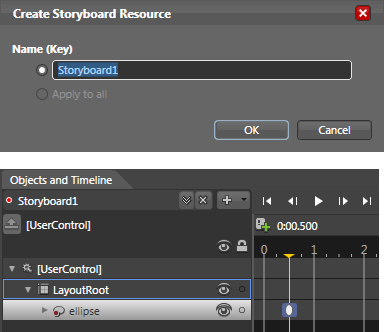
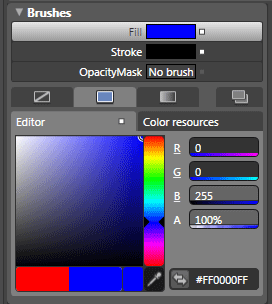
Now let's take a look at how color animations can be implemented via code. This project illustrates how to work with ColorAnimation objects. In this example, we will create a ColorAnimation that turns a red ellipse blue when the MouseEnter event is raised. The storyboard equivalent for this animation looks like the following.
<Storyboard x:Name="Storyboard1"> <ColorAnimationUsingKeyFrames BeginTime="00:00:00" Storyboard.TargetName="ellipse" Storyboard.TargetProperty="(Shape.Fill).(SolidColorBrush.Color)"> <EasingColorKeyFrame KeyTime="00:00:00.5000000" Value="#FF0000FF"/> </ColorAnimationUsingKeyFrames> </Storyboard>
-
In Visual Studio, open the MainControl.xaml.cs file for editing. Just above the MainControl() constructor, add the following code, which declares a storyboard:
private Storyboard TurnsBlue = new Storyboard();
-
On the next line, declare a new ColorAnimation object called BlueColor:
private ColorAnimation BlueColor = new ColorAnimation();
-
Next, code the animation object's properties inside the MainControl() constructor. In this case, the TargetName for the BlueColor animation is the MyEllipse object, and the TargetProperty is the object's fill.
BlueColor.SetValue(Storyboard.TargetNameProperty, "MyEllipse"); BlueColor.SetValue(Storyboard.TargetPropertyProperty, new PropertyPath("(Shape.Fill).(SolidColorBrush.Color)"));
-
In my previous article, double data types were being used. In this example, data of type Color will be manipulated. To change a color fill for an object, define the target color as a color from alpha, red, green and blue color values. Note that the code shown below here is using an Argb value (alpha, red, green, blue) to specify a color; where as the storyboard produced in Blend utilizes a hex value. Argb color values get their value from four byte values (0 through 255), separated by commas. This is probably a familiar format for you if you have worked in almost any paint program. Once a color had been defined, it can be assigned to the To property in the animation.
Color ToColor = Color.FromArgb(255, 13, 8, 116); BlueColor.To = ToColor;
-
The animation can now be added to the storyboard, and the storyboard added to the LayoutRoot element:
TurnsBlue.Children.Add(BlueColor); LayoutRoot.Resources.Add("TurnsBlue",TurnsBlue);
-
All that's left is an event listener and a little bit of event handler code.
-
The event handler is placed after the closing curly brace of the MainControl() constructor method:
private void MyEllipse_MouseEnter(object sender, MouseEventArgs e)
{ TurnsBlue.Begin(); }
Compile and run this project and place the pointer on the red ellipse. The object's color will shift to blue.
That's it you have successfully used animation in code behind.
Similarly you can add another StoryBoard for MouseLeave event.
Enjoy Animating.
|
|
|
Login
to add your contents and source code to this article
|
|
|
|
|
|
|
|
|
|
|
|
Diptimaya Patra
Diptimaya is working as a Software Engineer in UST Global Inc, Trivandrum Center. He is interested in Microsoft Technologies. He is a good learner. He has a large exposure on Microsoft Office SharePoint Services 2007, Windows SharePoint Services, Silverlight 2, Silverlight 3, Blend 2, Blend 3, WPF, WCF, ASP.NET, AJAX, and NHibernate.
He is a native of Cuttack, Orissa.
Reach him at diptimaya.patra@gmail.com
|
|
|
|
|
|
|
|
|
C# Consulting is founded in 2002 by the founders of C# Corner. Unlike a traditional
consulting company, our consultants are well-known experts in .NET and many of them
are MVPs, authors, and trainers. We specialize in Microsoft .NET development and
utilize Agile Development and Extreme Programming practices to provide fast pace
quick turnaround results. Our software development model is a mix of Agile Development,
traditional SDLC, and Waterfall models.
|
|
Click here to learn more about C# Consulting. |
|
|
|
|
|
|
|
Introducing MaxV - one click. infinite control. Hyper-V Hosting from MaximumASP.
Finally – a virtual platform that delivers next-generation Windows Server 2008 Hyper-V virtualization technology from a managed hosting partner you can truly depend on. Visit www.maximumasp.com/max for a FREE 30 day trial. Hurry offer ends soon.
Climb aboard the MaxV platform and take advantage of High Availability, Intelligent Monitoring, Recurrent Backups, and Scalability – with no hassle or hidden fees.
As a managed hosting partner focused solely on Microsoft technologies since 2000, MaximumASP is uniquely qualified to provide the superior support that our business is built on. Unparalleled expertise with Microsoft technologies lead to working directly with Microsoft as first to offer IIS 7 and SQL 2008 betas in a hosted environment; partnering in the Go Live Program for Hyper-V; and product co-launches built on WS 2008 with Hyper-V technology.
|
Dynamic PDF
ceTE software specializes in components for dynamic PDF generation and manipulation. The DynamicPDF™ product line allows you to dynamically generate PDF documents, merge PDF documents and new content to existing PDF documents from within your applications.
|
Go.NET
Build custom interactive diagrams, network, workflow editors, flowcharts, or software design tools. Includes many predefined kinds of nodes, links, and basic shapes. Supports layers, scrolling, zooming, selection, drag-and-drop, clipboard, in-place editing, tooltips, grids, printing, overview window, palette. 100% implemented in C# as a managed .NET Control. Document/View/Tool architecture with many properties&events. Optional automatic layout.
|
Dundas Software
Dundas Chart for .NET is the most advanced .NET charting package available today. With an extremely complete feature set, elegant architecture and easy implementation, Dundas Chart can quickly add advanced Charting functionality to enhance and transform ASP.NET and Windows Forms applications. Whether you are implementing charting into internal projects, or building applications for clients, Dundas Chart offers advanced technology and advanced results to get the most out of data.
|
Clickatell's SMS Gateway
Clickatell's Developer Solutions allow you to SMS enable any website or
application via a range of API's. Learn More about our API connections.
|
Microsoft Visual Studio 2010
Microsoft Visual Studio 2010 offers more to developers than any other
Visual Studio release. Work more productively and collaboratively-with
greater control over your work at every step. The Beta 2 can give you a
head start on achieving efficiency.
|
|
|
|
|
|
|
|
|
Download
Files:
|
|
|
|
|
|
|
|
|
|
|
|
|
|
|
|
|
|