Blue Theme Orange Theme Green Theme Red Theme
 
MindFusion's Components
Home | Forums | Videos | Photos | Downloads | Blogs | E-Books | Interviews | Jobs | Beginners | Training
 | Consulting  
Submit an Article Submit a Blog 
 Login Close
User Id:
Password:
 
Forgot Password
Forgot Username
Why Register
 Jump to
Skip Navigation Links
TechnologyExpand Technology
WebsiteExpand Website
 Resources  
Close
 Our Network  
Close
Search :       Advanced Search »
Home » XAML » Easing Function In Blend 3 In Silverlight 3

Easing Function In Blend 3 In Silverlight 3

Using Easing Function to Animate in Blend 3

Author Rank:
Technologies: .NET 3.0 and 3.5, Expression Blend, Silverlight, XAML,Visual C# .NET
Total downloads : 17
Total page views :  1683
Rating :
 0/5
This article has been rated :  0 times
   Print Read/Post comments Post a comment  Rate  
   Email to a friend  Bookmark  Similar Articles  Author's other articles  
Download Files:
AnimationEasingFunction.zip
 
Become a Sponsor


Related EbooksTop Videos


Introduction

In this article I will describe you how you can enhance your animation effects, you can say more rich. A set of Easing Functions those are pre defined in Blend 3. We will see how to use it.

Creating a Simple Silverlight Application

Open up Blend 3 and Create a new Silverlight Application.
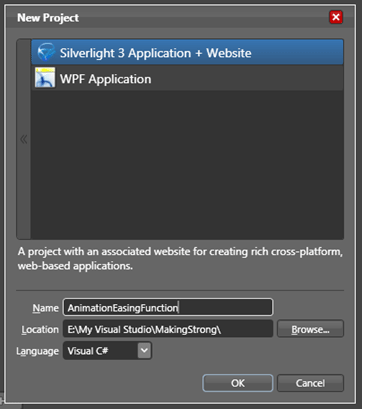
Image1.gif

Give the application a name, in our sample I have given AnimationEasingFunction.
Add a Button and name the Content as Animate.
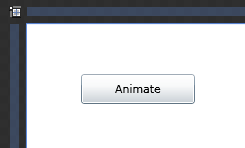
image2.gif

Add any control you want to animate, In this case I have used a Rectangle Control to animate, give the background so that you can see how it changes.
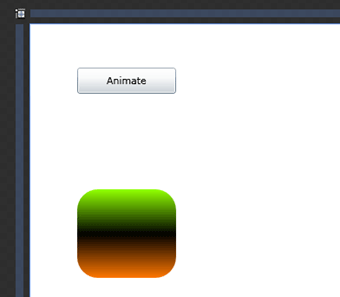
image3.gif

Now create a new storyboard and name it Animate.
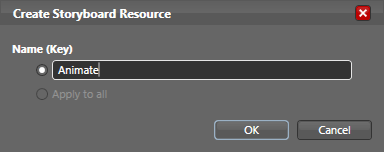
image4.gif

As soon as you click ok the recording for the storyboard will start. Select the target control you want to animate. In our case it is the Rectangle. Add the image5.gifsymbol to record a key frame.

image6.gif

Now click on 1(i.e. Changes after 1 second), to record your target animation.
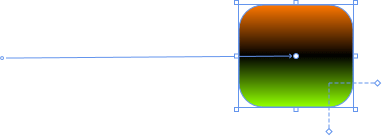
image7.gif

I have changed the Rotate Render Transform to 180 degrees and transformed from it's last location to its new location.

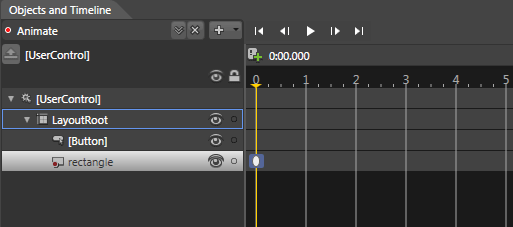
You can see the added record key frame in object and timeline pane as below.
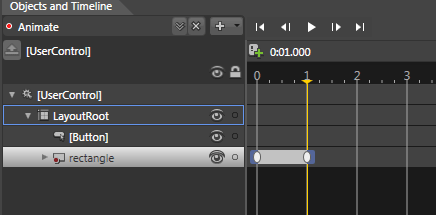
image8.gif

Now we will talk about the Easing Functions and how to use it.

Select the key frame and you will see Easing tab in your Properties pane.
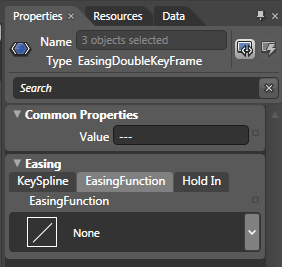
image9.gif

By default the Easing Function is None. You can see a varieties of Easing Function when you choose the drop down menu.
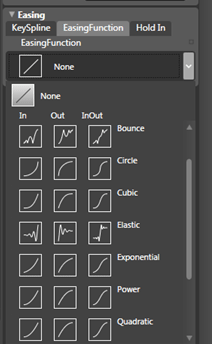
image10.gif

You can choose your best as your imagination.

In our sample I will choose the Elastic as you can see above.

Now after choosing animation you can modify your Easing Function from their properties as follows.
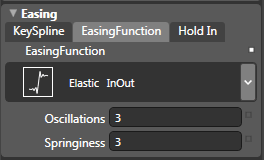
image11.gif

Now stop recording the storyboard and in the click event of the Button begin the storyboard.

private void Button_Click(object sender, System.Windows.RoutedEventArgs e)
{
                Animate.Begin();
}

Run your application and click the button, you will find it amazing.

Try your best imagination for using Easing Functions.

Enjoy Animating.


Login to add your contents and source code to this article
 [Top] Rate this article
 About the author
 
Diptimaya Patra

Diptimaya is working as a Software Engineer in UST Global Inc, Trivandrum Center.  He is interested in Microsoft Technologies. He is a good learner. He has a large exposure on Microsoft Office SharePoint Services 2007, Windows SharePoint Services, Silverlight 2, Silverlight 3, Blend 2, Blend 3, WPF, WCF, ASP.NET, AJAX, and NHibernate.


He is a native of Cuttack, Orissa.

Reach him at diptimaya.patra@gmail.com

Looking for C# Consulting?
C# Consulting is founded in 2002 by the founders of C# Corner. Unlike a traditional consulting company, our consultants are well-known experts in .NET and many of them are MVPs, authors, and trainers. We specialize in Microsoft .NET development and utilize Agile Development and Extreme Programming practices to provide fast pace quick turnaround results. Our software development model is a mix of Agile Development, traditional SDLC, and Waterfall models.
Click here to learn more about C# Consulting.
 
Introducing MaxV - one click. infinite control. Hyper-V Hosting from MaximumASP.
Finally – a virtual platform that delivers next-generation Windows Server 2008 Hyper-V virtualization technology from a managed hosting partner you can truly depend on. Visit www.maximumasp.com/max for a FREE 30 day trial. Hurry offer ends soon. Climb aboard the MaxV platform and take advantage of High Availability, Intelligent Monitoring, Recurrent Backups, and Scalability – with no hassle or hidden fees. As a managed hosting partner focused solely on Microsoft technologies since 2000, MaximumASP is uniquely qualified to provide the superior support that our business is built on. Unparalleled expertise with Microsoft technologies lead to working directly with Microsoft as first to offer IIS 7 and SQL 2008 betas in a hosted environment; partnering in the Go Live Program for Hyper-V; and product co-launches built on WS 2008 with Hyper-V technology.
Dynamic PDF
ceTE software specializes in components for dynamic PDF generation and manipulation. The DynamicPDF™ product line allows you to dynamically generate PDF documents, merge PDF documents and new content to existing PDF documents from within your applications.
Go.NET
Build custom interactive diagrams, network, workflow editors, flowcharts, or software design tools. Includes many predefined kinds of nodes, links, and basic shapes. Supports layers, scrolling, zooming, selection, drag-and-drop, clipboard, in-place editing, tooltips, grids, printing, overview window, palette. 100% implemented in C# as a managed .NET Control. Document/View/Tool architecture with many properties&events. Optional automatic layout.
Dundas Software
Dundas Chart for .NET is the most advanced .NET charting package available today.  With an extremely complete feature set, elegant architecture and easy implementation, Dundas Chart can quickly add advanced Charting functionality to enhance and transform ASP.NET and Windows Forms applications.  Whether you are implementing charting into internal projects, or building applications for clients, Dundas Chart offers advanced technology and advanced results to get the most out of data.
Clickatell's SMS Gateway
Clickatell's Developer Solutions allow you to SMS enable any website or application via a range of API's. Learn More about our API connections.
Free access to .NET Memory Management video
Everything you need to know about Garbage Collection, Temporary Objects, Fragmentation, Finalization and common causes of memory leaks in .NET. Watch the video here.
Microsoft Visual Studio 2010
Microsoft Visual Studio 2010 offers more to developers than any other Visual Studio release. Work more productively and collaboratively-with greater control over your work at every step. The Beta 2 can give you a head start on achieving efficiency.
 
   Print Read/Post comments Post a comment  Rate  
   Email to a friend  Bookmark  Similar Articles  Author's other articles  
Download Files:
AnimationEasingFunction.zip
 
 Post a Feedback, Comment, or Question about this article
Subject:  
Comment:  
Become a Sponsor
 Comments
Why this easing function doean't exist in WPf app? by miridfd On August 4, 2009

First, thanks for the great tutorial!

WPF and Silverlight share many common features except for e few, such as these easing functions, States are differ and so on. Any idea why?
Reply | Email | Delete | Modify | 

 Hosted by MaximumASP  |  Found a broken link?  |  Contact Us  |  Terms & conditions  |  Privacy Policy  |  Site Map  |  Suggest an Idea  |  Media Kit
Current Version: 5.2009.6.2
 © 1999 - 2009  Mindcracker LLC. All Rights Reserved