SIGN UP MEMBER LOGIN:    
ARTICLE

Tips & Tricks for Managing WSS 3.0

Posted by Moustafa Arafa Articles | SharePoint January 19, 2007
This article is to give the developers or system administrators who are responsible for installing WSS 3.0 for some tips which is important to keep their servers healthy and up after installing WSS 3.0 on their web servers
Reader Level:

Introduction

This article is to give the developers or system administrators who are responsible for installing WSS 3.0 for some tips which is important to keep their servers healthy and up after installing WSS 3.0 on their web servers.


Problem

If you installed WSS 3.0 on your PC, I'd like to mention some tricks if you are a .net developer or you are the person who managing web servers:

1-first, you will see that you can't debug any web application, if you are working in your development PC, and you will get error message when you are trying to debug any asp.net web site mentioning that "You are not debugger user", and you should notice that before installing WSS 3.0 you can debug any asp.net website or web service.


Problem Resolution

The Cause of this error is: after installing WSS 3.0, it creates a default site on port 80, and as you know that the default web site in IIS in listening also on port 80 that cause the Default web site doesn't work, and even if you change the port for the default SharePoint site, the site will not work.


Solution Tips & Tricks

Simply, 0pen SharePoint central administration site, go to Application managment, and click on create or extend web application, and you have to extend the new site to be in different port #.
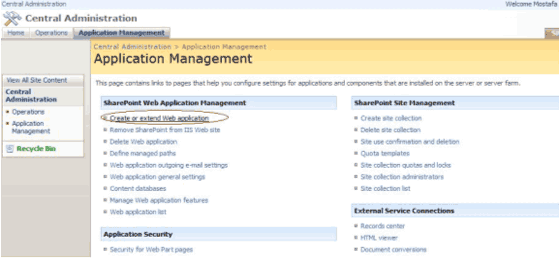


Then select to create new application, as shown below.
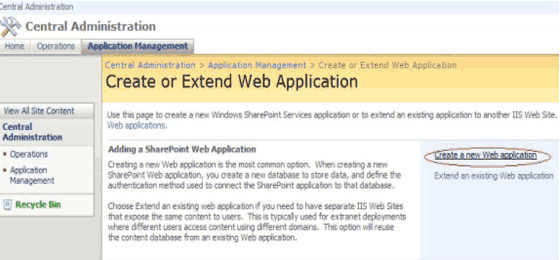


The page below is shown that a new web application will be created on new port #.
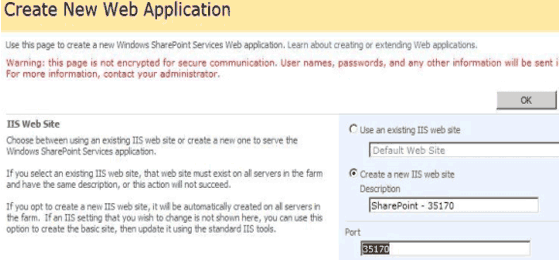


This is not all, the new create web application, you have to create a site for it, because by default it doesn't create the default site for you, create a new site.


Then, don't forget to delete the Default Site Web Application which is created when you were installing WSS 3.0, it will delete the web application and all related sites for it.


Note: If  you are a the person who responsible for managing web servers, don't forget to do that on Peak time, and creating the new web site for your staff on extended site not the default one as described above.

Login to add your contents and source code to this article
share this article :
post comment
 

Can i Modify Date and Time of Documents created on WSS 3.0

Posted by Ravikumar Biradar Sep 12, 2009

can you describe your problem in more detail ?

Posted by Moustafa Arafa Apr 10, 2007

I createed wss 3.0. I can view but can't perform any activity. I am login as user with Administrator rights. Any suggestion. Thanks

Posted by Hassan Feb 08, 2007
6 Months Free & No Setup Fees ASP.NET Hosting!
Become a Sponsor
PREMIUM SPONSORS
  • Finally – a virtual platform that delivers next-generation Windows Server 2008 Hyper-V virtualization technology from a managed hosting partner you can truly depend on. Visit www.maximumasp.com/max for a FREE 30 day trial. Hurry offer ends soon. Climb aboard the MaxV platform and take advantage of High Availability, Intelligent Monitoring, Recurrent Backups, and Scalability – with no hassle or hidden fees. As a managed hosting partner focused solely on Microsoft technologies since 2000, MaximumASP is uniquely qualified to provide the superior support that our business is built on. Unparalleled expertise with Microsoft technologies lead to working directly with Microsoft as first to offer IIS 7 and SQL 2008 betas in a hosted environment; partnering in the Go Live Program for Hyper-V; and product co-launches built on WS 2008 with Hyper-V technology.
    The leading .NET charting control now features PDF, Flash and Silverlight export, visualization of large datasets and more. Deliver true charting functionality to your BI, Scorecard, Presentation or Scientific apps. Download evaluation now.
Nevron Gauge for SharePoint
Become a Sponsor