ARTICLE

How to Extend User Profile in ASP.Net 2.0

Posted by Moustafa Arafa Articles | ASP.NET Programming October 03, 2006
This article will give you guidelines to extend user profile in standard table format which created from aspnet_regsql command by creating a detail table which will be linked to the main user table.
Reader Level:

Introduction

ASP.Net 2.0 is shipped with membership provider as well as Role provider.

By default, the membership provider comes with standard profile for users through building membership tables in your application database.

In business application, you need to extend the user profile table by adding new fields in that profile, I will mention one of the approaches to achieve this instead of creating custom membership from scratch.

Overview

This article will give you guidelines to extend user profile in standard table format which created from aspnet_regsql command by creating a detail table which will be linked to the main user table.

Prerequisites

  1. Visual Studio 2005
  2. MS SQL 2000/SQL 2005

Solution

The idea is to extend the aspnet user table by creating another table in your database with the required fields you want in your application based on your business requirements and specs.

See the below figure to see the extended table as will as the relation between the tables.
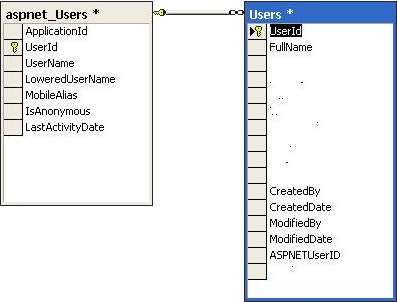
This solution is solve the problem if you need any extra fields you want to add it on your application, and at the same time it gives you the full functionality of the membership provider on web.config on your application.

Let's see the code to manage users in this solution

For example: Creating the user:

Code below shows the creation for user in aspnet user table and get the aspnetuserId and pass it as input parameter on your insert stored procedure to link the added user to your table in your database.

// insert the user in aspnet users.

MembershipUser usr = Membership.CreateUser(Username, Username, Email);

string aspnetUserId = "{" + usr.ProviderUserKey.ToString() + "}";

Guid gdAspnetUserId = new Guid(aspnetUserId);

// insert in your users table

UsersTableAdapter UserTA = new UsersTableAdapter();

UserTA.SP_Users_Insert(gdAspnetUserId, Username, Email, Address); //Your Paramaters

Conclusion

This article states a solution to extend default aspnetuser table in asp.net 2.0 to meet your requirements in any application you plan to extend the user profile.

Login to add your contents and source code to this article
post comment
     

You should be more specifiable :)

Posted by Nikhil Kumar Jan 09, 2010

The point of the article is to EXTEND the aspnet_users table. The primary key for the aspnet_users table is the USERID, the normal way to EXTEND this properly is to us the SAME field for the *USERS* key, so the userid in both match, and there are no duplicates, This is proper db design and works perfectly. Following the schema design of Microsoft ASP.NET 2.0 security this solution fits perfectly within the schema and will work fine.1. You will notice that both userid fields have the key symbol this means they are primary keys and thus unique by their nature.2. Pk's can be the receiving end of the FK so change the relationship to link from aspnet_users.userid = users.userid.3. items 1 and 2 ensure that this is a 1 to 1 relationship between the two tables, and you cannot have more than 1 record in each table that relate.4. I would use ASPNETUserid to track the NAME / Userid of the person ALTERING the user data, not as the FK for the extension of the table.

Posted by Cristopher Jones Aug 16, 2008

The point of the article is to EXTEND the aspnet_users table. The primary key for the aspnet_users table is the USERID, the normal way to EXTEND this properly is to us the SAME field for the *USERS* key, so the userid in both match, and there are no duplicates, This is proper db design and works perfectly. Following the schema design of Microsoft ASP.NET 2.0 security this solution fits perfectly within the schema and will work fine.1. You will notice that both userid fields have the key symbol this means they are primary keys and thus unique by their nature.2. Pk's can be the receiving end of the FK so change the relationship to link from aspnet_users.userid = users.userid.3. items 1 and 2 ensure that this is a 1 to 1 relationship between the two tables, and you cannot have more than 1 record in each table that relate.4. I would use ASPNETUserid to track the NAME / Userid of the person ALTERING the user data, not as the FK for the extension of the table.

Posted by Cristopher Jones Aug 16, 2008

The point of the article is to EXTEND the aspnet_users table. The primary key for the aspnet_users table is the USERID, the normal way to EXTEND this properly is to us the SAME field for the *USERS* key, so the userid in both match, and there are no duplicates, This is proper db design and works perfectly. Following the schema design of Microsoft ASP.NET 2.0 security this solution fits perfectly within the schema and will work fine. 1. You will notice that both userid fields have the key symbol this means they are primary keys and thus unique by their nature. 2. Pk's can be the receiving end of the FK so change the relationship to link from aspnet_users.userid = users.userid. 3. items 1 and 2 ensure that this is a 1 to 1 relationship between the two tables, and you cannot have more than 1 record in each table that relate. 4. I would use ASPNETUserid to track the NAME / Userid of the person ALTERING the user data, not as the FK for the extension of the table.

Posted by Cristopher Jones Aug 16, 2008

Before any thing, I want to thank you for your useful article. I think that the design is not ok: according to this relation there could be many users from the "Users" table that are related to one user form the "aspnet_Users" table. This is not reasonable. One user form the "Users" table should be related to one user form the "aspnet_Users" table. So, the relation should be One-to-One using the "UserID" filed from both tables. And the filed "ASPNETUserID" should be simply deleted.

Posted by variant tool Sep 09, 2007
COMMENT USING
PREMIUM SPONSORS
Over-C is a holistic consortium of communications and technology specialists. We build, deploy and market both business as well as consumer products and solutions.
Get Career Advice from Experts
SPONSORED BY
  • PDF reports have never been easier to create. With our included WYSIWYG Designer, you can layout your reports, set up your data source and let DynamicPDF ReportWriter do the rest.