

A model-defined function is a function that is defined in a conceptual model of EDMX. The body of the MDF (Model Define Function) is representing in Entity SQL, which allows the function to be used independently of rules or languages supported in the data source.
The ADO.NET Entity Framework uses the domain-specific language (DSL) called conceptual schema definition language (CSDL) to define conceptual models in EDMX. All MDF must be defined in the CSDL.
The following information is required to define MDF.
- Function Name (custom function name to identify specific function).
- Parameter (The parameter that passes for retrieving specific information).
- Return Type (optional parameter. If there is no return type then define it to void).
- Body of the function.
Define MDF in the Conceptual Model
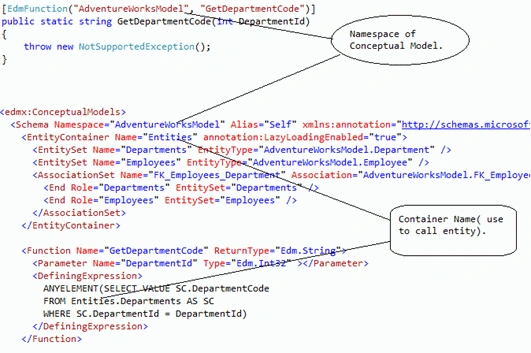
To define MDF, add a "Function" element with a "DefiningExpression" element to the conceptual Model of an EDMX. In MDF, we may define any Entity SQL statement, including parameterized statements.
The following Example explains how can we add a function in the conceptual model and call it from LINQ - entity query and ESQL.
- <edmx:ConceptualModels>
- <Schema Namespace="AdventureWorksModel" Alias="Self" xmlns:annotation="http://schemas.microsoft.com/ado/2009/02/edm/annotation" xmlns="http://schemas.microsoft.com/ado/2008/09/edm">
- <EntityContainer Name="Entities" annotation:LazyLoadingEnabled="true">
- <EntitySet Name="Departments" EntityType="AdventureWorksModel.Department" />
- <EntitySet Name="Employees" EntityType="AdventureWorksModel.Employee" />
- <AssociationSet Name="FK_Employees_Department" Association="AdventureWorksModel.FK_Employees_Department">
- <End Role="Departments" EntitySet="Departments" />
- <End Role="Employees" EntitySet="Employees" />
- </AssociationSet>
- </EntityContainer>
- <Function Name="GetDepartmentCode" ReturnType="Edm.String">
- <Parameter Name="DepartmentId" Type="Edm.Int32"></Parameter>
- <DefiningExpression>
- ANYELEMENT(SELECT VALUE SC.DepartmentCode
- FROM Entities.Departments AS SC
- WHERE SC.DepartmentId = DepartmentId)
- </DefiningExpression>
- </Function>
- <EntityType Name="Department">
- <Key>
- <PropertyRef Name="DepartmentId" />
- </Key>
- <Property Name="DepartmentId" Type="Int32" Nullable="false" />
- <Property Name="DepartmentCode" Type="String" Nullable="false" MaxLength="25" Unicode="false" FixedLength="false" />
- <Property Name="DepartmentName" Type="String" Nullable="false" MaxLength="100" Unicode="false" FixedLength="false" />
- <Property Name="IsActive" Type="Boolean" Nullable="false" />
- <Property Name="DepartmentType" Type="Int32" Nullable="false" />
- <NavigationProperty Name="Employees" Relationship="AdventureWorksModel.FK_Employees_Department" FromRole="Departments" ToRole="Employees" />
- </EntityType>
- <EntityType Name="Employee">
- <Key>
- <PropertyRef Name="EmployeeId" />
- </Key>
- <Property Name="EmployeeId" Type="Int32" Nullable="false" />
- <Property Name="EmployeeCode" Type="String" Nullable="false" MaxLength="25" Unicode="false" FixedLength="false" />
- <Property Name="Name" Type="String" Nullable="false" MaxLength="150" Unicode="false" FixedLength="false" />
- <Property Name="DepartmentId" Type="Int32" Nullable="false" />
- <Property Name="Isactive" Type="Boolean" Nullable="false" />
- <NavigationProperty Name="Department" Relationship="AdventureWorksModel.FK_Employees_Department" FromRole="Employees" ToRole="Departments" />
- </EntityType>
- <Association Name="FK_Employees_Department">
- <End Role="Departments" Type="AdventureWorksModel.Department" Multiplicity="1" />
- <End Role="Employees" Type="AdventureWorksModel.Employee" Multiplicity="*" />
- <ReferentialConstraint>
- <Principal Role="Departments">
- <PropertyRef Name="DepartmentId" />
- </Principal>
- <Dependent Role="Employees">
- <PropertyRef Name="DepartmentId" />
- </Dependent>
- </ReferentialConstraint>
- </Association>
- </Schema>
- </edmx:ConceptualModels>
If we want to use this function LINQ to Entity, we must define a CLR function.
- public static class mdfClass {
- [EdmFunction("AdventureWorksModel", "GetDepartmentCode")]
- public static string GetDepartmentCode(int DepartmentId) {
- throw new NotSupportedException();
- }
- }
Call Function from LINQ to Entity.
- Entities e = new Entities();
- var f = from g in e.Employees
- select new Details {
- EmpCode = g.EmployeeCode,
- Name = g.Name,
- DeptCode = mdfClass.GetDepartmentCode(g.DepartmentId)
- };
Call Function from ESQL.
- var qry1 = "select AdventureWorksModel.GetDepartmentCode(E.DepartmentId) as DeptCode,E.EmployeeCode as EmpCode,E.Name as Name FROM Entities.Employees AS E";
- ObjectQuery < DbDataRecord > query1 = new ObjectQuery < DbDataRecord > (qry1, e);
- foreach(DbDataRecord i1 in query1) {
- Console.WriteLine(i1.GetName(0) + " : " + i1.GetValue(0));
- Console.WriteLine(i1.GetName(1) + " : " + i1.GetValue(1));
- Console.WriteLine(i1.GetName(2) + " : " + i1.GetValue(2));
- }
Daisy KrausePosted Feb 7, 2012, 11:08 PM
You have presented your article very nicely.
Amit MaheshwariPosted Feb 7, 2012, 11:09 AM
Hi, Jignesh it's good explanation about model defined function, So keep it up and thanks for sharing.............