My control is useful for every project. This is localizable MessageBox control. Buttons on standard windows message box controls are always Yes, No, Abort, Cancel, OK, Ignore, Retry. I needed different text on my message boxes so I decided to develop custom message box control. I wrote one Test application just to show how it works. There are 10 predefined constructors.
- 5 classic like Windows.Forms.MessageBox
- public static DialogResult Display(string message,string caption,MessageBoxButtons buttons,MessageBoxIcon icon,MessageBoxDefaultButton defaultButton)
- public static DialogResult Display(string message,string caption,MessageBoxButtons buttons,MessageBoxIcon icon)
- public static DialogResult Display(string message,string caption,MessageBoxButtons buttons)
- public static DialogResult Display(string message,string caption)
- public static DialogResult Display(string message)
- 5 special with predefined text on buttons
- public static DialogResult DisplayLocal(string message,string caption,MessageBoxButtons buttons,MessageBoxIcon icon,MessageBoxDefaultButton defaultButton,string yesButtonText,string noButtonText,string abortButtonText)
- public static DialogResult DisplayLocal(string message,string caption,MessageBoxButtons buttons,MessageBoxIcon icon,string yesButtonText,string noButtonText,string abortButtonText)
- public static DialogResult DisplayLocal(string message,string caption,MessageBoxButtons buttons,string yesButtonText,string noButtonText,string abortButtonText)
- public static DialogResult DisplayLocal(string message,string caption,string yesButtonText)
- public static DialogResult DisplayLocal(string message,string yesButtonText)
Default text is Serbian Da=Yes, Ne=No and Odustani=Abort.
Dialog result is on of the following:
There is no DialogResult.OK, DialogResult.OK, DialogResult.Retry
You can
- Have maximum 3 buttons
- Choose one of four Icons (Error, Information, Warning, Question, No icon)
- Set default button
- Set text for each button
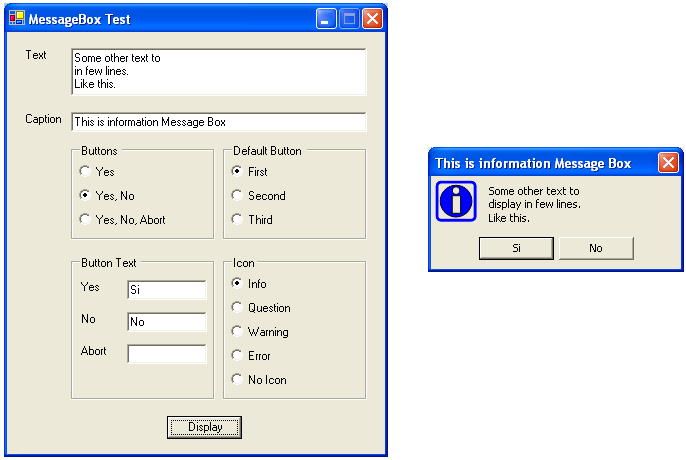
Here are some screen shots to take a look at:
Example 1:
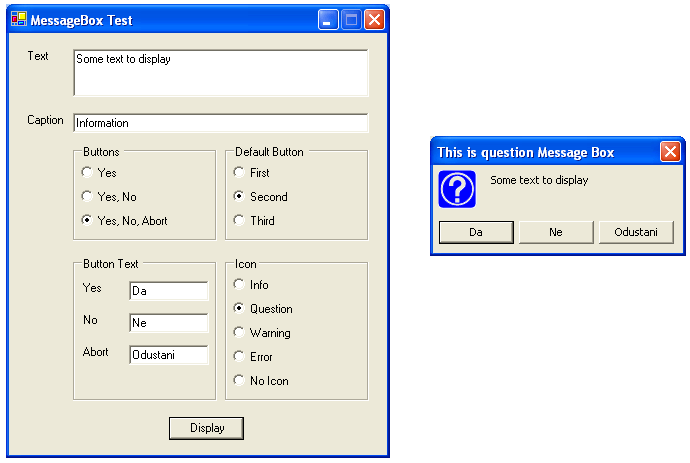
Example 2: