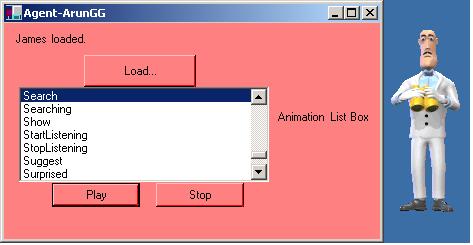
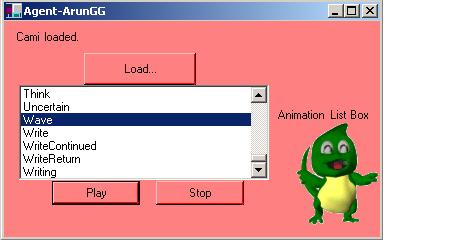
In this article, I will show you how to write a program which lists all the animations of the loaded characters which speak to us using synthesized speech, recorded audio, or text in a cartoon word balloon. Let us see in detail.
INTRODUCTION TO MICROSOFT AGENT:
The Microsoft Agent API affords services that support the display and animation of animated characters. Microsoft Agent consists of optional support for speech recognition as a result applications can respond to voice commands. Characters can react using synthesized speech, recorded audio, or text in a cartoon word balloon.
REQUIREMENTS:
To be proficient to use this technology, we must have:
- The Microsoft Agent Core components.
- The Microsoft Agent Characters Genie, Merlin, Robby, and Peedy.
- The Microsoft Speech API 4.0a runtime.
- The Microsoft Speech Recognition Engine.
- The Lernout and Hauspie Text-to-Speech engines for at least US English.
All these components are available from
Please refer the following two articles for a clear idea.
- www.c-sharpcorner.com/UploadFile/ggaganesh/UsingMSAgentinCSharpPartITextToSpeech11232005003127AM
/UsingMSAgentinCSharpPartITextToSpeech.aspx
- www.c-sharpcorner.com/UploadFile/ggaganesh/UsingMSAgentinCSharpPartIISpeechRecognition11232005011052AM
/UsingMSAgentinCSharpPartIISpeechRecognition.aspx
The below program shows all the animations of the loaded character. It also plays all the animations of that particular character.
using System;
using System.Drawing;
using System.WinForms;
using AgentObjects;
public class Agent: Form
{
private AxAgentObjects.AxAgent AxAgent;
private Label Label1;
private Button Stop;
private Button Play;
private Button Load;
private Label Label2;
private ListBox List1;
private IAgentCtlCharacterEx Character;
public Agent()
{
InitializeComponent();
}
public static void Main(string[] args)
{
Application.Run(new Agent());
}
private void InitializeComponent()
{
this.List1 = new ListBox();
this.AxAgent = new AxAgentObjects.AxAgent();
this.Label2 = new Label();
this.Play = new Button();
this.Label1 = new Label();
this.Load = new Button();
this.Stop = new Button();
AxAgent.BeginInit();
List1.Location = new System.Drawing.Point(15, 64);
List1.Size = new System.Drawing.Size(250, 95);
List1.TabIndex = 0;
List1.Sorted = true;
List1.DoubleClick += new System.EventHandler(List1_DoubleClick);
List1.Click += new System.EventHandler(List1_Click);
AxAgent.ActivateInput += new
AxAgentObjects._AgentEvents_ActivateInputEventHandler
AxAgent_ActivateInput);
AxAgent.ListenStart += new
AxAgentObjects._AgentEvents_ListenStartEventHandler(AxAgent_ListenStart);
AxAgent.IdleStart += new AxAgentObjects._AgentEvents_IdleStartEventHandler
AxAgent_IdleStart);
AxAgent.DefaultCharacterChange += new
AxAgentObjects._AgentEvents_DefaultCharacterChangeEventHandler
AxAgent_DefaultCharacterChange);
AxAgent.IdleComplete += new
AxAgentObjects._AgentEvents_IdleCompleteEventHandler(AxAgent_IdleComplete);
AxAgent.DblClick += new
AxAgentObjects._AgentEvents_DblClickEventHandler(AxAgent_DblClick);
AxAgent.Bookmark += new AxAgentObjects._AgentEvents_BookmarkEventHandler
AxAgent_Bookmark);
AxAgent.Command += new AxAgentObjects._AgentEvents_CommandEventHandler
AxAgent_Command);
AxAgent.BalloonHide += new
AxAgentObjects._AgentEvents_BalloonHideEventHandler(AxAgent_BalloonHide);
AxAgent.AgentPropertyChange += new System.EventHandler
AxAgent_AgentPropertyChange);
AxAgent.DragStart += new AxAgentObjects._AgentEvents_DragStartEventHandler
AxAgent_DragStart);
AxAgent.Shutdown += new System.EventHandler(AxAgent_Shutdown);
AxAgent.HelpComplete += new
AxAgentObjects._AgentEvents_HelpCompleteEventHandler(AxAgent_HelpComplete);
AxAgent.ActiveClientChange += new
AxAgentObjects._AgentEvents_ActiveClientChangeEventHandler
AxAgent_ActiveClientChange);
AxAgent.RequestComplete += new
AxAgentObjects._AgentEvents_RequestCompleteEventHandler
AxAgent_RequestComplete);
AxAgent.DragComplete += new
AxAgentObjects._AgentEvents_DragCompleteEventHandlerAxAgent_DragComplete);
AxAgent.RequestStart += new
AxAgentObjects._AgentEvents_RequestStartEventHandler(AxAgent_RequestStart);
AxAgent.BalloonShow += new
AxAgentObjects._AgentEvents_BalloonShowEventHandler(AxAgent_BalloonShow);
AxAgent.Restart += new System.EventHandler(AxAgent_Restart);
AxAgent.ListenComplete += new
AxAgentObjects._AgentEvents_ListenCompleteEventHandler
AxAgent_ListenComplete);
AxAgent.DeactivateInput += new
AxAgentObjects._AgentEvents_DeactivateInputEventHandler
AxAgent_DeactivateInput);
Label2.Location = new Point(10, 10);
Label2.Text = "No character loaded.";
Label2.Size = new Size(280, 24);
Label2.TabIndex = 1;
Play.Location = new System.Drawing.Point(48, 160);
Play.Size = new System.Drawing.Size(88, 24);
Play.TabIndex = 3;
Play.Enabled = false;
Play.Text = "Play";
Play.Click += new System.EventHandler(Play_Click);
Label1.Location = new System.Drawing.Point(272, 88);
Label1.Size = new System.Drawing.Size(96, 32);
Label1.Text = "Animation List Box";
Label1.TabIndex = 7;
Load.Location = new System.Drawing.Point(80, 32);
Load.Size = new System.Drawing.Size(112, 32);
Load.TabIndex = 2;
Load.Text = "&Load...";
Load.Click += new System.EventHandler(Load_Click);
Stop.Location = new System.Drawing.Point(152, 160);
Stop.Size = new System.Drawing.Size(88, 24);
Stop.TabIndex = 4;
Stop.Text = "Stop";
Stop.Enabled = false;
Stop.Click += new System.EventHandler(Stop_Click);
this.Text = "Agent-ArunGG";
this.ClientSize = new Size(376, 216);
this.BackColor = (System.Drawing.Color)System.Drawing.Color.FromARGB((byte)
55, (byte)128, (byte)128);
this.AcceptButton = Load;
this.Closing += new System.ComponentModel.CancelEventHandler
AgentDemoForClosing);
this.Controls.Add(AxAgent);
this.Controls.Add(Label1);
this.Controls.Add(Stop);
this.Controls.Add(Play);
this.Controls.Add(Load);
this.Controls.Add(Label2);
this.Controls.Add(List1);
AxAgent.EndInit();
}
protected void AxAgent_Shutdown(object sender, System.EventArgs e)
{
}
protected void AxAgent_Restart(object sender, System.EventArgs e)
{
}
protected void AxAgent_RequestStart(object sender,AxAgentObjects._AgentEvents_RequestStartEvent e)
{
}
protected void AxAgent_RequestComplete(object sender,AxAgentObjects._AgentEvents_RequestCompleteEvent e)
{
}
protected void AxAgent_ListenStart(object sender,AxAgentObjects._AgentEvents_ListenStartEvent e)
{
}
protected void AxAgent_ListenComplete(object sender,AxAgentObjects._AgentEvents_ListenCompleteEvent e)
{
}
protected void AxAgent_IdleStart(object sender,AxAgentObjects._AgentEvents_IdleStartEvent e)
{
}
protected void AxAgent_IdleComplete(object sender,AxAgentObjects._AgentEvents_IdleCompleteEvent e)
{
}
protected void AxAgent_HelpComplete(object sender,AxAgentObjects._AgentEvents_HelpCompleteEvent e)
{
}
protected void AxAgent_DragStart(object sender,AxAgentObjects._AgentEvents_DragStartEvent e)
{
}
protected void AxAgent_DragComplete(object sender,AxAgentObjects._AgentEvents_DragCompleteEvent e)
{
}
protected void AxAgent_DefaultCharacterChange(object sender, AxAgentObjects._AgentEvents_DefaultCharacterChangeEvent e)
{
}
protected void AxAgent_DeactivateInput(object sender,AxAgentObjects._AgentEvents_DeactivateInputEvent e)
{
}
protected void AxAgent_DblClick(object sender,AxAgentObjects._AgentEvents_DblClickEvent e)
{
}
protected void AxAgent_Command(object sender,AxAgentObjects._AgentEvents_CommandEvent e)
{
IAgentCtlUserInput ui;
ui = (IAgentCtlUserInput)e.p_userInput;
if(ui.Name == "CharacterOptions")
{
AxAgent.PropertySheet.Visible = true;
}
}
protected void AxAgent_Bookmark(object sender,AxAgentObjects._AgentEvents_BookmarkEvent e)
{
}
protected void AxAgent_BalloonShow(object sender, AxAgentObjects._AgentEvents_BalloonShowEvent e)
{
}
protected void AxAgent_BalloonHide(object sender, AxAgentObjects._AgentEvents_BalloonHideEvent e)
{
}
protected void AxAgent_AgentPropertyChange(object sender, System.EventArgs e)
{
}
protected void AxAgent_ActiveClientChange(object sender, AxAgentObjects._AgentEvents_ActiveClientChangeEvent e)
{
}
protected void AxAgent_ActivateInput(object sender,AxAgentObjects._AgentEvents_ActivateInputEvent e)
{
}
protected void AgentDemoForClosing(object sender,System.ComponentModel.CancelEventArgs e)
{
try
{
Character.Hide(null);
AxAgent.Characters.Unload("CharacterID");
}
catch {}
}
protected void Stop_Click(object sender, System.EventArgs e)
{
Character.Stop(null);
}
protected void Play_Click(object sender, System.EventArgs e)
{
int index = List1.SelectedIndex;
if(index == -1) return;
String anilist = List1.Items[index].ToString();
Character.Play(anilist);
}
protected void Load_Click(object sender, System.EventArgs e)
{
OpenFileDialog openFileDialog = new OpenFileDialog();
openFileDialog.AddExtension = true;
openFileDialog.Filter = "Microsoft Agent Characters (*.acs)|*.acs";
openFileDialog.FilterIndex = 1 ;
openFileDialog.RestoreDirectory = true ;
if(openFileDialog.ShowDialog() != DialogResult.OK)
return;
try { AxAgent.Characters.Unload("CharacterID"); }
catch { }
AxAgent.Characters.Load("CharacterID", (object)openFileDialog.FileName);
Character = AxAgent.Characters["CharacterID"];
Label2.Text = Character.Name + " loaded.";
Character.LanguageID = 0x409;
List1.Items.Clear();
foreach(String anilist in Character.AnimationNames)
{
List1.Items.Add((object)anilist);
}
this.AcceptButton = Play;
Character.Show(null);
Play.Enabled = true;
Stop.Enabled = true;
Character.Commands.RemoveAll();
Character.Commands.Add("CharacterOptions",
(object)"&Options...", null, null, null);
}
protected void List1_DoubleClick(object sender, System.EventArgs e)
{
Play_Click(sender, e);
}
protected void List1_Click(object sender, System.EventArgs e)
{
this.AcceptButton = Play;
}
}
OUTPUT: