The TextBox control is the most used control in window program. It also cause a lot of problems either from QA or user, because the invalid data that were entered. Using masked control will solve these problems and save a lot of time for developer.
This masked intelligent user control enhances the function of TextBox control, which can mask the Date, IP Address, SSN, Phone number, digit, decimal and check the validation, automatically set delimit location.
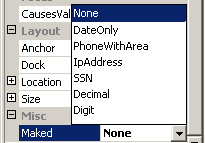
The property Masked is set to None by default and the control works like a normal TextBox control.
If setting the property to DateOnly, the control is masked to Date format.
Ex. When DateOnly is true
When user enter Display
12 12/
124 12/04/
13 01/3
3 03/
34 03/04/
14 01/04/
1/ 01/
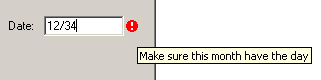
Using the ErroProvider to handle the invalidate input:
Creating Control:
1. Start the Visual Studio.NET Windows Forms designer.
2. Select a new C# project by clicking New from the File menu.
3. Click Windows control library template on the templates.
4. Set the Name MaskedTextBox
Then open the maskedTextBox.cs to Change the base class to the System.Windows.Forms.TextBox.
Adding a Property:
public
enum Mask
{
None, DateOnly, PhoneWithArea, IpAddress , SSN, Decimal, Digit };
private Mask m_mask;
public Mask Maked
{
get { return m_mask;}
set
{
m_mask = value;
this.Text="";
}
}
Overwrite the OnKeyPress function.
this.KeyPress += new
KeyPressEventHandler(this.OnKeyPress);
private void OnKeyPress(object sender, KeyPressEventArgs e)
{
MaskedTextBox sd = (MaskedTextBox) sender;
switch(m_mask)
{
case Mask.DateOnly:
sd.MaskDate(e);
break;
case Mask.PhoneWithArea:
sd.MaskPhoneSSN(e, 3, 2);
break;
case Mask.IpAddress:
sd.MaskIpAddr(e);
break;
case Mask.SSN:
break;
case Mask.Decimal:
sd.MaskDecimal(e);
break;
case Mask.Digit:
sd.MaskDigit(e);
break;
}
}
Unboxing the sender and using it to call these function are very important for multiple properties and more than one control are used in one form, otherwise different control may share same variable with other control, that will cause the unexpected results.
Double checke the masked format:
private void OnLeave(object sender, EventArgs e)
{
MaskedTextBox sd = (MaskedTextBox) sender;
Regex regStr;
switch(m_mask)
{
case Mask.DateOnly:
regStr = new Regex(@"\d{2}/\d{2}/\d{4}");
if(!regStr.IsMatch(sd.Text))
errorProvider1.SetError(this, "*");
break;
case Mask.PhoneWithArea:
regStr = new Regex(@"\d{3}-\d{3}-\d{4}");
if(!regStr.IsMatch(sd.Text))
errorProvider1.SetError(this,"**");
break;
case Mask.IpAddress:
short cnt=0;
int len = sd.Text.Length;
for(short i=0; i<len;i++)
if(sd.Text[i] == '.')
{
cnt++;
if(i+1 < len)
if(sd.Text[i+1] == '.')
{
errorProvider1.SetError(this, "*");
break;
}
}
if(cnt < 3 || sd.Text[len-1] == '.')
errorProvider1.SetError(this, "*");
break;
case Mask.SSN:
regStr = new Regex(@"\d{3}-\d{2}-\d{4}");
if(!regStr.IsMatch(sd.Text))
errorProvider1.SetError(this, "*");
break;
case Mask.Decimal:
break;
case Mask.Digit:
break;
}
}
Usage:
After creating the DLL program, you should add the component into ToolBox. By right clicking the mouse in the ToolBox, and then select Customize Toolbox to open a dialog. Select the tab .Net framework component, using browser to find your DLL, check it, then click Ok. The control should be in the ToolBox that is ready to use.
After creating the DLL program, you should add the component into ToolBox. By:
1. Right click the mouse in the ToolBox, and then select Customize Toolbox to open a dialog.
2. Select the tab .Net framework component,
3. Use the browser to find your DLL, check it, then click Ok.
The control should be in the ToolBox and it is ready to use.
That is all. I hope you enjoy it.