This demo shows how to create the remote objects with callback functions and use them in the window host.
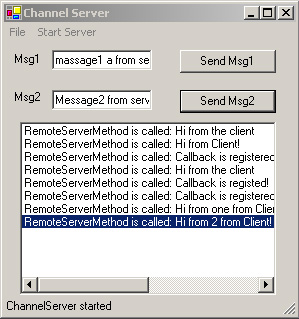
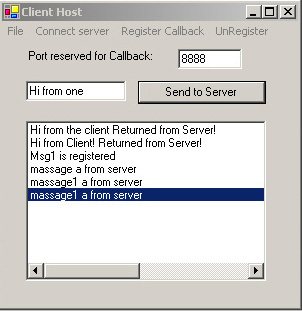
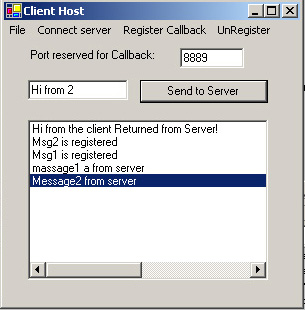
.NET Remote objects can be hosted in the .NET Windows EXE server, the Internet Information Server (IIS) and the .NET component services. Using object references to communicate between server objects and clients is the heart of remote. The remote objects are reusable and lets you design a business logic object model according to the needs of the application.
The real strength of the remote system is its ability to transport messages between remote objects in different application domains or processes using different transportation protocols, serialization formats, object lifetime schemes.
In this article we only discuss how to use event handler to register the client's callback function. The Server Object declare three events that can be used by the client to register the event handler in their host or register their callback function with which client can be called when the event raise. The clients use server's event handler to register their callback function is very easy.
Server Object:
namespace
WremoteServer
{
// Define the event
public delegate void RegisterEventHandler(object sender,RemoteEventArgs e);
public class RemoteServer : MarshalByRefObject
{
public static event ServerEventHandler InvokeHostForm;
public event RegisterEventHandler SrvMessaging;
public event RegisterEventHandler SrvMessaging2;
public void RemoteServerMethod(string str, out string strOut)
{
string tmp=string.Format("RemoteServerMethod is called: {0}",str);
RemoteEventArgs e = new RemoteEventArgs(tmp);
// Fire server form event
if(InvokeHostForm != null)
InvokeHostForm(this, e);
strOut = str + " Returned from Server!";
}
public void SendMsgToClient(string str, int msg)
{
RemoteEventArgs e = new RemoteEventArgs(str);
// Fire client form vent
if (InvokeCallbackMethod != null && (msg == 1 || msg==0))
InvokeCallbackMethod(this, e);
else if (InvokeCallbackMethod2 != null && (msg == 2 || msg==0))
InvokeCallbackMethod2(this, e);
}
}
}
Server host:
private void startServer()
{
ListDictionary channelProperties = new ListDictionary();
channelProperties.Add("port", 8085);
HttpChannel chan = new HttpChannel(channelProperties, new BinaryClientFormatterSinkProvider(), new BinaryServerFormatterSinkProvider());
if(ChannelServices.GetChannel(chan.ToString()) == null )
ChannelServices.RegisterChannel(chan);
try
{
RemotingConfiguration.ApplicationName = "RemotingServer";
RemotingConfiguration.RegisterWellKnownServiceType( Type.GetType("WRemoteServer.RemoteServer, RemoteProj"), "RemotingServer.soap", WellKnownObjectMode.Singleton);
sBar.Text = this .GetType().Name + " is ready";
SrvActObj = (RemoteServer)Activator.GetObject( typeof(WRemoteServer.RemoteServer), Http://localhost:8085/RemotingServer/RemotingServer.soap);
}
catch (Exception e2)
{
MessageBox.Show("Register remote fail" + e2.ToString());
}
}
Client host:
// connect to server object without register callback
private void ConnSrv_Click(object sender, System.EventArgs e)
{
try
{
if (registedChan != null)
{
ChannelServices.UnregisterChannel(registedChan);
registedChan = null;
unRegistAll();
}
HttpChannel chan = new HttpChannel(Int32.Parse(port.Text));
ChannelServices.RegisterChannel(chan);
registedChan = chan;
SrvObj = (RemoteServer)Activator.GetObject( typeof(WRemoteServer.RemoteServer), http://localhost:8085/RemoteObj);
if (SrvObj == null)
lb.Items.Add("Can't connect to server");
else
{
string strServer;
SrvObj.RemoteServerMethod(tb.Text + " from the client", out strServer); lb.Items.Add(strServer);
}
}
catch(Exception e2)
{
lb.Items.Add(e2.Message);
}
}
// register callback on the msg1
private void ForMsg1_Click(object sender, System.EventArgs e)
{
if(callbackFlg == false && registedChan != null)
{
Callback = new MyCallbackClass(this) ;
SrvObj.InvokeCallbackMethod += new RegisterEventHandler (Callback.SubmissionCallback);
string strServer;
lb.Items.Add("Msg1 is registered");
SrvObj.RemoteServerMethod("Callback is registered!", out strServer);
callbackFlg = true;
}
}