Description:
This Program will generate all the colors that are supported in C# according to the Name. I expected from you a better version of this program If you can , then inform me how you made it e.g. you make a dll file where the whole color array is stored then your coding lines will decrease. I tried that way but the trial was in vane....
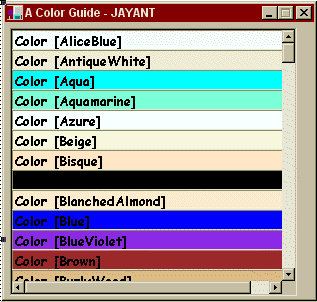
Source Code:
//ColorGuide.cs
using System;
using System.WinForms;
using System.Drawing;
public class CreateMyPanel : Form
{
Color[] color = new Color[]{
Color.AliceBlue,
Color.AntiqueWhite,
Color.Aqua,
Color.Aquamarine,
Color.Azure,
Color.Beige,
Color.Bisque,
Color.Black,
Color.BlanchedAlmond,
Color.Blue,
Color.BlueViolet,
Color.Brown,
Color.BurlyWood,
Color.CadetBlue,
Color.Chartreuse,
Color.Chocolate,
Color.Coral,
Color.Cornflower,
Color.Cornsilk,
Color.Crimson,
Color.Cyan,
Color.DarkBlue,
Color.DarkCyan,
Color.DarkGoldenrod,
Color.DarkGray,
Color.DarkGreen,
Color.DarkKhaki,
Color.DarkMagenta,
Color.DarkOliveGreen,
Color.DarkOrange,
Color.DarkOrchid,
Color.DarkRed,
Color.DarkSalmon,
Color.DarkSeaGreen,
Color.DarkSlateBlue,
Color.DarkSlateGray,
Color.DarkTurquoise,
Color.DarkViolet,
Color.DeepPink,
Color.DeepSkyBlue,
Color.DimGray,
Color.DodgerBlue,
Color.Firebrick,
Color.FloralWhite,
Color.ForestGreen,
Color.Fuchsia,
Color.Gainsboro,
Color.GhostWhite,
Color.Gold,
Color.Goldenrod,
Color.Gray,
Color.Green,
Color.GreenYellow,
Color.Honeydew,
Color.HotPink,
Color.IndianRed,
Color.Indigo,
Color.Ivory,
Color.Khaki,
Color.Lavender,
Color.LavenderBlush,
Color.LawnGreen,
Color.LemonChiffon,
Color.LightBlue,
Color.LightCoral,
Color.LightCyan,
Color.LightGoldenrodYellow,
Color.LightGray,
Color.LightGreen,
Color.LightPink,
Color.LightSalmon,
Color.LightSeaGreen,
Color.LightSkyBlue,
Color.LightSlateGray,
Color.LightSteelBlue,
Color.LightYellow,
Color.Lime,
Color.LimeGreen,
Color.Linen,
Color.Magenta,
Color.Maroon,
Color.MediumAquamarine,
Color.MediumBlue,
Color.MediumOrchid,
Color.MediumPurple,
Color.MediumSeaGreen,
Color.MediumSlateBlue,
Color.MediumSpringGreen,
Color.MediumTurquoise,
Color.MediumVioletRed,
Color.MidnightBlue,
Color.MintCream,
Color.MistyRose,
Color.Moccasin,
Color.NavajoWhite,
Color.Navy,
Color.OldLace,
Color.Olive,
Color.OliveDrab,
Color.Orange,
Color.OrangeRed,
Color.Orchid,
Color.PaleGoldenrod,
Color.PaleGreen,
Color.PaleTurquoise,
Color.PaleVioletRed,
Color.PapayaWhip,
Color.PeachPuff,
Color.Peru,
Color.Pink,
Color.Plum,
Color.PowderBlue,
Color.Purple,
Color.Red,
Color.RosyBrown,
Color.RoyalBlue,
Color.SaddleBrown,
Color.Salmon,
Color.SandyBrown,
Color.SeaGreen,
Color.SeaShell,
Color.Sienna,
Color.Silver,
Color.SkyBlue,
Color.SlateBlue,
Color.SlateGray,
Color.Snow,
Color.SpringGreen,
Color.SteelBlue,
Color.Tan,
Color.Teal,
Color.Thistle,
Color.Tomato,
Color.Transparent,
Color.Turquoise,
Color.Violet,
Color.Wheat,
Color.White,
Color.WhiteSmoke,
Color.Yellow,
Color.YellowGreen
};
private Panel panel1 = new Panel();
private Label[] col = new Label[141];
public CreateMyPanel()
{
// Initialize the Panel control.
panel1.Location = new Point(ClientRectangle.Left + 5,ClientRectangle.Top + 5);
panel1.Size = new Size(ClientRectangle.Right-5, ClientRectangle.Bottom-5);
panel1.BorderStyle = System.WinForms.BorderStyle.Fixed3D;
this.Controls.Add(panel1); // Add the Panel control to (inside) the form.
// Initalize the Label controls.
int ystart = ClientRectangle.Top;
for(int j=0; j<141; j++)
col[j] = new Label();
for(int i = 0; i<141; i++)
{
col[i].Size = new Size(ClientRectangle.Right, 20);
col[i].Font = new System.Drawing.Font("Comic Sans MS",10,FontStyle.Bold);
col[i].ForeColor = Color.Black;
if(col[i].Equals(Color.Black) == true)
{
col[i].ForeColor = Color.White;
}
col[i].Text = color[i].ToString();
col[i].Location = new Point(ClientRectangle.Left,ystart);
col[i].BackColor = color[i];
col[i].BorderStyle = System.WinForms.BorderStyle.Fixed3D;
panel1.Controls.Add(col[i]); // Add the Label controls to (inside) the Panel.
if((col[i].Location.Y > panel1.Location.Y))
{
panel1.AutoScroll = true;
}
ystart += 20;
}
this.Size = new Size(315, 300);
this.Text = "A Color Guide - JAYANT";
this.MaximizeBox = false;
this.BorderStyle = FormBorderStyle.FixedDialog;
this.StartPosition = FormStartPosition.CenterScreen;
}
public static void Main()
{
Application.Run(new CreateMyPanel());
}
}
/* To Compile : sc /r:System.dll /r:System.Drawing.dll /r:System.WinForms.dll /r:Microssft.Win32.InterOp.dll /out:ColorGuide.exe
Colorguide.cs
*/