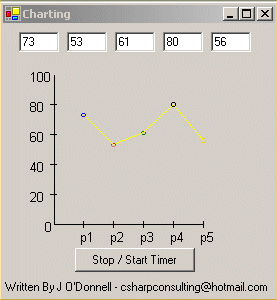
Here is an example of creating simple charts using GDI+ commands in C#. I have used the random class to create 5 random percentage values. I then use GDI+ to plot these values on a chart.
I have used a timer control that creates an event once every second. My code for this event is simply the Invalidate command. This forces the form to be refreshed.
My main code is in the OnPaint method. This code is responsible for creating the chart each time the timer event fires. The code is pretty self explanatory. Any problems feel free to email me.
Here is a screenshot of the application and after that, the source code to the OnPaint method.
protected
override void OnPaint(PaintEventArgs e)
{
Point[] pointarray=new Point[5];
Random r=new Random();
this.Value1.Text=r.Next(100).ToString();
this.Value2.Text=r.Next(100).ToString();
this.Value3.Text=r.Next(100).ToString();
this.Value4.Text=r.Next(100).ToString();
this.Value5.Text=r.Next(100).ToString();
float a=Convert.ToInt32(this.Value1.Text.ToString());
a=a*3;
a=a/2;
a=150-a;
float b=Convert.ToInt32(this.Value2.Text.ToString());
b=b*3;
b=b/2;
b=150-b;
float c=Convert.ToInt32(this.Value3.Text.ToString());
c=c*3;
c=c/2;
c=150-c;
float d=Convert.ToInt32(this.Value4.Text.ToString());
d=d*3;
d=d/2;
d=150-d;
float f=Convert.ToInt32(this.Value5.Text.ToString());
f=f*3;
f=f/2;
f=150-f;
Pen newpen = new Pen(Color.Black);
Graphics g=Graphics.FromHwnd(this.Handle);
//Set point of origin to be 50,50 on the form
g.TranslateTransform(50,50);
g.DrawLine(newpen,1,1,1,150);
g.DrawLine(newpen,1,150,150,150);
//Draw X and y axis
g.DrawLine(newpen,-3,30,3,30);
g.DrawLine(newpen,-3,60,3,60);
g.DrawLine(newpen,-3,90,3,90);
g.DrawLine(newpen,-3,120,3,120);
g.DrawLine(newpen,30,147,30,153);
g.DrawLine(newpen,60,147,60,153);
g.DrawLine(newpen,90,147,90,153);
g.DrawLine(newpen,120,147,120,153);
g.DrawLine(newpen,150,147,150,153);
Font newfont=new Font("Arial",10);
//label Y axis
g.DrawString("100",newfont,new SolidBrush(Color.Black),-25,-5);
g.DrawString("80",newfont,new SolidBrush(Color.Black),-25,25);
g.DrawString("60",newfont,new SolidBrush(Color.Black),-25,55);
g.DrawString("40",newfont,new SolidBrush(Color.Black),-25,85);
g.DrawString("20",newfont,new SolidBrush(Color.Black),-25,115);
//Label X axis
g.DrawString("0",newfont,new SolidBrush(Color.Black),-10,145);
g.DrawString("p1",newfont,new SolidBrush(Color.Black),25,155);
g.DrawString("p2",newfont,new SolidBrush(Color.Black),55,155);
g.DrawString("p3",newfont,new SolidBrush(Color.Black),85,155);
g.DrawString("p4",newfont,new SolidBrush(Color.Black),115,155);
g.DrawString("p5",newfont,new SolidBrush(Color.Black),145,155);
//Plot points
g.DrawEllipse(new Pen(Color.Blue),30-2,a-2,4,4);
g.DrawEllipse(new Pen(Color.Red),60-2,b-2,4,4);
g.DrawEllipse(new Pen(Color.Green),90-2,c-2,4,4);
g.DrawEllipse(new Pen(Color.Black),120-2,d-2,4,4);
g.DrawEllipse(new Pen(Color.Gold),150-2,f-2,4,4);
//Join the points
pointarray[0]=new Point(30,Convert.ToInt32(a));
pointarray[1]=new Point(60,Convert.ToInt32(b));
pointarray[2]=new Point(90,Convert.ToInt32(c));
pointarray[3]=new Point(120,Convert.ToInt32(d));
pointarray[4]=new Point(150,Convert.ToInt32(f));
g.DrawLines(new Pen(Color.Yellow),pointarray);
}