Overview
This article will be very helpful for the beginners who want to know and start development on Silverlight projects, if you are already working on Silverlight you will find complete understanding of Silverlight Introduction. In this article I have started with definition of Silverlight, purpose of the Silverlight technology and different versions released so far. You will also see development tools required to work with Silverlight. End of this article you will get the complete introduction of Silverlight.
What is Silverlight?
-
Silverlight is the new Microsoft technology on web platform for Rich Internet Applications (RIA) launched by Microsoft in 2007.
-
Silverlight supports multiple browsers called cross-browser technology, which includes Internet Explorer, Firefox, and Safari, opera etc...
-
Silverlight supports multiple Operating Systems called cross-platform technology, which includes Windows family of OS, Mac, and Linux with moonlight technology (Moonlight is an open source implementation of Silverlight, primarily for Linux and other Unix/X11 based operating systems).
-
Silverlight is also supports multiple devices called cross-device technology, which include mobile devices to desktop browsers to 720p HDTV video modes etc...
-
Silverlight is a browser plug-in approximately 4MB in size, it is client side free software for easy and fast less than 10 sec one time installation available for any client side browsers.
-
Silverlight supports the display of high-definition video files, and sending them over the Net.
-
Silverlight applications are delivered to a browser in a text-based markup language called XAML. XAML is a declarative markup language that you can use to define the UI elements for your Silverlight-based application.
-
Silverlight is considered as a competitor to Adobe's flash technology.
-
One of the design goals of the Silverlight technology is to fill the gap between windows application and web application in terms of creating Graphical User Interface (GUI). So far web developers were not able to make client happy in terms of UI, but now web developer will be able to full fill this with the help of Silverlight technology.
Why Silverlight?
Here is the list of advantage why we should go with Silverlight over the Flash and other technologies already available:
-
Support of .NET framework - if you are already .NET developer it is easy to start programming on Silverlight.
-
Support of Managed code - you can write programming in your favorite language which .NET CLR supports like C#,VB.NET, Dynamic languages(IronPython, IronRuby).
-
Better development tools -Visual Studio 2010, Expression Blend.
-
Large community- available lot of learning resource as compare to Flash technology.
-
Integration with Enterprise based technologies like WPF, LINQ etc...
Silverlight releases
Silverlight 1.0
This is the first release of Silverlight technology in 2007. There are lot of releases happened in initial stage of Silverlight technology, however later at end of the year 2007 final release of version 1.0 got released. Originally this release was called WPF/E, which stands for Windows Presentation Foundation/ Everywhere. This release consists of the core presentation framework, which is responsible for UI, interactivity and user input, basic UI controls, graphics and animation, media playback and DOM integration.
The Major drawback of this release is not supporting managed code, which means you can't use .NET supported programming languages for manipulating GUI elements. This was managed by scripting programming languages like Java Script (Only interpretation no compilation), which is hard for non Java Script programmers.
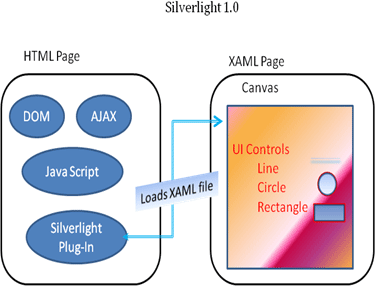
Applications are written either completely in XAML or in a mix of XAML and JavaScript with DOM (Document Object Model) to manipulate the user interface. Since there is no managed code there is no compilation required only JavaScript is interpreted on the client (browser).
Silverlight application starts by invoking the Silverlight control from the HTML page, which then loads up a XAML file. The XAML file contains a Canvas object, which acts as placeholder for other elements. Silverlight provides various geometrical primitives like lines, ellipses and other shapes, to elements like text, images, and media etc.
Silverlight 2.0
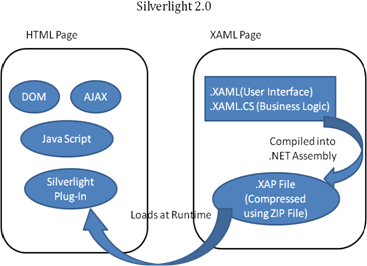
After Silverlight 1.0 there are preview releases to fix bugs from initial release and improved performance issues then released Silverlight 2.0 in March 2008. We can consider this is the first release of the Silverlight for start application development because of lot limitations in Silverlight 1.0 and was not ready for developing applications efficiently. This is the exciting release to the developers, which supports managed code, living in the .NET world without managed code is very difficulty (actually not possible ). Silverlight 2.0 supports .NET programming languages like C#, VB.NET to write business logic or manipulate UI Elements at client side. Silverlight 2.0 is based on .NET Framework 3.5.
You can have a code behind file for every XAML (.xaml) file like ASP.NET (.aspx) pages to handle the business logic. It can be used to programmatically manipulate both the Silverlight application and the HTML page which hosts the Silverlight control. The XAML markup as well as the code, is compiled into .NET assemblies which are then compressed using ZIP and stored in a .xap file.
In this release Silverlight came up with own library, which is subset of .NET framework's Base Class Library this included controls, components, support of web services and LINQ API features. It is also provides security, not to access Silverlight platform API from outside the world.
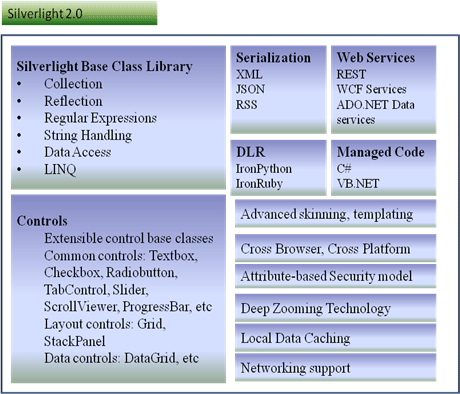
Features of Silverlight 2.0:
- Rich base class library: - This is a compatible subset of the full .NET Framework. It supports Collection, Reflection, Regular Expressions, String Handling, Data Access, LINQ etc...
- Powerful built-in controls: - These include verity of controls :
o Extensible control base classes
o Common controls: Textbox, Checkbox, Radiobutton, TabControl, Slider, ScrollViewer, ProgressBar, Calendar etc...
ayout controls: Grid, StackPanel etc...
ata controls:DataGrid, etc..
- Advanced skinning and templating support: - This makes it easy to customize the look and feel of an application.
- Deep zoom: - which allows users to zoom into, or out of, an image (or a collage of images), with smooth transitions, using the mouse wheel.
- Networking support:- Out-of-the-box support allows calling REST, WS*/SOAP, POX, RSS and standard HTTP services, enabling users to create applications that easily integrate with existing back-end systems.
- Programming Languages:- including Visual Basic, C#, JavaScript, IronPython and IronRuby, making it easier for developers already familiar with one of these languages to repurpose their existing skill sets.
- Cross-platform and cross-browser support: - This includes support for Mac, Windows and Linux in Firefox, Safari and Windows Internet Explorer.
- Security: - Silverlight CoreCLR uses an attribute-based security model, as opposed to the Code Access Security (CAS) model of the desktop version of .NET Framework.
Silverlight 3
Silverlight version 3.0 was release in July 9, 2009, which is an extension to Silverlight 2.0 and mainly provides improvements in graphics capabilities, media management, application development areas (additional controls, enhanced binding support, and out-of-browser functionality), and integration in the designers' Expression Blend 3 tools.
Features of Silverlight 3.0:
- Improved graphics capabilities to support a richer and more interactive user interface
-> Support for 3D graphics
-> Animation
-> Pixel Shaders
-> Theme application support
-> Enhanced control-skinning
-> Improved text rendering
-> Bitmap APIs
- Enhanced media management supporting high-quality and secured multimedia streaming
-> Support for new media formats
-> IIS Media Services-> Silverlight DRM for media streaming
- Empowers developers to develop data-rich and media-rich interactive RIAs.
-> New networking APIs (new offline APIs Out-of-Browser functionality )
-> Silverlight 3 SDK
-> New FormsXAML controls
-> New DataManipulationXAML controls
-> New ContentXAML controls
-> Other user interface framework improvements
-> Search Engine Optimization (SEO)
Silverlight 4.0
Silverlight version 4.0 beta was release on November 18, 2009, at the Professional Developers Conference in Los Angeles, Microsoft Corp.
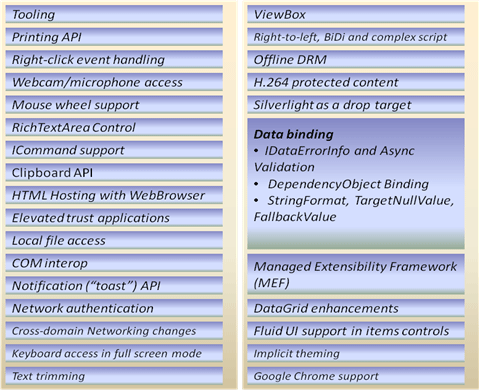
Features of Silverlight 4.0 beta:
Development tools
- Visual Studio provides productivity tools for developing applications using managed code. All the existing features of Visual Studio are available for Silverlight. In addition, this version of Visual Studio includes Silverlight-specific features, including IntelliSense, debugging, and Silverlight project templates that create and link all required files. http://www.microsoft.com/downloads/details.aspx?familyid=FBEE1648-7106-44A7-9649-6D9F6D58056E&displaylang=en
Microsoft Expression Blend: -This tool can be used to create and modify the presentation layer of an application by manipulating the XAML canvas and controls, working with graphics, and programming the presentation layer with a dynamic language such as JavaScript. http://www.microsoft.com/downloads/details.aspx?FamilyID=e82db5e2-7106-419e-80b0-65cce89f06bb&displaylang=en
Install Deep Zoom Composer: - This tool allows you to prepare your images for use with the Deep Zoom feature in Silverlight 3. http://www.microsoft.com/downloads/details.aspx?displaylang=en&FamilyID=457b17b7-52bf-4bda-87a3-fa8a4673f8bf
Download Silverlight Toolkit: -This Toolkit is a Microsoft project containing Silverlight controls, components and utilities that can be downloaded and used in your Silverlight applications. It includes full source code, samples and tests. http://silverlight.codeplex.com/releases/view/36060
Download .NET RIA Services: - Microsoft .NET RIA Services simplifies the traditional n-tier application pattern by bringing together the ASP.NET and Silverlight platforms. The RIA Services provides a pattern to write application logic that runs on the mid-tier and controls access to data for queries, changes and custom operations. http://silverlight.net/getstarted/riaservices/Silverlight vs. Flash
Adobe Flash is the most popular competitor to Silverlight both supports browser plug-in and enables execution of rich content for the Web. Flash is not the new technology, which is already having long life span as compared to Silverlight. But it does not have huge community as expected; it may be cause of limited development tools, which are not kwon to most of the developers. Flash uses ActionScript as programming language and Flex as programming environment, which most of the developer are far from these technologies.
For ASP.NET developers to extend their websites using flash content is not so simples, they need to learning development environment as mentioned above like ActionScript and Flex, apart from that there is no way to generate Flash content using server-side .NET code, which means it's difficult to integrate ASP.NET content and Flash content.
Silverlight aims to give .NET developers a better option for creating rich web content. Silverlight provides a browser plug-in with many similar features to Flash, but one that's designed from the ground up for .NET. Silverlight natively supports the C# language and uses a range of .NET concepts. As a result, developers can write client-side code for Silverlight in the same language they use for server-side code (such as C# and VB), and use many of the same abstractions (including streams, controls, collections, generics, and LINQ).
| S.No. |
Silverlight |
WPF |
| Definition |
The Silverlight is Microsoft's latest development platform for building next-generation Web client applications. |
The Windows Presentation Foundation (WPF) is Microsoft's latest development platform for building next-generation Windows client applications. |
| Subset of |
Silverlight is generally considered to be a subset of WPF and is a XAML-based technology that runs within the sandbox of browser plug-in. |
WPF is generally considered to be a subset of .NET Framework and is a XMAL based technology. |
| GUI |
Silverlight will be used in development of Rich Internet Application (RIA) for web client users |
WPF will be used in development of Rich Windows Graphical User Interface(GUI) for windows client users |
| Support |
Cross OS, cross browser, cross device |
Windows Only |
| Software Required |
Silverlight is the add-on mechanism available for most of the browsers, in order to run Silverlight applications at client machines we need to install Silverlight software on client machine once. |
WPF on the other hand does not support any plug-in mechanism instead we need to install completed WPF client application in order to use the WPF application at client place. |
| Framework Support |
Silverlight has very small own rich base class library to make plug-in as small as possible. that is highly optimized for size and is a small subset of the full .NET Framework, to embed within it |
WPF, on the other hand, has full access to the main .Net Framework and all its associated assemblies. |
| Deployment |
Silverlight applications are hosted within a web server and a web page. To minimize client download size, Silverlight uses an XAP archive. A XAP archive is a zip-compressed archive of the Silverlight application, plus a manifest file describing the content. Visual Studio automatically generates the XAP archive when using the Silverlight project template. |
WPF applications can be deployed as a standalone application, ClickOnce application, or a XAML Browser application. |
XAML
XAML stands for eXtensible Application Markup Language is the declarative markup language follows the XML rule and is used for developing User Interface in WPF and Silverlight technology. XAML files are XML files that generally have the .xaml extension and then separate the UI definition from the run-time logic by using code-behind files, joined to the markup through partial class definitions.
XAML has a set of rules that map object elements into classes or structures, attributes into properties or events, and XML namespaces to CLR namespaces. XAML elements map to Microsoft .NET types as defined in referenced assemblies, and the attributes map to members of those types.
Silverlight installation:
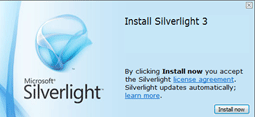
Click on the following link to install Silverlight 3.0 version http://silverlight.net/getstarted/silverlight3/ follow the steps given in the installation wizard and completed the installation, if you already have installed this visions it will say installation failed, don't worry on this.
Conclusion
I hope you enjoyed my article, this is just introduction to Silverlight, please stick with me for more articles on Silverlight in the future. You can also ready my other article.http://www.c-sharpcorner.com/UploadFile/keesari_anjaiah/260/Default.aspx?ArticleID=40474d7f-3fef-4058-8c9f-55c80a7d4575