ARTICLE

Adding Images to ToolBar Button

Posted by Mahesh Chand Articles | Windows Forms C# January 29, 2000
An article shows you how to add images and tooltips to the toolbar buttons.
Reader Level:

The ImageList class and ToolBarButton's ImageIndex property are used to load images to toolbar buttons.

First you load images to ImageList. You can even add your images to the ImageList at design time by using Propeties of ImageList control.
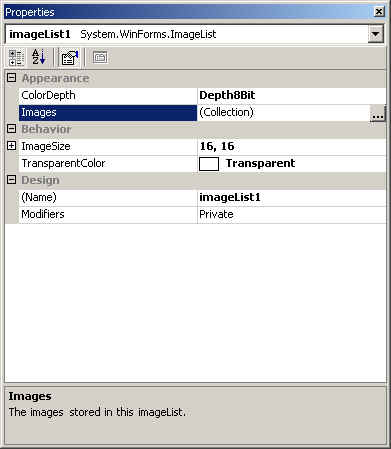


Add and Remove images by using Add and Remove buttons.
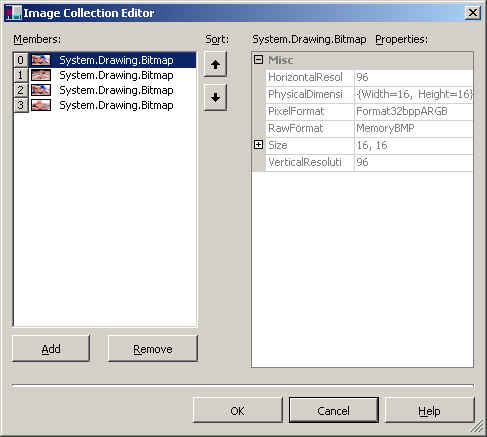


Once images are loaded to the ImageList, you use ToolBarButton class's ImageIndex property to set tollbar button images.

tb1.ImageIndex = 1;
tb2.ImageIndex = 2;
tb3.ImageIndex = 3 ;

Adding ToolTips to the ToolBar Buttons

ToolTipText property of Control class is used to Add ToolTips to ToolBar buttons. If tb1, tb2, tb2 are your ToolBarButton class objects, you can directly call ToolTipText to set tool tip for toolbar buttons.

// adding tooltips to the button
tb2.ToolTipText = tb2.Text ;
tb1.ToolTipText = tb1.Text ;
tb3.ToolTipText = tb3.Text ;

Login to add your contents and source code to this article
post comment
     

Respected once,
hi i'm beginer to asp  
how to add images to the asp form simple code snipt i need, and also steps is required in detail for me ,
email id: amarmmvsh@gmail.com

Posted by amaresh m Jun 26, 2010
COMMENT USING
PREMIUM SPONSORS
Over-C is a holistic consortium of communications and technology specialists. We build, deploy and market both business as well as consumer products and solutions.
Join a Chapter
SPONSORED BY
  • PDF reports have never been easier to create. With our included WYSIWYG Designer, you can layout your reports, set up your data source and let DynamicPDF ReportWriter do the rest.
Get Career Advice from Experts