ARTICLE

Tip: How to change the color of Chart Bars in Crystal Reports?

Posted by Mahesh Chand Articles | Crystal Reports C# October 20, 2006
This tip shows you how to change the color of a chart bars in Crystal Reports.
Reader Level:

Recently, I got an email on how to change color of chart items (bars) in Crystal Reports. As usual, instead of replying the individual email, I am adding this Tip to the Crystal Reports section.

If you want to change the default color of a chart bars in Crystal Reports, you can do in Crystal Report designer by selecting a chart bar (make sure the bar is selected) and right click and select Chat Options -> Selected Item from the menu. See Figure 1.
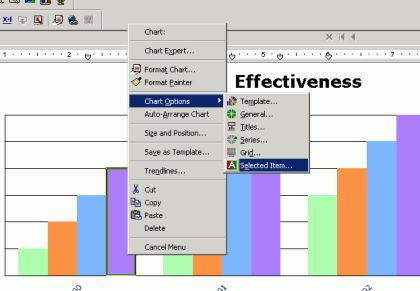
Figure 1.

On next dialog, you can select a color, gradient, texture, and a picture. See Figure 2.
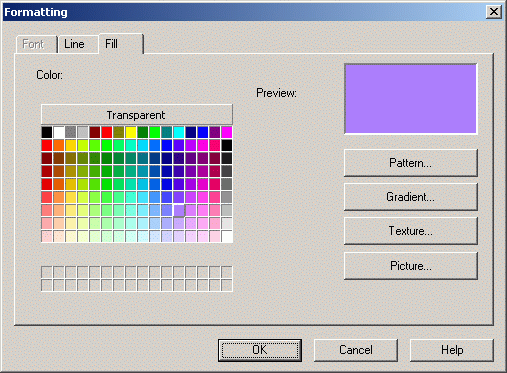
Figure 2.

However, if you are using Visual Studio .NET/2003, you may not see this option. I guess the way you do is, buy the licensed version of Crystal Reports? If you know how to do the same in Visual Studio, do not forget to share with us.


Login to add your contents and source code to this article
post comment
     

I found this instruction helpful but appears a little different in XI outside of .NET: After selecting the Bar and right clicking, I see menu options - - Chart; Format Series Riser Chart Options Series Options Trendlines The second option got me to a dialoge box "Format Series Riser ..." with a drop down box "Foreground Color" that displayed the current color of the bar riser that I had selected. The down arrow in the drop down displays a color pallet but just selecting a different color seems to have no effect. There is a command button "Pattern" just below the drop down. Clicking that button reveals some selectors for BackGround color and ForeGround color. Choosing a new color for both was the only way I was able to succeed.

Posted by Al Samuelson Jan 08, 2012

i have bar chart in my CR. i have to display color in my chart based on the DB value. When i am seeing CR preview i can see the chart color .But i was trying to see it through ASP.NET web application,I could not able to see the colored chart instead it was displaying gray color in my system but not in others system. note : i have used crystal report version10.0

Posted by kumaravel r Jan 11, 2008

i am using CR 10 .NET version.The report contains a pie chart which will represents Safe,High,Medium and Low values.The color corresponding to each values is stored in the DB.How can i configure the color of the pie chart from the DB value. Please help.

Posted by sree devi Sep 12, 2007

How can i display the Data label text vertically, in bar chart, in crystal reports.

Posted by siri y Jun 21, 2007

How to display thetext of a datalabel vertically

Posted by siri y Jun 21, 2007
COMMENT USING
PREMIUM SPONSORS
DynamicPDF™ product line allows you to dynamically generate PDF documents, merge PDF documents and add new content to existing PDF documents from within your applications.
Get Career Advice from Experts
SPONSORED BY
  • PDF reports have never been easier to create. With our included WYSIWYG Designer, you can layout your reports, set up your data source and let DynamicPDF ReportWriter do the rest.
Join a Chapter