SIGN UP MEMBER LOGIN:    
ARTICLE

My First Tablet PC Application using C#

Posted by Mahesh Chand Articles | Metro Style Apps in C# May 24, 2004
This step by step tutorial shows you how to create your first Tablet PC application using Visual Studio .NET and C# with the help of Microsoft Tablet PC API.
Reader Level:
Download Files:
 

This step by step tutorial shows how to create our first Tablet PC application.

1. Create a new Windows application using Visual Studio .NET. I call my project "HelloTabletPC".

2. To use the Tablet PC functionality in our application, we have to add reference to the Tablet PC API, which provides access to the library that contains the functionality to access Tablet PC. As you can see from following Figure, I select Microsoft Tablet PC API on the Add Reference dialog and click OK.
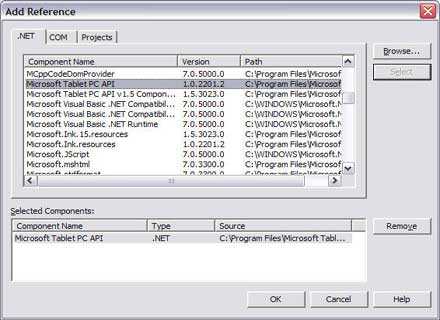


Which adds Microsoft.Ink namespace to our References list as you can see from the following figure.
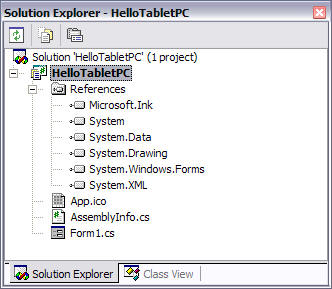
3. The Tablet PC Ink functionality of Tablet PC is defined in the Microsoft.Ink namespace. So we include the namespace in our application by adding the following line of code.

using Microsoft.Ink;

4. Now we write code to enable Ink overlay on the form so we can use Ink or mouse to write on the Form. On the Form's load event handler, we write the following code:

InkOverlay inkOverlay = new InkOverlay();
inkOverlay.Handle= this.Handle;
inkOverlay.Enabled = true;

This code enables the ink overlay on the form. Which means you can use pen to write on the Form.

5. Now using pen, I write the following on the form. You can even use the mouse.
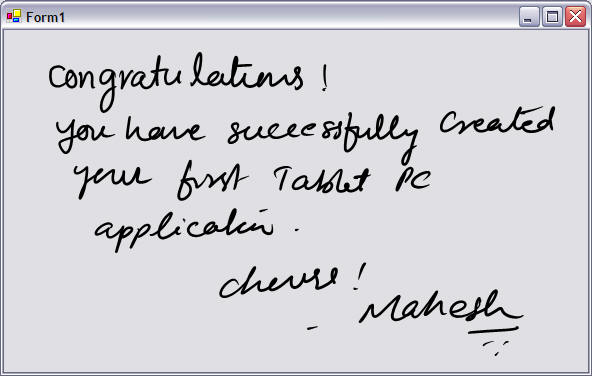
That's it. 

Login to add your contents and source code to this article
share this article :
post comment
 

You will have to download Tablet PC API and install it. Now, in WPF, Ink is supported automatically. So you don't need Tablet API anymore.

Posted by Mahesh Chand May 10, 2011

Mayur, A Tablet PC (back then) used to come with a Pen that you would use to write on a the screen and it will record your hand writing. This is pen and you could program it.

Posted by Mahesh Chand May 04, 2011

i am not finding reference Tablet PC API in vs 2008

Posted by Mayur Gujrathi May 04, 2011

using pen means what?

Posted by Mayur Gujrathi May 04, 2011
Become a Sponsor
PREMIUM SPONSORS
  • ceTE software specializes in components for dynamic PDF generation and manipulation. The DynamicPDF™ product line allows you to dynamically generate PDF documents, merge PDF documents and new content to existing PDF documents from within your applications.
6 Months Free & No Setup Fees ASP.NET Hosting!
Become a Sponsor