Master pages is a new concept in ASP.NET 2.0, which allows site developers to build master templates for their site's look and feel and put all common code which is shared by all the pages.
Designing the Master Page
A master page is defined using the following code:
<%@ master language="C#" %>
You can also add a master page in Visual Studio 2005 using "Add New Item" menu of the project and selecting "Master Page" template. See figure 1. The master page is saved as .master extension. We call our master page as CSharpCorner.master.

Figure 1. Adding a master page using Visual Studio 2005.
Now let's design our master page. In my sample, I will put C# Corner header and footer on the master page so later I can inherit C# Corner Web site pages from master page and hence all the pages will have header and footer.
A master page also has a ContentPlaceHolder control (asp:contentplaceholder). This control actually hosts a page which is inherited from the master page. For example, if we inherit a page "Login.aspx" from master page, the contents of "Login.aspx" will be displayed in the ContentPlaceHolder control of master page.
My final master page looks like Figure 2. As you can see from this code, I have a header, footer, and content place holder.
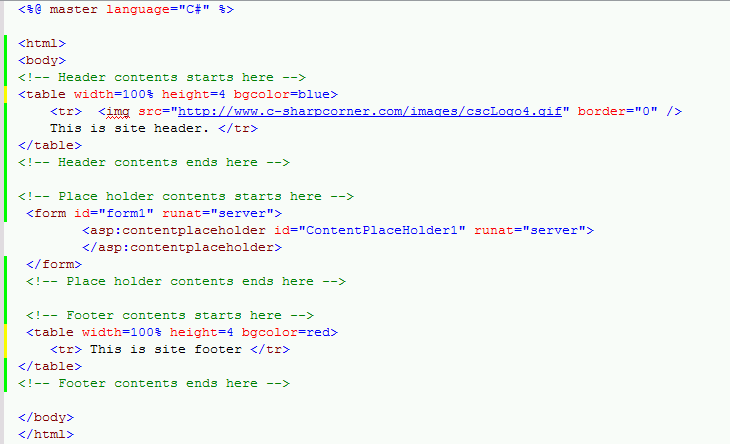
Figure 2. C# Corner Master page.
The design view of my master page looks like Figure 3.

Figure 3. Design view of C# Corner master page.
Designing the Sub Pages
Now I will design site's sub pages which will inherit from the master page. I add a page called Login.aspx, which will allow site visitors to login to the site. The page has Textbox controls for email and password and a button control. The page contents looks like Figure 4. As you can see from this code, the contents of the page are within <asp;Content> control which is associated with ContentPlaceHolder1. This is the ID of ContentPlaceHolder control defined in our master page.

Figure 4. Login.aspx page code.
The ContentPlaceHolder of Login.aspx looks like Figure 5.
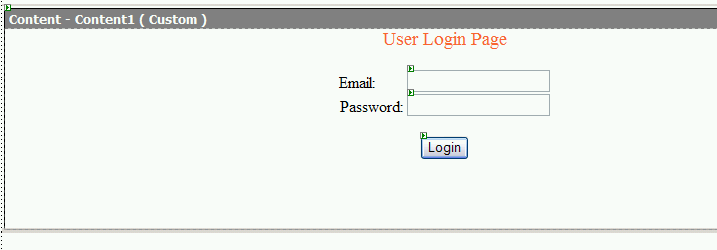
Figure 5. Login.aspx page.
Now I run Login.aspx which looks like Figure 6. As you can see from this figure, the content of master page are loaded outside of the ContentPlaceHolder.
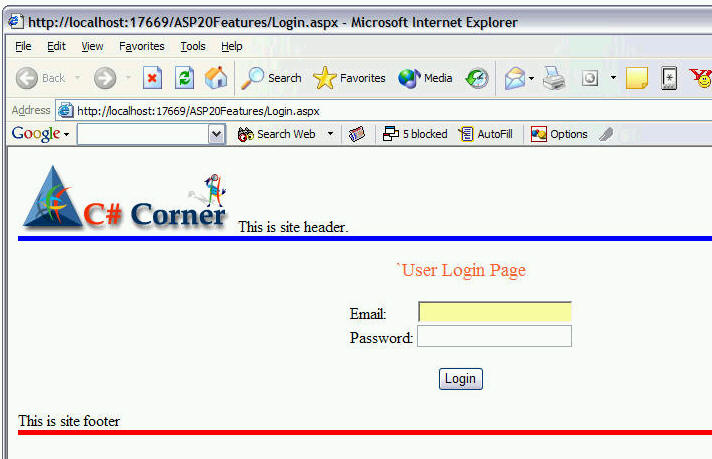
Figure 6. Login.aspx page with master page contents.
Note: You need ASP.NET 2.0 or Visual Studio 2005 to run this code.
Summary
Since the release of ASP.NET 1.0, ASP.NET has earned a reputation of writing Web applications faster and now with the help of new and enhanced features of ASP.NET 2.0, Web developers will find themselves writing 50% less code than ASP.NET 1.0. In this article, you saw how master pages can be used to define various common layout pages of a site and reuse them in your sub pages. In my forthcoming articles, I will explore other new features of ASP.NET 2.0.
Suggested Readings
You can find more details and interesting features about Master Pages in Master Pages in Whidbey article of MSDN.