SIGN UP MEMBER LOGIN:    
ARTICLE

Object Binding in DataGrid with C#

Posted by Mahesh Chand Articles | Windows Controls C# June 15, 2004
In this article, I will discuss how to bind objects such as an ArrayList to a DataGrid control using C#.
Reader Level:
Download Files:
 

Introduction

In this article, I will discuss how to bind objects such as an ArrayList to a DataGrid control using C# and ADO.NET.

Binding an ArrayList

If you create an ArrayList and bind it to the DataGrid control, DataGrid does not display the contents. For example, the following code creates an ArrayList objects, add items to it, and binds it to the DataGrid:

ArrayList list = new ArrayList();
list.Add(1);
list.Add(2);
list.Add(3);
dataGrid1.DataSource = list;

The problem with this code is DataGrid is not aware of the contents of the ArrayList. DataGrid can only display contents having a format of schema where there should be a column name and column type.

The Solution

The solution of the problem is to create a class that exposes an integer as its property. Then you create an ArrayList and bind it to the DataGrid. For example, the following code creates an ArrayList of MyClass object, which takes one value as constructor parameter. Here MyClasss exposes this value as an int property.

ArrayList list = new ArrayList();
list.Add(
new MyClass(1);
list.Add(
new MyClass(2);
list.Add(
new MyClass(3);
dataGrid1.DataSource = list;

The Complete Code

Here is a class with integer and string properties.

public class BindingObject
{
private int intMember;
private string stringMember;
private string nullMember;
public BindingObject(int i, string str1, string str2)
{
intMember = i;
stringMember = str1;
nullMember = str2;
}
public int IntMember
{
get { return intMember; }
}
public string StringMember
{
get { return stringMember; }
}
public string NullMember
{
get { return nullMember; }
}
}

Now you can create an ArrayList of this class objects and bind it to the DataGrid as following:

ArrayList list = new ArrayList();
list.Add(
new BindingObject(1, "One", null));
list.Add(
new BindingObject(2, "Two", null));
list.Add(
new BindingObject(3, "Three", null));
dataGrid1.DataSource = list;

The contents would look like the following:
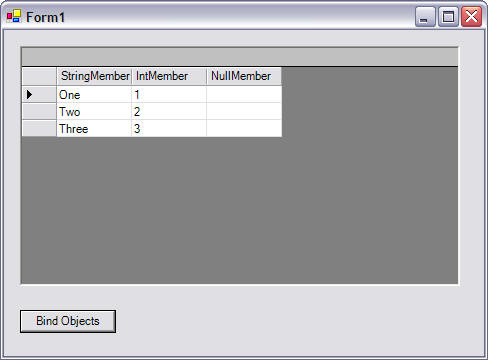
Where StringMember, IntMember, and NullMember are three properties of the object.

See the attached code for more details.

Summary

In this article, you learned how to take advantage of DataGrid binding feature to display the contents of an array of objects.

Login to add your contents and source code to this article
share this article :
post comment


    Hi Mahesh,

    How do you manage the item when the final user Insert, Update or Delete a Row, I mean, you have each row of the ArrayList as a row in the DataBase, then you should reflect every change in the database.

    Thanks in advanced.

Posted by Francisco Gonzalez Jun 01, 2010

thank u very much this article has been very helpful,in displaying arrays in a datagrid.

Posted by Ruzive Mazhandu Oct 03, 2009

There is no direct way to fill a List from a DataGrid.
You should have a data source bound to a DataGrid, that's where you will get data to fill your list.

What exactly are you trying to do? If you have a DataSource bound to a DataGrid, for example, a DataSet or a DataTable, you use that to get data.

Posted by Mahesh Chand Aug 28, 2009

How can I do the inverse method?
Fill a list from a datagrid

Thks

Posted by Luis Arellano Aug 19, 2009

This article is useful but leaves me ever so frustrated. It does not explain why the order of the columns is different to the order of the fields in the class (or more to the point what to do about it). It leaves the reader hungry just after he has been given the first course. Just as bad, it doesnt give any pointers to further reading.

Posted by Henri de Feraudy Feb 08, 2008
Become a Sponsor
PREMIUM SPONSORS
  • The leading .NET charting control now features PDF, Flash and Silverlight export, visualization of large datasets and more. Deliver true charting functionality to your BI, Scorecard, Presentation or Scientific apps. Download evaluation now.
    Finally – a virtual platform that delivers next-generation Windows Server 2008 Hyper-V virtualization technology from a managed hosting partner you can truly depend on. Visit www.maximumasp.com/max for a FREE 30 day trial. Hurry offer ends soon. Climb aboard the MaxV platform and take advantage of High Availability, Intelligent Monitoring, Recurrent Backups, and Scalability – with no hassle or hidden fees. As a managed hosting partner focused solely on Microsoft technologies since 2000, MaximumASP is uniquely qualified to provide the superior support that our business is built on. Unparalleled expertise with Microsoft technologies lead to working directly with Microsoft as first to offer IIS 7 and SQL 2008 betas in a hosted environment; partnering in the Go Live Program for Hyper-V; and product co-launches built on WS 2008 with Hyper-V technology.
Nevron Gauge for SharePoint
Become a Sponsor