This article summarizes the new and updated features of ADO.NET 2.0, which ships with .NET Framework 2.0. In my following articles I will discuss these features in more details with sample examples.
Here is a list of new and updated additions to ADO.NET:
1. Bulk Copy Operation
Bulk copying of data from a data source to another data source is a new feature added to ADO.NET 2.0. Bulk copy classes provides the fastest way to transfer set of data from once source to the other. Each ADO.NET data provider provides bulk copy classes. For example, in SQL .NET data provider, the bulk copy operation is handled by SqlBulkCopy class, which can read a DataSet, DataTable, DataReader, or XML objects. Read more about Bulk Copy here.
2. Batch Update
Batch update can provide a huge improvement in the performance by making just one round trip to the server for multiple batch updates, instead of several trips if the database server supports the batch update feature. The UpdateBatchSize property provides the number of rows to be updated in a batch. This value can be set up to the limit of decimal.
3. Data Paging
Now command object has a new execute method called ExecutePageReader. This method takes three parameters - CommandBehavior, startIndex, and pageSize. So if you want to get rows from 101 - 200, you can simply call this method with start index as 101 and page size as 100.
4. Connection Details
Now you can get more details about a connection by setting Connection's StatisticsEnabled property to True. The Connection object provides two new methods - RetrieveStatistics and ResetStatistics. The RetrieveStatistics method returns a HashTable object filled with the information about the connection such as data transferred, user details, curser details, buffer information and transactions.
5. DataSet.RemotingFormat Property
When DataSet.RemotingFormat is set to binary, the DataSet is serialized in binary format instead of XML tagged format, which improves the performance of serialization and deserialization operations significantly.
6. DataTable's Load and Save Methods
In previous version of ADO.NET, only DataSet had Load and Save methods. The Load method can load data from objects such as XML into a DataSet object and Save method saves the data to a persistent media. Now DataTable also supports these two methods.
You can also load a DataReader object into a DataTable by using the Load method.
7. New Data Controls
In Toolbox, you will see these new controls - DataGridView, DataConnector, and DataNavigator. See Figure 1. Now using these controls, you can provide navigation (paging) support to the data in data bound controls.
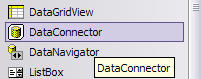
Figure 1. Data bound controls.
8. DbProvidersFactories Class
This class provides a list of available data providers on a machine. You can use this class and its members to find out the best suited data provider for your database when writing a database independent applications.
9. Customized Data Provider
By providing the factory classes now ADO.NET extends its support to custom data provider. Now you don't have to write a data provider dependent code. You use the base classes of data provider and let the connection string does the trick for you.
10. DataReader's New Execute Methods
Now command object supports more execute methods. Besides old ExecuteNonQuery, ExecuteReader, ExecuteScaler, and ExecuteXmlReader, the new execute methods are ExecutePageReader, ExecuteResultSet, and ExecuteRow. Figure 2 shows all of the execute methods supported by the command object in ADO.NET 2.0.
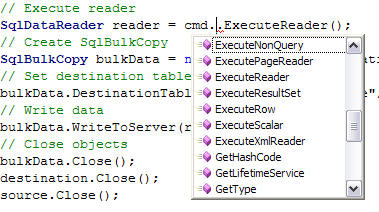
Figure 2. Command's Execute methods.
Summary
ADO.NET 2.0 provides many new and improved features for developers to improve the performance and reduce the code. In this article, I discussed top 10 features of ADO.NET 2.0. In my forthcoming articles, I will be discussing these features in more details.