|
|
|
|
|
|
Author Rank:
|
|
Technologies:
.NET 1.0/1.1, GDI+,Visual C# .NET
|
|
Total downloads :
|
1200
|
|
Total page views :
|
55250
|
|
Rating :
|
|
4.5/5
|
|
This article has been rated :
|
4 times
|
|
|
|
|
Download
Files:
|
|
|
|
|
|
|
|
|
|
Similar ArticlesMost ReadTop RatedLatest
|
|
Related EbooksTop Videos
|
|
|
Description
|
|
The Complete Visual C# Programmer's Guide, written by the authors of C# Corner, covers most of the major components that make up C# and the .NETenvironment including Windows Forms, ADO.NET, GDI+, Web Services, and Security. The book is geared toward the beginner to intermediate programmers.
|
|
|
|
|
|
|
|
|
|
|
|
|
Image transformation is exactly the same as any other transformation process. In this section we will see how to rotate, scale, translate, reflect, and shear images. We will create a Matrix object, set the transformation process by calling its methods, set the Matrix object as the Transform property or the transformation methods of the Graphics object, and call DrawImage.
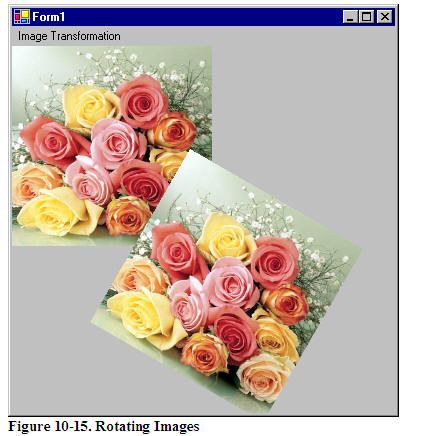
Rotating images is similar to rotating other graphics. Listing 10.16 rotates an image. We create a Graphics object using the CreateGraphics method. Then we create a Bitmap object from a file and call the DrawImage method, which draws the image on the form. After that we create a Matrix object, call its Rotate method, rotate the image by 30 degrees, and apply the resulting matrix to the surface using the Transform property. Finally, we draw the image again using DrawImage.
Listing 10.16: Rotating images
private void RotationMenu_Click(object sender, System.EventArgs e) { Graphics g = this.CreateGraphics(); g.Clear(this.BackColor); Bitmap curBitmap = new Bitmap(@"roses.jpg"); g.DrawImage(curBitmap, 0, 0, 200, 200); // Create a Matrix object, call its Rotate method, // and set it as Graphics.Transform Matrix X = new Matrix(); X.Rotate(30); g.Transform = X; // Draw image g.DrawImage(curBitmap, new Rectangle(205, 0, 200, 200), 0, 0, curBitmap.Width, curBitmap.Height, GraphicsUnit.Pixel) ; // Dispose of objects curBitmap.Dispose(); g.Dispose(); }
Figure 10.17 shows the output from Listing 10.16. The first image is the original; the second image is rotated.
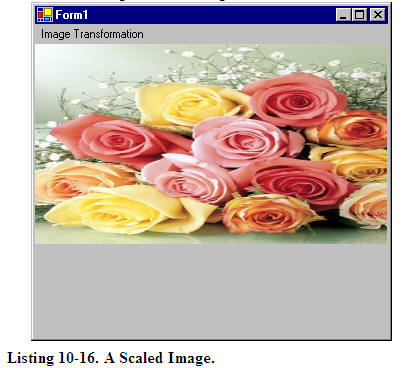
Now let's apply other transformations. Replacing the Rotate method in Listing 10.16 with the following line scales the image:
X.Scale(2, 1, MatrixOrder.Append);
The scaled image is shown in Figure 10.18.
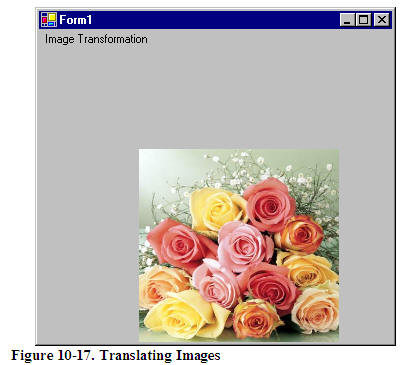
Replacing the Rotate method in Listing 10.16 with the following line translates the image with 100 offset in the x- and y-directions:
X.Translate(100, 100);
The new output is shown in Figure 10.19.
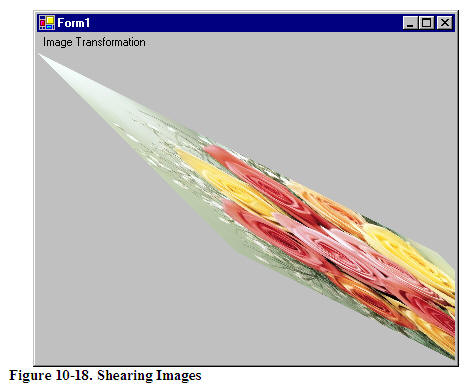
Replacing the Rotate method in Listing 10.16 with the following line shears the image:
X.Shear(2, 1);
The new output is shown in Figure 10.20.
You have probably noticed that image transformation is really no different from the transformation of other graphics objects. I recommend that you download the source code samples from the book's Web site to see the detailed code listings.
This articles is taken from Chapter 10 "Transformations" of Graphics Programming with GDI+.
|
|
|
Login
to add your contents and source code to this article
|
|
|
|
|
|
|
|
|
|
|
|
Mahesh Chand
Mahesh is a software developer with over 13 years of experience building systems for Financial and Banking, Engineering & Architectural, Imaging, Construction, Biological & Pharmaceuticals, Healthcare and Education industries. His expertise is Windows Forms, ASP.NET, Silverlight, WPF, WCF, Visual Studio 2010, SQL Server, and Oracle. If you are looking for a Windows Forms, ASP.NET, WPF, Silverlight, C#, VB.NET, Oracle, and SQL Server Consultant in Philadelphia area or remote location, drop me a line at MAHESH [AT] C-SHARPCORNER [DOT] COM.
|
|
|
|
|
|
|
|
|
C# Consulting is founded in 2002 by the founders of C# Corner. Unlike a traditional
consulting company, our consultants are well-known experts in .NET and many of them
are MVPs, authors, and trainers. We specialize in Microsoft .NET development and
utilize Agile Development and Extreme Programming practices to provide fast pace
quick turnaround results. Our software development model is a mix of Agile Development,
traditional SDLC, and Waterfall models.
|
|
Click here to learn more about C# Consulting. |
|
|
|
|
|
|
|
Introducing MaxV - one click. infinite control. Hyper-V Hosting from MaximumASP.
Finally – a virtual platform that delivers next-generation Windows Server 2008 Hyper-V virtualization technology from a managed hosting partner you can truly depend on. Visit www.maximumasp.com/max for a FREE 30 day trial. Hurry offer ends soon.
Climb aboard the MaxV platform and take advantage of High Availability, Intelligent Monitoring, Recurrent Backups, and Scalability – with no hassle or hidden fees.
As a managed hosting partner focused solely on Microsoft technologies since 2000, MaximumASP is uniquely qualified to provide the superior support that our business is built on. Unparalleled expertise with Microsoft technologies lead to working directly with Microsoft as first to offer IIS 7 and SQL 2008 betas in a hosted environment; partnering in the Go Live Program for Hyper-V; and product co-launches built on WS 2008 with Hyper-V technology.
|
Dynamic PDF
ceTE software specializes in components for dynamic PDF generation and manipulation. The DynamicPDF™ product line allows you to dynamically generate PDF documents, merge PDF documents and new content to existing PDF documents from within your applications.
|
Go.NET
Build custom interactive diagrams, network, workflow editors, flowcharts, or software design tools. Includes many predefined kinds of nodes, links, and basic shapes. Supports layers, scrolling, zooming, selection, drag-and-drop, clipboard, in-place editing, tooltips, grids, printing, overview window, palette. 100% implemented in C# as a managed .NET Control. Document/View/Tool architecture with many properties&events. Optional automatic layout.
|
Dundas Software
Dundas Chart for .NET is the most advanced .NET charting package available today. With an extremely complete feature set, elegant architecture and easy implementation, Dundas Chart can quickly add advanced Charting functionality to enhance and transform ASP.NET and Windows Forms applications. Whether you are implementing charting into internal projects, or building applications for clients, Dundas Chart offers advanced technology and advanced results to get the most out of data.
|
Clickatell's SMS Gateway
Clickatell's Developer Solutions allow you to SMS enable any website or
application via a range of API's. Learn More about our API connections.
|
Microsoft Visual Studio 2010
Microsoft Visual Studio 2010 offers more to developers than any other
Visual Studio release. Work more productively and collaboratively-with
greater control over your work at every step. The Beta 2 can give you a
head start on achieving efficiency.
|
|
|
|
|
|
|
|
|
Download
Files:
|
|
|
|
|
|
|
|
|
|
|
|
|
|
|
|
|
|