SIGN UP MEMBER LOGIN:    
ARTICLE

Text Transformation using GDI+ and C#

Posted by Mahesh Chand Articles | GDI+ & Graphics April 27, 2004
This article shows you how to use GDI+ classes defined in the .NET Framework class library to apply transformations on text.
Reader Level:
Download Files:
 

In Chapter 5, we discussed how to use the ScaleTransform, RotateTransform, and TranslateTransform methods to transform text. We can also use a transformation matrix to transform text.

We create a Matrix object with the transformation properties and apply it on the surface using the Transform property of the Graphics object. Listing 10-19 creates a Matrix object and sets it as the Transform property. We then call DrawString, which draws the text on the form. To test this code, add the code to a Form's paint event handler.

Graphics g = e.Graphics;

string str = "Colors, fonts and text are common" +" elements of graphics programming." + "In this chapter, you learned " +" about the colors, fonts and text" +" representation in the "+".NET framework class library. "+ "You learned how to create "+"these elements and use in GDI+.";
// Create a Matrix
Matrix M = new
Matrix(1, 0, 0.5f, 1, 0, 0);
g.RotateTransform(45.0f,
System.Drawing.Drawing2D.MatrixOrder.Prepend);
g.TranslateTransform(-20, -70);
g.Transform = M;
g.DrawString(str,
new
Font("Verdana", 10),
new
SolidBrush(Color.Blue),
new
Rectangle(50,20,200,300) );

Listing 10-19. Text Transformation Sample

Listing 10-19 Generates Figure 10-29.
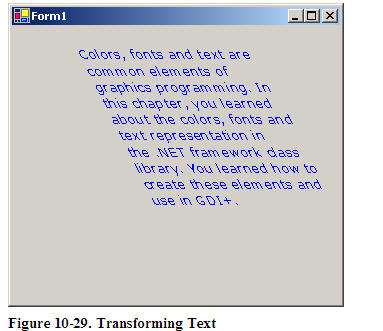
You can apply shearing and other effects by changing the values of Matrix. For example, if you change Matrix as follows:

Matrix M = new Matrix(1, 0.5f, 0, 1, 0, 0);

The new code will generate Figure 10-30.
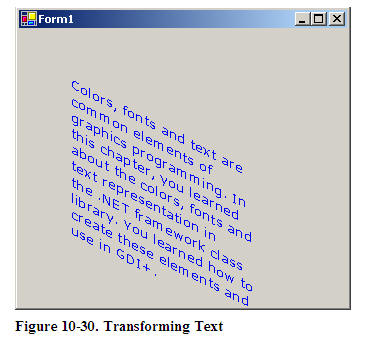
Figure 10-30. Transforming Text

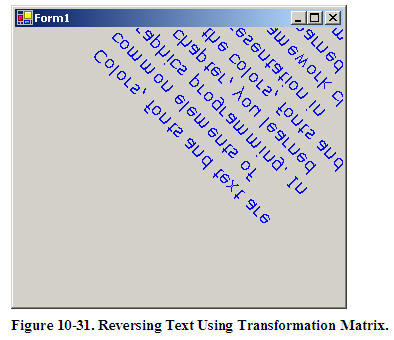
We can reverse the text by just changing the value of the Matrix object as follows:

Matrix M = new Matrix(1, 1, 1, -1, 0, 0);

Wit results shown in Figure 10-31.
This articles is taken from Chapter 10 "Transformations" of Graphics Programming with GDI+.

Login to add your contents and source code to this article
share this article :
post comment
 

For that, you will need to call DrawString method for each character. Treat a character as a string, apply transformation to it and draw it.

Posted by Mahesh Chand Apr 07, 2009

I want ot transform each and every character.Each Character should have different transformation

Posted by Sumesh Nair Nov 28, 2008
6 Months Free & No Setup Fees ASP.NET Hosting!
Become a Sponsor
PREMIUM SPONSORS
  • Finally – a virtual platform that delivers next-generation Windows Server 2008 Hyper-V virtualization technology from a managed hosting partner you can truly depend on. Visit www.maximumasp.com/max for a FREE 30 day trial. Hurry offer ends soon. Climb aboard the MaxV platform and take advantage of High Availability, Intelligent Monitoring, Recurrent Backups, and Scalability – with no hassle or hidden fees. As a managed hosting partner focused solely on Microsoft technologies since 2000, MaximumASP is uniquely qualified to provide the superior support that our business is built on. Unparalleled expertise with Microsoft technologies lead to working directly with Microsoft as first to offer IIS 7 and SQL 2008 betas in a hosted environment; partnering in the Go Live Program for Hyper-V; and product co-launches built on WS 2008 with Hyper-V technology.
    ceTE software specializes in components for dynamic PDF generation and manipulation. The DynamicPDF™ product line allows you to dynamically generate PDF documents, merge PDF documents and new content to existing PDF documents from within your applications.
Nevron Gauge for SharePoint
Become a Sponsor