SIGN UP MEMBER LOGIN:    
ARTICLE

Learning Visual Studio 2005 IDE - Quick Access to Active Tool Windows and Files

Posted by Mahesh Chand Articles | Visual Studio 2010 July 31, 2005
One of the coolest feature in Visual Studio 2005 I like is quick access to all active Windows and Files and switing control between them.
Reader Level:

One of the coolest feature in Visual Studio 2005 I like is quick access to all active Windows and Files and jumping from one to another quickly.

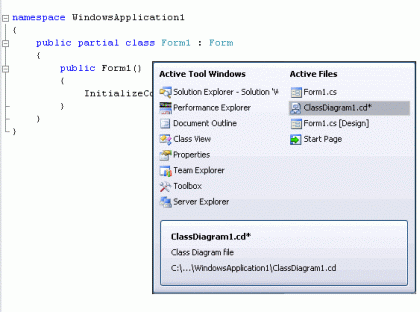
For developers, it is very ofter to jump from one window to another and one file to another in Visual Studio IDE. New Visual Studio 2005 IDE provides a quick access dialog (not sure what we call this dialog because it does not have a title), which allows us to activate different windows.

If you click on CTRL+TAB, you will see the following dialog. Now clicking CTRL+TAB and left, right, up, and down keys, you can switch from one Active Tool windows and active files to another. 

This dialog shows Active Tool Windows, Active Files, and at the bottom, it shows current active file, which is open in the IDE.
 

Hopefully, you will like this new feature. I certainly am enjoying this feature.

Login to add your contents and source code to this article
share this article :
post comment
 
Team Foundation Server Hosting
Become a Sponsor
PREMIUM SPONSORS
  • Finally – a virtual platform that delivers next-generation Windows Server 2008 Hyper-V virtualization technology from a managed hosting partner you can truly depend on. Visit www.maximumasp.com/max for a FREE 30 day trial. Hurry offer ends soon. Climb aboard the MaxV platform and take advantage of High Availability, Intelligent Monitoring, Recurrent Backups, and Scalability – with no hassle or hidden fees. As a managed hosting partner focused solely on Microsoft technologies since 2000, MaximumASP is uniquely qualified to provide the superior support that our business is built on. Unparalleled expertise with Microsoft technologies lead to working directly with Microsoft as first to offer IIS 7 and SQL 2008 betas in a hosted environment; partnering in the Go Live Program for Hyper-V; and product co-launches built on WS 2008 with Hyper-V technology.
    Get 2 Months Free of ASP.NET Hosting for Only $4.95/month! Receive FREE MS SQL and MySQL Databases Including ASP.NET 4/3.5, MVC 3.0, Silverlight 4, Windows 2008/IIS 7.0 Plus FREE IIS 7 Modules. Host UNLIMITED ASP.NET Web Sites - Click Here!
6 Months Free & No Setup Fees ASP.NET Hosting!
Become a Sponsor