Introduction
Sharepoint Portal Server 2003 (WSS) exposes its functionality using a Web Service interface, which has sixteen Web services and each of these services exposes different functionality such as security groups and users, user permissions, documents and imaging, lists, alerts, meetings, sites and site data, versions, views, forms, and web parts. These Web Services are listed in Appendix A in the end of this article.
This article discusses how we can leverage Sharepoint Portal Web Services to work with WSS in Microsoft .NET. The sample code used in this article shows how to access Lists Web Service to get the available lists in WSS. The sample code also shows how to add and update list items.
Adding Web Service Reference
To access WSS Web Services, first thing we need to do is to add reference of the Web Service to the project by right clicking on the project in Solution Explorer and selecting Add Web Reference menu item, which opens Add Web Reference dialog (See Figure 1). In the URL, enter your server URL followed by /_vti_bin/lists.asmx. By default, all WSS Web Services are deployed in _vti_bin folder. As soon you click Go button, you will see all available methods of the Lists Web Service. Now in Web reference name text box type of the name of the reference which you want the reference to be and click on Add Reference button. I call it ListsWS as you can see in Figure 1.
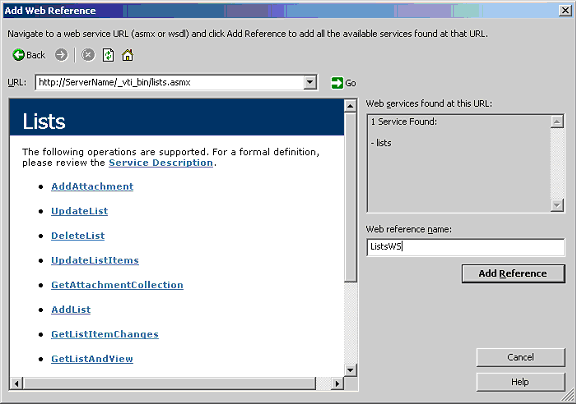
Figure 1.
Now you will see ListsWS under Web References in the Solution Explorer. See Figure 2.
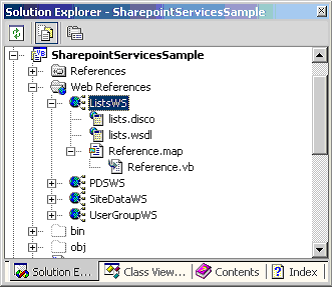
Figure 2.
Once a Web reference is added to your project, you use Lists Web Service as any other Web Service.
The code listed in Listing 1 calls GetListCollection method and adds all available lists to a ListBox control.
Dim listService As ListsWS.Lists = New ListsWS.Lists
listService.Credentials = System.Net.CredentialCache.DefaultCredentials
Dim listNodes As XmlNode = listService.GetListCollection
Dim listName As String
Dim listItemsNode As XmlNode
For Each node As XmlNode In listNodes
listName = node.Attributes("Title").Value
ListBox1.Items.Add(listName)
Next
Listing 1.
Now using the same process, you can call other methods to add, update, or delete lists and list items.
Adding Network Credentials
It is possible; your default network credentials may not have access to the Web Service. The following code adds Network Credentials to the Service. You need to replace dummy user name, password, and domain name with your correct user name, password, and domain name.
Dim myCred As New System.Net.NetworkCredential("UserID", "PWD", "Domain")
Dim myCache As New System.Net.CredentialCache
myCache.Add(New Uri("SERVERURI"), "NTLM", myCred)
listService.Credentials = myCache
Listing 2.
Adding and Deleting a List Items
The UpdateListItems method is used to add, update, and delete a list items. In our items list, we have an item called User.
The following code adds a new user to the list.
Dim doc As XmlDocument = New XmlDocument
' Create a Batch element
Dim addUserBatch As XmlElement = doc.CreateElement("Batch")
' Create Batch element XML request with Cmd = New to add a new record
' Other fields are Email, Title, Functional Area, and CT Membership
' Text 'x0020' in the Field is for space
addUserBatch.InnerXml = "<Method ID='1' Cmd='New'>" & _
"<Field Name='ID'>New</Field>" & _
"<Field Name='Email'>" + email + "</Field>" & _
"<Field Name='Title'>" + userName + "</Field>" & _
"<Field Name='Functional_x0020_Area'>" + fa + "</Field>" & _
"<Field Name='CT_x0020_Membership'>" + ctm + "</Field>" & _
"</Method>"
' Create an instance of Lists web service
Dim listService As ListsWS.Lists = New ListsWS.Lists
' Call UpdateListItems method to add new list item
Dim returnNode As XmlNode = listService.UpdateListItems(listName, addUserBatch)
Dim resultNode As XmlNode = returnNode.FirstChild
For Each childNode As XmlNode In resultNode.ChildNodes
For Each attrib As XmlAttribute In childNode.Attributes
If (attrib.Name = "ows_SelectTitle") Then
newCreatedUserId = attrib.Value
Exit For
End If
Next
Next
Listing 3.
The following code deletes an existing user from the list items.
' Create a Batch element
Dim addUserBatch As XmlElement = doc.CreateElement("Batch")
' Create Batch element XML request with Cmd = Delete and pass UserID
addUserBatch.InnerXml = "<Method ID='1' Cmd='Delete'>" & _
"<Field Name='ID'>" + userId + "</Field>" & _
"</Method>"
' Create an instance of Lists web service
Dim listService As ListsWS.Lists = New ListsWS.Lists
' Call UpdateListItems method to add new list item
Dim returnNode As XmlNode = listService.UpdateListItems(listName, addUserBatch)
Listing 4.
Summary
The Web Services interface of Windows Sharepoint Portal Server 2003 is one way to access and manipulate Sharepoint database. In this article, I discussed how we can leverage Lists Web Service to retrieve, add, and update Lists and List items using Microsoft .NET.
Appendix A: Windows Sharepoint Portal 2003 Web Services
The following summarizes these Web services.
- Administration Service - This service provides functionality for managing Sharepoint Services such as creating and deleting site collections.
- Alerts Web Service - This service provides functionality to work with alerts in a Sharepoint site.
- Document Workspace Web Service - This service provides functionality for managing document workspace sites and the data they contain.
- Forms Web Service - This service provides functionality to return forms that are used in the user interfaces when working with the contents of a list.
- Imaging Web Service - This service provides functionality to create and manage picture libraries.
- List Data Retrieval Service - This service provides functionality to perform queries against lists in the Sharepoint Services.
- Lists Web Service - This service provides functionality to work with lists and list data Sharepoint Services.
- Meeting Web Service - This service provides functionality to create and manage Meeting Workspace sites.
- Permissions Web Service - This service provides functionality to create and manage Meeting Workspace sites.
- Site Data Web Service - This service provides functionality to return metadata or list data from sites.
- Sites Web Service - This service provides functionality to return information about the collection of site templates on the virtual server.
- Users and Groups Web Service - This service provides functionality for working with users, site groups, and cross-site groups.
- Versions Web Service - This service provides functionality to work with file versions.
- Views Web Service - This service provides functionality to work with views of lists.
- Web Part Pages Web Service - This service provides functionality to send information to and retrieve information from XML Web services.
- Webs Web Service - This service provides functionality to work with sites and subsites.