In Focus
Kolkata Chapter Developer Day: May 25
C# Corner Delhi Chapter Meet, May-18, 2013 Official Recap
MOBILE: HTML 5 vs. Native Apps
Istanbul Chapter May 2013 2nd Seminar Announced : Learn WinJS, Windows Store, MVC
ANNOUNCEMENT: April 2013 Month Winners
Email :
Password :
Remember me?
Forgot password
Contribute
An Article
A Blog
A News
A Video
A Link
An Interview Question
Ask a Question
TECHNOLOGIES
.NET 4.5
Current Affairs
Learn .NET
SharePoint 2010
Web Development
.NET Assemblies
Databases & DBA
LightSwitch 2012
SharePoint 2013
Web Services in C#
ADO.NET in C#
Design & Architecture
LINQ
Silverlight with C#
Windows 8
AJAX in C#
Exception Handling C#
Mobile & Embedded
Smart Devices
Windows Azure
Android Programming
Graphics Design
Office 2013
SQL
Windows Controls C#
Articles C#
Hardware
OOP/OOD
SQL Server 2012
Windows Forms C#
ASP.NET Controls in C#
How do I
Operating Systems
Testing
Windows Phone 8
ASP.NET MVC with C#
HTML 5
PHP
TypeScript
Windows Server 2012
ASP.NET Programming
Internet & Web
Products
Visual C#
Windows Store Apps
C# Language
iPhone/iPad
Project Management
Visual Studio .NET
Workflow Foundation in C#
C# Tutorials
Java
Reports using C#
Visual Studio 2010
WPF
C, C++, MFC
Java and .NET
Robotics & Hardware
Visual Studio 2012
XAML
Career Advice
JavaScript, CSS
Security in .NET
WCF with C#
XML
Chapters
JQuery
Request a new Category
|
View All
ANSWERS
BLOGS
VIDEOS
INTERVIEWS
BOOKS
LINKS
NEWS
CHAPTERS
CAREER ADVICE
Create Outlook Add-in by MAPI Functionality ...
Debugging jQuery in ASP.NET
How to Enable Sign in as Different User Opti ...
Top 10 HTML5 Interview Questions
Find and Delete Duplicate Records From SQL Table
Custom Paging With GridView in ASP.NET 4.5
Encrypt and Decrypt in SQL Server: Part 2
Panel Default Button is Not Working For Rad ...
Working With Database in HTML5
Extending WinJS ListView With Custom Item Events
ARTICLE
Install latest Windows Updates on Windows 8
Posted by
Mahesh Chand
in
Articles
|
Windows 8
on
June 14, 2012
Tags:
Latest installation Windows 8
,
Windows 8
,
Windows 8 updates
,
Windows update
How to install latest Windows Updates on Windows 8
Tweet
1493
0
0
Reader Level:
Go to search bar (PRESS WIN+Q)
Type Windows Update in the search bar and make sure Settings is selected.
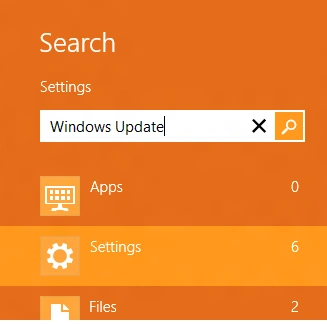
You will see Windows Update option. Select it or touch it.
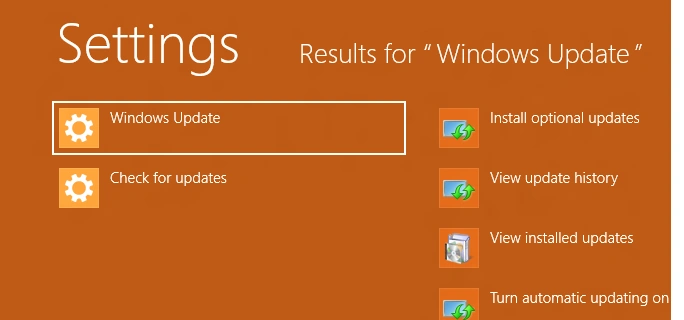
You will move to the Windows Update screen. If you do have any pending updates, you will see the list.
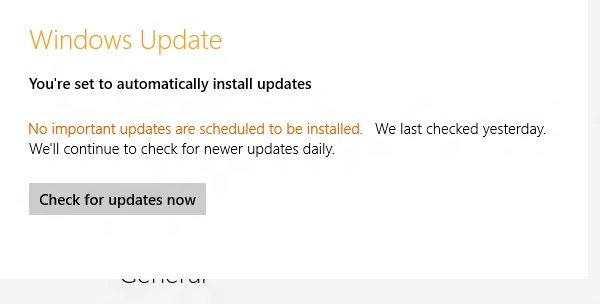
Click on Check for updates now button to see if you have any pending updates.
Login
to add your contents and source code to this article
This Feature is Sponsored By
DynamicPDF Merger is a developers dream for interacting with any existing PDF documents. Merge, append, split, form fill, flatten stamp and so much more.
How to Launch Start Menu in Windows 8
Tags:
launch start menu Windows 8
,
Windows 8
,
Windows 8 start menu
Browsing IE10 in Windows 8 Release Preview
Tags:
IE10
,
IE10 in windows8
,
windows 8 Tutorials
,
windows8
Related Articles
Installing Application from Marketplace
Installing IIS on Windows XP, Vista, and Windows 7
Install Google Drive on Windows 8
How to Install Custom Icons in Windows 8
Installing And Configuring The Windows Server AppFabric Cache Services
Update Virus Protection and Windows Defender in Windows 8
Install Windows 8 on VMware
NotePad 2009
What is AzureQuery
Requesting Admin Approval at Application Start
post comment
COMMENT USING
PREMIUM SPONSORS
DynamicPDF Developer Components
DynamicPDF™ product line allows you to dynamically generate PDF documents, merge PDF documents and add new content to existing PDF documents from within your applications.
TRENDING UP
Create Outlook Add-in by MAPI Functionality by Using Visual Studio 2010 Outlook Project
Debugging jQuery in ASP.NET
How to Enable Sign in as Different User Option in SharePoint 2013
Top 10 HTML5 Interview Questions
Find and Delete Duplicate Records From SQL Table
Custom Paging With GridView in ASP.NET 4.5
Encrypt and Decrypt in SQL Server: Part 2
Panel Default Button is Not Working For Rad Combobox
Working With Database in HTML5
Extending WinJS ListView With Custom Item Events
View All
MOST LIKED ARTICLE
WCF Introduction and Contracts - Day 1
Create SSRS Report Using Report Wizard
CREATE READ UPDATE and DELETE - CRUD Operation Using LINQ to SQL
WCF - Data Contract - Day 4
WCF - Difference Between Service Application and Service Library: Day 5
Follow @twitterapi
HOT KEYWORDS
Debugging Mode
Default Programs
Edit User Accounts
Export SSL Certificates
Import SSL Certificates
Install Windows 8 on VMware Player
Media Streaming
Metro UI
Protect Drive in Windows 8
Remove Recycle Bin
Remove Volume Control Icon Using Windows 8
Security Messages
Task Manager
Win RT
Windows 8 Article
Windows 8 articles
Windows 8 Disable Computer sharing
Windows 8 Installation
windows 8 operating system
Windows 8 Troubleshoot
Windows 8 Tutorial
Windows 8 Tutorials
Windows 8 UI
windows server
Windows Store
SPONSORED BY
DynamicPDF ReportWriter Suite
PDF reports have never been easier to create. With our included WYSIWYG Designer, you can layout your reports, set up your data source and let DynamicPDF ReportWriter do the rest.
My Facebook Friends
WHITEPAPERS AND BOOKS
Interview Questions on SharePoint 2013
SharePoint 2010 Administration & Development
Getting Started with Managed Metadata Service in SharePoint 2010
Windows Phone 7 Hileleri
Windows Phone Development Step by Step Tutorial
Essentials of SharePoint 2010: Business Intelligence Capabilities
Working with Directories in C#
FileInfo in C#
Programming List with C#
Source Code: Graphics Programming with GDI+
View All
Poll
Result
All Polls
Favorite Computer Manufacturer
Who is your favorite Computer manufacturer?
Lenovo
HP
Dell
Toshiba
Acer
Sony
Who is your favorite Computer manufacturer?
Options
Votes
%
Lenovo
30
8.22
HP
15
4.11
Dell
206
56.44
Toshiba
54
14.79
Acer
47
12.88
Sony
13
3.56
Total
365
100%