Sometimes its desirable to get those graphics moving a bit and this control should help you do just that. The control takes advantage of the built in ImageList control and the built in Timer control. The control basically cycles through each image in the ImageList Image Collection and draws them. When it runs out of images it starts again (If Looping is set to true, that is). There is an attempt at double buffering in this control, to reduce the flicker on the screen as we shall see.
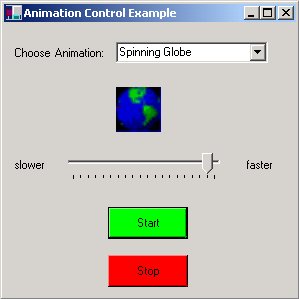
The basic use of the control is very simple. Assign an ImageList to the animator, set the timer and call Start.
animator1.TimerTick = 100;
// Assign Time Interval in milliseconds (100 = 1/10 of a second)
animator1.AnimatorImages = imageList2; // assign an imagelist component to the animator
.......
animator1.Start();
The control paints each image based on an Invalidation event propagated from the timer event:
protected void timer1_Tick (object sender, System.EventArgs e)
{
if (TheImageList.Images.Count == 0)
{
return; // precondition, make sure there are images in the list
}
this.Invalidate(); // force the control to repaint
m_nIndex++; // increment to the next image in the list
if (m_nIndex >= TheImageList.Images.Count)
{
if (m_bLooping == true)
{
m_nIndex = 0; // if we are looping, restart the index into the image list
}
else
{
timer1.Stop(); // not looping, just stop the timer
}
}
}
Once the OnPaint event receives the command to redraw (triggered by the Invalidate Call) we can paint our current image. This routine pulls the image out using the current image index and draws the image using DrawImage:
protected override void OnPaint(PaintEventArgs pe)
{
Graphics g = pe.Graphics;
Rectangle rect = this.ClientRectangle;
try
{
if (TheImageList == null)
{
g.FillRectangle(Brushes.White, rect); // if no imagelist, just paint an empty white rectangle
return;
}
if (TheImageList.Images.Count > 0) // make sure there are images in the list
{
NewBitmap = TheImageList.GetBitmap(m_nIndex); // get the bitmap from the image list
g.DrawImage(NewBitmap, 0, 0, rect.Width, rect.Height); // Draw the bitmap to the screen to the size of the control
if (OldBitmap != null)
{
OldBitmap.Dispose();
}
OldBitmap = NewBitmap; // save latest bitmap for double buffering in the OnPaintBackground routine
}
else
{
g.FillRectangle(Brushes.White, rect); // if no images, just paint an empty white rectangle
}
}
catch (Exception exx)
{
System.Console.WriteLine(exx.Message.ToString());
}
}
In order to reduce screen flickering, we intercept the OnPaintBackground event and paint the last image here as well:
protected override void OnPaintBackground(PaintEventArgs pevent)
{
Graphics g = pevent.Graphics;
Rectangle rect = this.ClientRectangle;
if (OldBitmap != null)
{
g.DrawImage(OldBitmap, 0, 0, rect.Width, rect.Height); // Draw the last image as background, instead of allowing
} // the base class OnPaintBackground to be called
}
Some future enhancements to this control are still in order. First, it would be nice if there was a property called Autosize that just read the first image in the sequence and determined the dimensions. Look for a new release on this control in the near future.