Blue Theme Orange Theme Green Theme Red Theme
 
Home | Forums | Videos | Photos | Downloads | Blogs | Interviews | Jobs | Beginners | Training
 | Consulting  
Submit an Article Submit a Blog 
 Login Close
User Id:
Password:
 
Forgot Password
Forgot Username
Why Register
 Jump to
Skip Navigation Links
TechnologyExpand Technology
WebsiteExpand Website
World Class ASP.NET Hosting - 3 Month Free Hosting, Click Here!
 Resources  
Close
 Our Network  
Close
Search :       Advanced Search »
Home » GDI+ & Graphics » Mastermind Computer Player using Genetic Algorithms in C#

Mastermind Computer Player using Genetic Algorithms in C#

After writing the Genetic Algorithm Article for implementing a Genetic Algorithm in C#, I tried to think of a good example of how to illustrate a real-world use of Genetic Algorithms to illustrate artificial intelligence.

Author Rank:
Total page views :  29015
Total downloads :  800
   Print Read/Post comments Post a comment  Similar Articles  
   Email to a friend  Bookmark  Author's other articles  
Download Files:
MastermindAI.zip
 
Powerful ASP.NET Hosting w/ NO Setup Fees. Click Here!
Become a Sponsor


MindCracker Certification


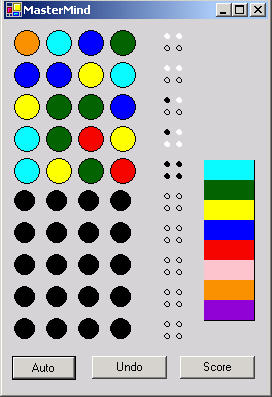
Figure 1 - The Game of Mastermind played by the computer

After writing the Genetic Algorithm Article for implementing a Genetic Algorithm in C#, I tried to think of a good example of how to illustrate a real-world use of Genetic Algorithms to illustrate artificial intelligence. It dawned on me that Mastermind could be played completely by the computer using AI. Looking back at my Mastermind Game in C# (also check out Jigar Desai's Mastermind game, a much more graphically pleasing and user friendly version), I thought it would be easy enough to drop in the Genetic Algorithm stuff to produce a feature in the game that allowed the computer to give a best guess for the current row. The design of the incorporation of the Genetic Algorithm classes into the game is shown below:
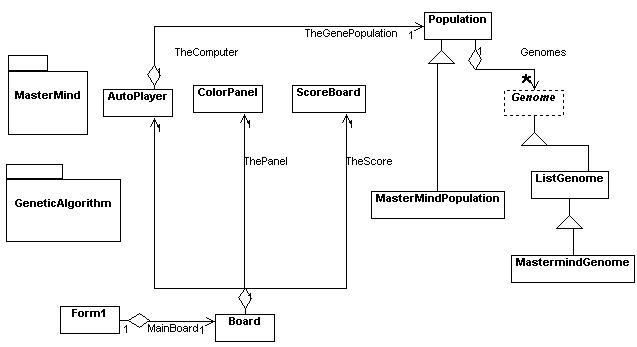


Figure 2 - UML Design of AI Mastermind game  reverse engineered using WithClass 2000

I extended the Genetic Algorithm library, by creating a MasterMindPopulation and MastermindGenome class  to work specifically with Mastermind color arrays. There is actually very little difference between a MastermindGenome and a ListGenome except for the Fitness Function and how a MastermindGenome converts itself into a string. The AutoPlayer class encapsulates most of how the MastermindGenome calculates its fitness function to product the computers guess. The  MastermindGenome also uses the Board and the ScoreBoard objects to compute its fitness function.

So how do we go about having the computer player calculate a fitness score that illustrates a fitness of the next best guess for the current row on the Mastermind Board?  Believe it or not, I stayed awake at night trying to figure this one out. It turns out that its not really that hard. To calculate the fitness for the next guess on the board, simply compare the current genome values against the score for all known turns on the board. For example if row #1 has two white pegs, then the Genomes that produce two white pegs compared against row #1 get a perfect fitness for that row, because the unknown final answer we are trying to match against also matches row #1 with two white pegs. Repeat this test for all of the rows on the board and add up the fitnesses for all of the rows.  This is the final fitness number. Below is the Fitness function in C# in the MastermindGenome class

private float CalculateFromMastermindBoard()
{
// cycle through all of the current rows on the board and calculate a fitness score
// based upon how each of the guessing row's peg score matches against the Genome
// as if the Genome were the current solution
float fFitnessScore = 0.0f;
for (int i = 0; i < TheBoard.CurrentRow; i++)
{
// calculate a score using the Board's calculate function against the next guessed row
int[] result = TheBoard.CalcScore(GetIntArray(TheArray), i);
// compare the actual peg score of the next guessed row to the peg score of the Genome against that same row
int numCorrectInRow = CompareToScore(i, result);
// Normalize the fitness score a little bit (not really necessary, since the AutoPlayer takes the highest fitness score in
// final generation)
fFitnessScore += ((float)numCorrectInRow)/4.0f;
}
// this function goes through each peg score of the current peg row and compares it to the
// peg score that was calculated against the same row and returns the # of pegs that match against
// it (including blank pegs)
private int CompareToScore(int nCompareRow, int[] testpegs)
{
int nScoreMatch = 0;
for (int i = 0; i < 4; i++)
{
int nPeg = TheScore.GetPeg(i, nCompareRow);
if (testpegs[i] == nPeg)
{
nScoreMatch++;
}
}
return nScoreMatch;
}
fFitnessScore += .02f;
// give it some value greater than 0
return fFitnessScore;
}
public override float CalculateFitness()
{
CurrentFitness = CalculateFromMastermindBoard();
return CurrentFitness;
}

Conclusion

The computer seems to average winning in 5 tries or less at the expert level. The beginner level either loses or takes longer to get the right answer. You can make the computer play a little worse by reducing the population size and population limit in the Population class and by decreasing the # of generations the AutoPlayer goes through in the CalculateGeneration method. The download is initally set at expert level with a population of 1000 Mastermind Genomes and number of generations set to 10.  The beginner level is set to a population of 10 Genomes and 25 generations.


Login to add your contents and source code to this article
 About the author
 
Mike Gold
Michael Gold is President of Microgold Software Inc., makers of the WithClass UML Tool. His company is a Microsoft VBA Partner and Borland Partner. Mike is a Microsoft MVP and founding member of C# Corner. He has a BSEE and MEng EE from Cornell University and has consulted for Chase Manhattan Bank, JP Morgan, Merrill Lynch, and Charles Schwab. Currently he is a senior developer at Finisar Corp. He has been involved in several .NET book projects, and is currently working on a book for using .NET with embedded systems. He can be reached at mike@c-sharpcorner.com
Looking for C# Consulting?
C# Consulting is founded in 2002 by the founders of C# Corner. Unlike a traditional consulting company, our consultants are well-known experts in .NET and many of them are MVPs, authors, and trainers. We specialize in Microsoft .NET development and utilize Agile Development and Extreme Programming practices to provide fast pace quick turnaround results. Our software development model is a mix of Agile Development, traditional SDLC, and Waterfall models.
Click here to learn more about C# Consulting.
 
Introducing MaxV - one click. infinite control. Hyper-V Hosting from MaximumASP.
Finally – a virtual platform that delivers next-generation Windows Server 2008 Hyper-V virtualization technology from a managed hosting partner you can truly depend on. Visit www.maximumasp.com/max for a FREE 30 day trial. Hurry offer ends soon. Climb aboard the MaxV platform and take advantage of High Availability, Intelligent Monitoring, Recurrent Backups, and Scalability – with no hassle or hidden fees. As a managed hosting partner focused solely on Microsoft technologies since 2000, MaximumASP is uniquely qualified to provide the superior support that our business is built on. Unparalleled expertise with Microsoft technologies lead to working directly with Microsoft as first to offer IIS 7 and SQL 2008 betas in a hosted environment; partnering in the Go Live Program for Hyper-V; and product co-launches built on WS 2008 with Hyper-V technology.
Dynamic PDF
ceTE software specializes in components for dynamic PDF generation and manipulation. The DynamicPDF™ product line allows you to dynamically generate PDF documents, merge PDF documents and new content to existing PDF documents from within your applications.
Go.NET
Build custom interactive diagrams, network, workflow editors, flowcharts, or software design tools. Includes many predefined kinds of nodes, links, and basic shapes. Supports layers, scrolling, zooming, selection, drag-and-drop, clipboard, in-place editing, tooltips, grids, printing, overview window, palette. 100% implemented in C# as a managed .NET Control. Document/View/Tool architecture with many properties&events. Optional automatic layout.
Dundas Software
Dundas Chart for .NET is the most advanced .NET charting package available today.  With an extremely complete feature set, elegant architecture and easy implementation, Dundas Chart can quickly add advanced Charting functionality to enhance and transform ASP.NET and Windows Forms applications.  Whether you are implementing charting into internal projects, or building applications for clients, Dundas Chart offers advanced technology and advanced results to get the most out of data.
Clickatell's SMS Gateway
Clickatell's Developer Solutions allow you to SMS enable any website or application via a range of API's. Learn More about our API connections.
Free access to .NET Memory Management video
Everything you need to know about Garbage Collection, Temporary Objects, Fragmentation, Finalization and common causes of memory leaks in .NET. Watch the video here.
Nevron Chart for .NET 2010.1 Now Available
The leading .NET charting control now features PDF, Flash and Silverlight export, visualization of large datasets and more. Deliver true charting functionality to your BI, Scorecard, Presentation or Scientific apps. Download evaluation now.
 
   Print Read/Post comments Post a comment  Similar Articles  
   Email to a friend  Bookmark  Author's other articles  
Download Files:
MastermindAI.zip
 
 Post a Feedback, Comment, or Question about this article
Subject:  
Comment:  
Powerful ASP.NET Hosting w/ NO Setup Fees. Click Here!
Become a Sponsor
 Comments

 Hosted by MaximumASP  |  Found a broken link?  |  Contact Us  |  Terms & conditions  |  Privacy Policy  |  Site Map  |  Suggest an Idea  |  Media Kit
Current Version: 5.2009.6.2
 © 1999 - 2010  Mindcracker LLC. All Rights Reserved