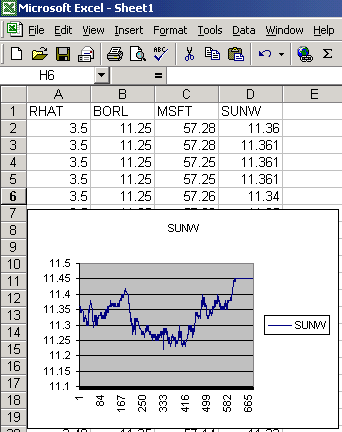
I may seem a little Bullish on .NET, but I was able to create this application fairly quickly in C# thanks to the rich library and ease of connecting to COM applications like Excel. Those of you who are Visual C++ programmers will be greatly relieved that it is finally as easy as using Visual Basic to talk to the COM interfaces of applications and ActiveX controls in C#. This article is based upon the code and article written by Dipal Choksi. You may want to refer to this article to see how the stock quotes are captured from the web. I've added the port of the quotes to Excel as well as a timer that retrieves the quotes every 10 seconds. You can change this interval to whatever time you wish by changing the Interval property in timer1.
Below is the code that initializes the Excel Application Object so you can use it like any other class:
First I had to import the Excel library. This can either be done by adding a reference or adding the statement below:
using
Excel;
I then added the code to instantiate an Excel Application object:
private
Excel.Application ExcelObj = new Excel.Application();
Next we need to show Excel as a visible object and add a workbook to populate:
ExcelObj.Visible =
true;
ExcelObj.Workbooks.Add(XlWBATemplate.xlWBATWorksheet);
Now we are ready to use Excel to display our stock quotes. Each time the timer tick event is entered we print out a stock quote to the spreadsheet (Note: Alot of the codein this method is taken from the article by Dipal Choksi :
private
void timer1_Tick(object sender, System.EventArgs e)
{
string strQuotes;
int i;
strQuotes = "";
for(i=0;i<strQuoteArray.Length;i++)
{
// Retrieve the stock information from the web site
string strResult = GetQuoteFromWebSite(strQuoteArray[i]);
string[] temp = strResult.Split(separator) ;
//Check if the string array returned has more than one elements
//since if there are less than one elements then a exception must have been returned
if(temp.Length >1)
{
//The WebService returns a lot of information about the stock,
//We only show the relevant portions .
WriteExcelQuote(i, strQuoteArray[i], temp[1]);
}
else
{
strerror ="Error :"+ strResult ; //set the error label
strQuotes = strQuotes + strerror + System.Environment.NewLine;
}
}
Counter ++;
}
The routine below takes the stock quote and the stock name and populates the excel spreadsheet.
private
void WriteExcelQuote(int index, string symbol, string quote)
{
Workbooks workbooks = ExcelObj.Workbooks;
// get the workbook from the existing spreadsheet
_Workbook workbook = workbooks.get_Item(1);
// get the collection of sheets in the workbook
Sheets sheets = workbook.Worksheets;
// get the first and only worksheet from the collection
// of worksheets
_Worksheet worksheet = (_Worksheet) sheets.get_Item(1);
// form a range with a single cell based on the index of the quote
// and the Incremented Counter.
char rangeChar = (char)(index + 65);
string strCell = rangeChar + Convert.ToString(Counter);
Range range2 = worksheet.get_Range(strCell, strCell);
// if its the first quote, populate the cell with the symbol
// otherwise populate the cell with the quote for the symbol
if (Counter == 1)
range2.Value = symbol;
else
range2.Value = quote;
}
Note there is not much code here. The hardest part about populating an Excel Cell is forming the letter-number combination to put the quote in the correct row and column. The index is converted to a letter (A - Z) and is concatenated with the ongoing Counter incremented each time in the timer event. The cell names come out to Row Column representations such as "A4" (row 4, column 1) or "B5" (row 5. column 2). This letter number combination uses the get_Range function in the worksheet to obtain a range to populate. In our case we are getting a range for a single cell (e.g. "A1" to "A1"). This code could be altered to populate an array of cells by getting a larger range, if for some reason you need to populate the cells alot faster for a large range of quotes.
Extras
Once you've populated an excel spreadsheet there are many things you can do with it. For example you can create a graph or write some more C# code to analyze your data or even populate a database. Hope this lesson gives you another way to think about your portfolio and sparks some possibilities for organizing your trading with .NET.