LINQ (.Net Language Integrated Query) is the general-purpose standard query operators that allow traversal, filter and projection operations to be expressed in a direct yet declarative way in any .Net programming language. The extensibility of the LINQ query language provides implementations that work over both XML and SQL data. The query operator over XML is called XLINQ and the one over SQL is called DLINQ. XLinQ is an efficient and in-memory XML facility to provide XPath/XQuery functionality. Dlinq operator is for the integration of SQL based schema definitions into the CLR type System.
LINQ will be fully integrated with the next release of the Visual Studio which is named as Orcas now. The best thing is that the LINQ can also be installed in Visual Studio 2005. The May 2006 CTP release of LINQ is available and can be downloaded from thins link. Let's see how to create a new web site that uses LINQ features.
Creating C# LINQ ASP.NET Web site
After installing the May CTP download of the LINQ, Open Visual Studio and click the link for creating new website File-> New -> Web Site
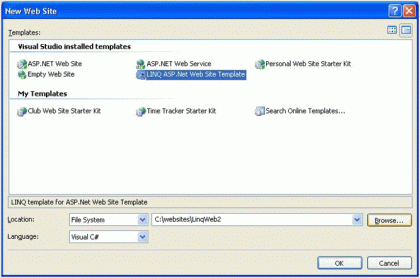
The project will be created with the same files as it is with the normal website that we create. There is a minor difference in web.config under the configuration section. You can see a new section as codedom to specify the compiler and the language. The Visual Studio 2005 should use the new C# 3.0 compiler.
<system.codedom>
<compilers>
<compiler language="c#;cs;csharp" extension=".cs" type="Microsoft.CSharp.CSharp3CodeProvider, CSharp3CodeDomProvider"/>
</compilers>
</system.codedom>
Open the Default.aspx file and drag and drop DropdownList and Gridview controls on the design surface. Right click on the project folder in the solution explorer and add App_code folder from the ASP.NET folders list.
Let us take a simple example of creating a web page which shows the list of current open positions in an organization under different technologies. So whenever the user select's the technology in the drop down box, the Grid view should show the list of current open positions in the organization under the selected technology. I created two SQL tables one for storing the list of technologies and the other one for storing the current open positions for each technology. We don't need to go to the details of creating the tables. Assume that the tables are created.
Add two C# class files to the App_Code directory one for the business logic and other one for the data access. Create an entity class as PositionDetails to hold the open position information and add the following code to the class file.
using System;
using System.Collections.Generic;
using System.Data;
using DataAccessLayer;
namespace BusinessLogicLayer
{
public class PositionDetails
{
private string _technology;
private string _skillSet;
private string _details;
private string _education;
private string _experience;
private DateTime _openPositionDate;
private string _numberofPosOpen;
public string Technology
{
get { return _technology; }
set { _technology = value; }
}
public string SkillSet
{
get { return _skillSet; }
set { _skillSet = value; }
}
public string Details
{
get { return _details; }
set { _details = value; }
}
public string Education
{
get { return _education; }
set { _education = value; }
}
public string Experience
{
get { return _experience; }
set { _experience = value; }
}
public string NumberofPosOpen
{
get { return _numberofPosOpen; }
set { _numberofPosOpen = value; }
}
public DateTime OpenPositionDate
{
get { return _openPositionDate; }
set { _openPositionDate = value; }
}
public PositionDetails(string technology,
string skillset, string details, string education, string experience, string NumberofPosOpen, DateTime openPositionDate)
{
_technology = technology;
_skillSet = skillset;
_details = details;
_education = education;
_experience = experience;
_numberofPosOpen = NumberofPosOpen;
_openPositionDate = openPositionDate;
}
}
public class ListPositionDetails
{
private int _tech;
public int Technology
{
get { return _tech; }
set { _tech = value; }
}
public List<PositionDetails> ListPosDetails
{
get
{
DataAccess DALLayer = DataAccessHelper.GetDataAccess();
List<PositionDetails> PostDet =
DALLayer.GetOpenPositionsforTechnology(Technology);
return PostDet;
}
}
public ListPositionDetails(int Tech)
{
Technology = Tech;
}
}
}
The first one is the entity class with the name PositionDetails and it has a constructor in it to initialize the properties. The second class file is the one to hold list of Position details which has a method which calls a method in the Data access layer which connects to the database and retrives the list of current open positions for selected technology in the dropdown box which is passed as a parameter to the method. The Data Access layer will look like the one below.
public override List<PositionDetails> GetOpenPositionsforTechnology(int Technology)
{
PositionDetails temp1 = null;
using (SqlConnection connection = new SqlConnection(ConfigurationManager.ConnectionStrings["connection"].ConnectionString))
{
using (SqlCommand command = new SqlCommand("GetPositionDetailsforTechnology", connection))
{
command.CommandType = CommandType.StoredProcedure;
command.Parameters.Add(new SqlParameter("@Technology", Technology));
connection.Open();
List<PositionDetails> list = new List<PositionDetails>();
using (SqlDataReader reader = command.ExecuteReader())
{
if (reader.HasRows)
{
while (reader.Read())
{
temp1 = new PositionDetails(
(string)reader["Technology"],
(string)reader["SkillSet"],
(string)reader["Details"],
(string)reader["Education"],
(string)reader["Experience"],
(string)reader["NumberofPosOpen"],
(DateTime)reader["OpenPositionDate"]);
list.Add(temp1);
}
}
return list;
}
}
}
}
Now using the above class files, let us see how we can make use of LINQ operations to bind the data to the GridView control.
Select the Drop Down List which shows the list of technologies and add the following code for the SelectedIndexChanged event.
ListPositionDetails PosDetList = new ListPositionDetails(Convert.ToInt32(TechnologyList.SelectedValue));
GridViewLINQ.DataSource = from PositionDetails in PosDetList.ListPosDetails
orderby PositionDetails.Experience
select PositionDetails;
GridViewLINQ.DataBind();
The DataSource for the GridView component is a direct SQL like statement which makes use of the PosDetList object which has the collection of current open positions for the selected technology. This is similar to an SQL Statement and is dynamic.
The best this here is that the LINQ is strongly-typed. If I used SQL statement to fetch the details, won't be able to get the errors in my SQL statement at design time. But here the compiler will give the errors in the queries during compile time itself.
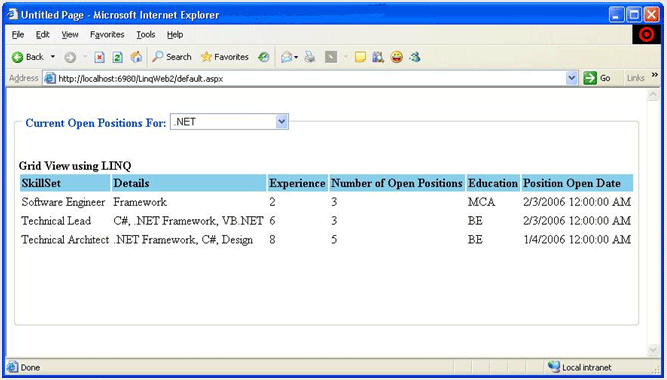
We can have conditions in queries. For example, if I want to list all open positions for the selected .net technology which requires more than 3 years of experience then I can change the query like this
ListPositionDetails PosDetList = new ListPositionDetails(Convert.ToInt32(TechnologyList.SelectedValue));
GridViewLINQ.DataSource = from PositionDetails in PosDetList.ListPosDetails
where Convert.ToInt32(PositionDetails.Experience) > 3
orderby PositionDetails.Experience
select PositionDetails;
GridViewLINQ.DataBind();
Now the Grid displays only the records which has the Experience field value greater than 3
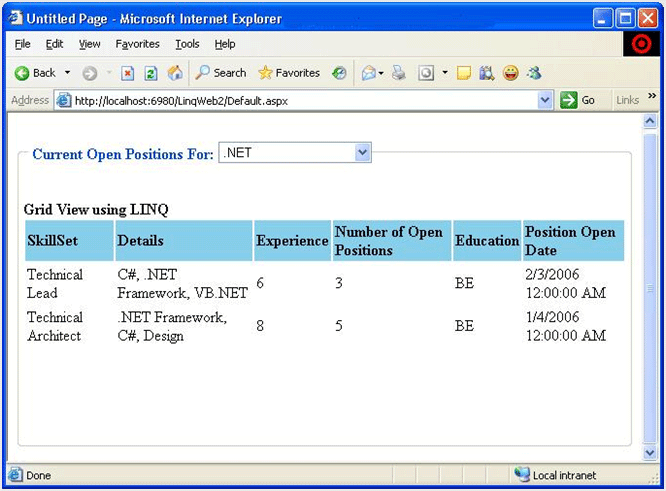
Now we will change the query so that only two records should be listed in the grid. The query will look like
ListPositionDetails PosDetList = new ListPositionDetails(Convert.ToInt32(TechnologyList.SelectedValue));
GridViewLINQ.DataSource = (from PositionDetails in PosDetList.ListPosDetails
orderby PositionDetails.Experience
select PositionDetails).Take(2);
GridViewLINQ.DataBind();
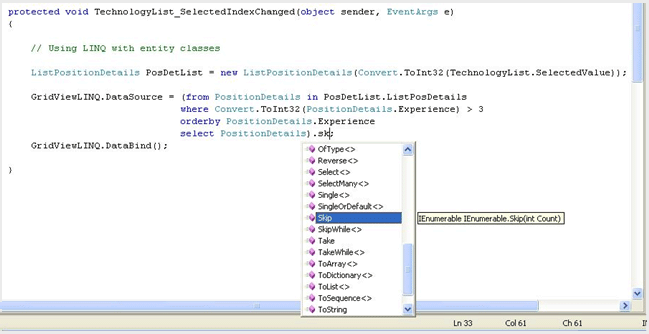
The Visual Studio provides the intellisense help when you write queries as give below.
Using Anonymous Types
Linq takes the advantage of the Anonymouse types also. This allows us to create types and use it inline without declaring the object model as we do normally. This is very useful to customize the data. In all the above examples shown above, you can see the total number of fields shown in the grid is six. We may not need all the fields at all time. Sometimes we may want to hide or show only the required fields. Lets see how to do this easily using LINQ. Change the query like the one below.
ListPositionDetails PosDetList = new ListPositionDetails(Convert.ToInt32(TechnologyList.SelectedValue));
GridViewLINQ.DataSource = from PositionDetails in PosDetList.ListPosDetails
orderby PositionDetails.Experience
select new {
PositionDetails.SkillSet,
PositionDetails.Experience,
PositionDetails.Details
};
GridViewLINQ.DataBind();
In the above code we can see only three fields in the select statement which retrieves only three fields instead of all six fields.
Summary
The above given examples are just an introduction to LINQ. There are lots of cool features that comes with DLinq and XLinq. Using Linq we don't need to create more controls and entity classes as we do normally. There are lots of properties and methods provided for the Linq queries. There is a DLinq designer by which we can create the Linq Objects without writing any code and creating the user interface forms for the applications much faster.