Description
This is the second version of my client/server program. The server and the client can be run on the same machine or on different machines. The following is the brief description of the server and the client programs specifically.
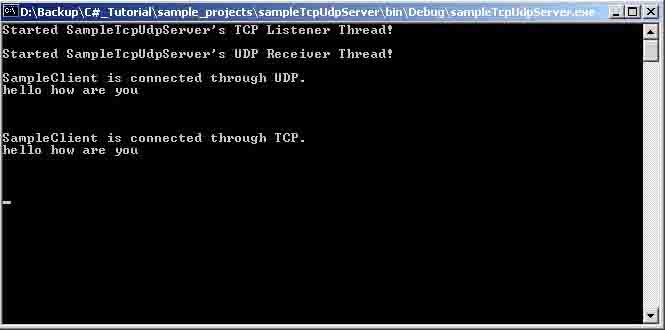
sampleTcpUdpServer2.cs: This program functions exactly the same as v1 posted earlier. The only difference is in the coding. It employs a more efficient coding way for the socket programming. It uses the TcpListener class provided by the .Net class library, instead of the traditional (bind/listen/accept) way employed in v1.
Usage : sampleTcpUdpServer2
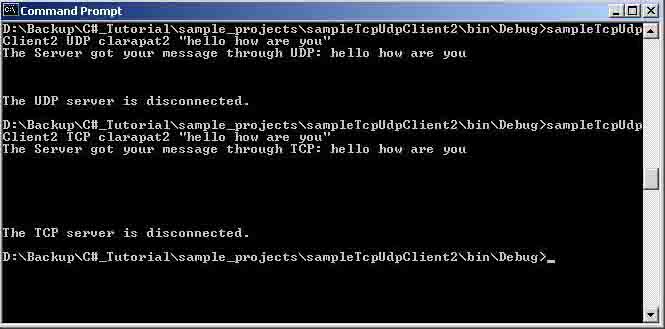
sampleTcpUdpClient2.cs: Similar to te changes made to the server program, this client program employs a more efficient way of socket programming provided by the .Net class library. It uses TcpClient and UdpClient classes instead of the traditional way employed in v1.
Usage : sampleTcpUdpClient2 <TCP or UDP> <destination hostname or IP> "Any message."
Example: sampleTcpUdpClient2 TCP your_hostname "hello. how are you?"
All the other information is provided at the beginning of each file.
Source Code:
/* Project : Simple Multi-threaded TCP/UDP Server v2
* Author : Patrick Lam
* Date : 09/19/2001
* Brief : The simple multi-threaded TCP/UDP Server v2 does the same thing as v1. What
* it intends to demonstrate is the amount of code you can save by using
TcpListener
* instead of the traditional raw socket implementation (The UDP part is still
* the same. When you compare the following code with v1, you will see the
* difference.
* Usage : sampleTcpUdpServer2
*/
namespace sampleTcpUdpServer2
{
using System;
using System.Net;
using System.Net.Sockets;
using System.Threading;
public class SampleTcpUdpServer2
{
private const int sampleTcpPort = 4567;
private const int sampleUdpPort = 4568;
public Thread sampleTcpThread, sampleUdpThread;
public SampleTcpUdpServer2()
{
try
{
//Starting the TCP Listener thread.
sampleTcpThread = new Thread(new ThreadStart(StartListen2));
sampleTcpThread.Start();
Console.WriteLine("Started SampleTcpUdpServer's TCP Listener Thread!\n");
}
catch (Exception e)
{
Console.WriteLine("An TCP Exception has occurred!" + e.ToString());
sampleTcpThread.Abort();
}
try
{
//Starting the UDP Server thread.
sampleUdpThread = new Thread(new ThreadStart(StartReceiveFrom2));
sampleUdpThread.Start();
Console.WriteLine("Started SampleTcpUdpServer's UDP Receiver Thread!\n");
}
catch (Exception e)
{
Console.WriteLine("An UDP Exception has occurred!" + e.ToString());
sampleUdpThread.Abort();
}
}
public static void Main(String[] argv)
{
SampleTcpUdpServer2 sts = new SampleTcpUdpServer2();
}
public void StartListen2()
{
//Create an instance of TcpListener to listen for TCP connection.
TcpListener tcpListener = new TcpListener(sampleTcpPort);
try
{
while (true)
{
tcpListener.Start();
//Program blocks on Accept() until a client connects.
Socket soTcp = tcpListener.AcceptSocket();
Console.WriteLine("SampleClient is connected through TCP.");
Byte[] received = new Byte[512];
int bytesReceived = soTcp.Receive(received, received.Length, 0);
String dataReceived = System.Text.Encoding.ASCII.GetString(received);
Console.WriteLine(dataReceived);
String returningString = "The Server got your message through TCP: " +
dataReceived;
Byte[] returningByte = System.Text.Encoding.ASCII.GetBytes
(returningString.ToCharArray());
//Returning a confirmation string back to the client.
soTcp.Send(returningByte, returningByte.Length, 0);
tcpListener.Stop();
}
}
catch (SocketException se)
{
Console.WriteLine("A Socket Exception has occurred!" + se.ToString());
}
}
public void StartReceiveFrom2()
{
IPHostEntry localHostEntry;
try
{
//Create a UDP socket.
Socket soUdp = new Socket(AddressFamily.InterNetwork, SocketType.Dgram, ProtocolType.Udp);
try
{
localHostEntry = Dns.GetHostByName(Dns.GetHostName());
}
catch(Exception)
{
Console.WriteLine("Local Host not found"); // fail
return ;
}
IPEndPoint localIpEndPoint = new IPEndPoint(localHostEntry.AddressList[0], sampleUdpPort);
soUdp.Bind(localIpEndPoint);
while (true)
{
Byte[] received = new Byte[256];
IPEndPoint tmpIpEndPoint = new IPEndPoint(localHostEntry.AddressList[0], sampleUdpPort);
EndPoint remoteEP = (tmpIpEndPoint);
int bytesReceived = soUdp.ReceiveFrom(received, ref remoteEP);
String dataReceived = System.Text.Encoding.ASCII.GetString(received);
Console.WriteLine("SampleClient is connected through UDP.");
Console.WriteLine(dataReceived);
String returningString = "The Server got your message through UDP:" + dataReceived;
Byte[] returningByte = System.Text.Encoding.ASCII.GetBytes(returningString.ToCharArray());
soUdp.SendTo(returningByte, remoteEP);
}
}
catch (SocketException se)
{
Console.WriteLine("A Socket Exception has occurred!" + se.ToString());
}
}
}
}
/* Project: Simple TCP/UDP Client v2
* Author : Patrick Lam
* Date : 09/19/2001
* Brief : The simple TCP/UDP Client v2 does exactly the same thing as v1. What
itintends
* to demonstrate is the amount of code you can save by using TcpClient and UdpClient
* instead of the traditional raw socket implementation. When you
* compare the following code with v1, you will see the difference.
* Usage : sampleTcpUdpClient2 <TCP or UDP> <destination hostname or IP> "Any message."
* Example: sampleTcpUdpClient2 TCP localhost "hello. how are you?"
* Bugs : When you send a message with UDP, you can't specify localhost as the
* destination. Doing so will produce an exception. Can't figure out why yet. The workaround
* to use the machine's hostname instead.
*/
namespace multiThreadedTcpUdpClient2
{
using System;
using System.Net;
using System.Net.Sockets;
using System.Threading;
public class sampleTcpUdpClient2
{
public enum clientType {TCP, UDP}; //Type of connection the client is making.
private const int ANYPORT = 0;
private const int SAMPLETCPPORT = 4567;
private const int SAMPLEUDPPORT = 4568;
private bool readData = false;
public clientType cliType;
private bool DONE = false;
public sampleTcpUdpClient2(clientType CliType)
{
this.cliType = CliType;
}
public void sampleTcpClient2(String serverName, String whatEver)
{
try
{
//Create an instance of TcpClient.
TcpClient tcpClient = new TcpClient(serverName,SAMPLETCPPORT);
//Create a NetworkStream for this tcpClient instance.
//This is only required for TCP stream.
NetworkStream tcpStream = tcpClient.GetStream();
if (tcpStream.CanWrite)
{
Byte[] inputToBeSent = System.Text.Encoding.ASCII.GetBytes(whatEver.ToCharArray());
tcpStream.Write(inputToBeSent, 0, inputToBeSent.Length);
tcpStream.Flush();
}
while (tcpStream.CanRead && !DONE)
{
//We need the DONE condition here because there is possibility that
//the stream is ready to be read while there is nothing to be read.
if (tcpStream.DataAvailable)
{
Byte[] received = new Byte[512];
int nBytesReceived = tcpStream.Read(received, 0, received.Length);
String dataReceived = System.Text.Encoding.ASCII.GetString(received);
Console.WriteLine(dataReceived);
DONE = true;
}
}
}
catch (Exception e)
{
Console.WriteLine("An Exception has occurred.");
Console.WriteLine(e.ToString());
}
}
public void sampleUdpClient2(String serverName, String whatEver)
{
try
{
//Create an instance of UdpClient.
UdpClient udpClient = new UdpClient(serverName, SAMPLEUDPPORT);
Byte[] inputToBeSent = new Byte[256];
inputToBeSent = System.Text.Encoding.ASCII.GetBytes(whatEver.ToCharArray());
IPHostEntry remoteHostEntry = Dns.GetHostByName(serverName);
IPEndPoint remoteIpEndPoint = new IPEndPoint(remoteHostEntry.AddressList[0], SAMPLEUDPPORT);
int nBytesSent = udpClient.Send(inputToBeSent, inputToBeSent.Length);
Byte[] received = new Byte[512];
received = udpClient.Receive(ref remoteIpEndPoint);
String dataReceived = System.Text.Encoding.ASCII.GetString(received);
Console.WriteLine(dataReceived);
udpClient.Close();
}
catch (Exception e)
{
Console.WriteLine("An Exception Occurred!");
Console.WriteLine(e.ToString());
}
}
public static void Main(String[] argv)
{
if (argv.Length < 3)
{
Console.WriteLine("Usage: sampleTcpUdpClient2 <TCP or UDP> <Server Name or IP Address> Message");
Console.WriteLine("Example: sampleTcpUdpClient2 TCP localhost ''hello. how are you?''");
}
else if ((argv[0] == "TCP") || (argv[0] == "tcp"))
{
sampleTcpUdpClient2 stc = new sampleTcpUdpClient2(clientType.TCP);
stc.sampleTcpClient2(argv[1], argv[2]);
Console.WriteLine("The TCP server is disconnected.");
}
else if ((argv[0] == "UDP") || (argv[0] == "udp"))
{
sampleTcpUdpClient2 suc = new sampleTcpUdpClient2(clientType.UDP);
suc.sampleUdpClient2(argv[1], argv[2]);
Console.WriteLine("The UDP server is disconnected.");
}
}
}
}
// created on 8/26/2001 at 1:21 PM