Introduction
With the integration of the CLR with SQL Server 2005, we can create database objects using modern object-oriented languages like VB.NET and C#.
This article is trying to explain the simple and required steps that are require starting the creation of Manage Triggers using C#.
The Project
We will create a Visual Studio 2005 database project for the managed Trigger.
Creating the Database project:
Open Microsoft Visual Studio 2005 and create a SQL Server Project.
File->New->Project->Database
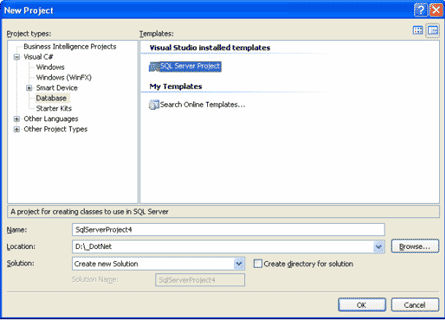
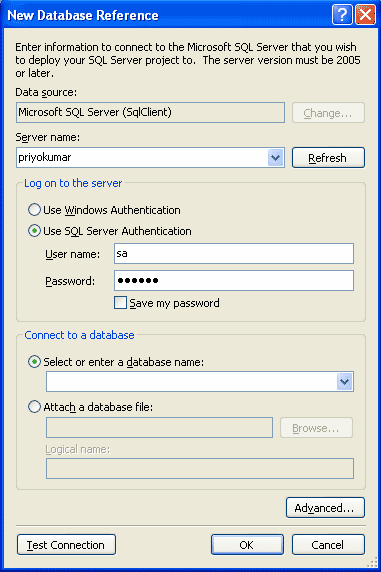
Adding a database reference:
Now it will ask for a database reference. Add one.
Add a Trigger:
Right click on the Project and add a Trigger.
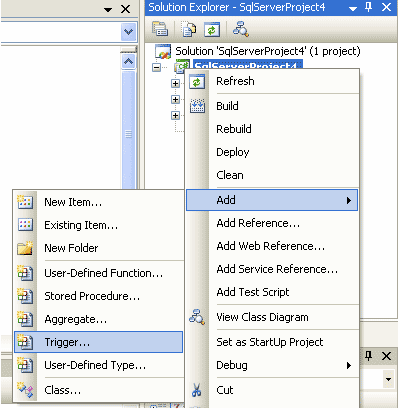
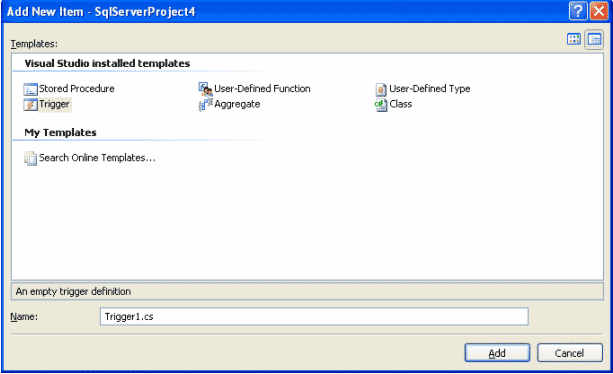
The file Trigger1.cs:
Past following lines to the file Trigger1.cs. Make sure that the table Person exist on your database or give the name of your table instead of Person.
using System;
using System.Data;
using System.Data.SqlClient;
using Microsoft.SqlServer.Server;
public partial class Triggers
{
// Enter existing table or view for the target and uncomment the attribute line
[Microsoft.SqlServer.Server.SqlTrigger (Name="Trigger1", Target="Person", Event="FOR UPDATE")]
public static void Trigger1()
{
// Replace with your own code
SqlContext.Pipe.Send("Trigger FIRED");
}
}
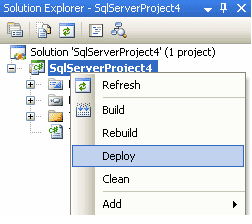
Deploy the Trigger:
Build the project and then deploy it.
Test the Trigger:
Make sure the clr is enabled with your SQL Server by running the following sql.
sp_configure 'clr enabled', 1;
GO
RECONFIGURE;
GO