Introduction:
With the integration of the CLR with SQL Server 2005, we can create database objects using modern object-oriented languages like VB.NET and C#.
This article is trying to explain the simple and required steps that are require starting the creation of Manage User Defined Functions using C#.
The Project:
We will create a Visual Studio 2005 database project for the managed Trigger.
Creating the Database project:
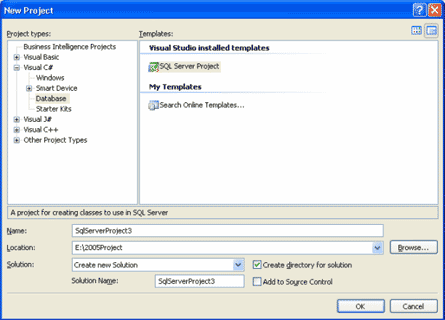
Open Microsoft Visual Studio 2005 and create a SQL Server Project.
File->New->Project->Database
Adding a database reference:
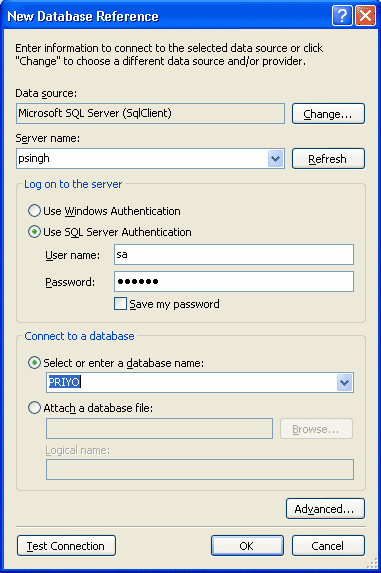
Now it will ask for a database reference. Add one.
Add a User Defined Function:
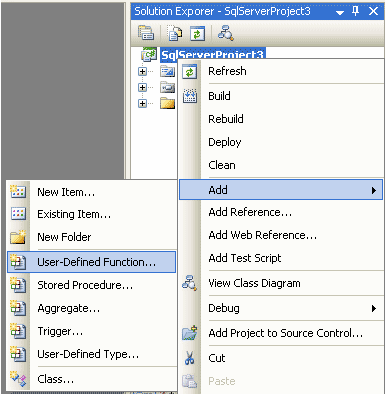
Right click on the Project and add a User Defined Function.
The file Function1.cs:
Past following lines to the file Function1.cs.
using System;
using System.Data;
using System.Data.SqlClient;
using System.Data.SqlTypes;
using Microsoft.SqlServer.Server;
public partial class UserDefinedFunctions
{
[Microsoft.SqlServer.Server.SqlFunction]
public static SqlInt64 Function1(SqlInt32 a, SqlInt32 b)
{
// Put your code here
// return new SqlString("Hello");
return (a + b);
}
};