Normally we use browser back button frequently to go to back/previous page importantly its useful when we are searching using search controls or using Paging, Sorting etc.
In a normal web page developed using ASP.NET browser history is updated for every post back i.e. when user clicks on the paging links or sorting links or search buttons etc. Hence user can easily check the previous records by clicking on browser back button.
In an AJAX enabled web page where we have GridView inside an update panel browser history does not get update as post back happens asynchronously which browser is not aware of.
Handle GridView Sorting and PageIndexChanged events as below where we will add an entry to history with PageIndex or SortExpression and Direction.
GridView Sorting:
protected void GridView1_Sorting(object sender, GridViewSortEventArgs e)
{
UpdateHistory1.AddEntry("SortDirection=" + e.SortDirection.ToString() + "&&SortExpression=" + e.SortExpression);
}
GridView Paging:
protected void GridView1_PageIndexChanging(object sender, GridViewPageEventArgs e)
{
if (ScriptManager1.IsInAsyncPostBack)
{
UpdateHistory1.AddEntry("PageIndex=" + GridView1.PageIndex.ToString());
}
}
Finally we need to handle OnNavigate Event of UpdateHistory control to get the PageIndex and SortExpression and set to gridview. This OnNavigate event is fired when the user tries to navigate using browser back and forward buttons.
protected void ScriptManager1_Navigate(object sender, HistoryEventArgs e)
{
string entryName = e.EntryName.ToString();
if (e.EntryName.Contains("SortDirection") && e.EntryName.Contains("SortExpression"))
{
string[] splitter = new String[1];
splitter[0] = "&&";
string[] text = e.EntryName.Split(splitter, StringSplitOptions.None);
string sortExpression = text[1].Replace("SortExpression=", "");
string strSortDirection = text[0].Replace("SortDirection=", "");
SortDirection sortDirection = (SortDirection)Enum.Parse(typeof(SortDirection), strSortDirection);
GridView1.Sort(sortExpression, sortDirection);
}
string pageIndex = string.Empty;
if (e.EntryName.Contains("PageIndex"))
{
pageIndex = e.EntryName.Replace("PageIndex=", "");
}
if (string.IsNullOrEmpty(pageIndex))
{
GridView1.PageIndex = 0;
}
else
{
GridView1.PageIndex = Convert.ToInt32(pageIndex);
}
}
Example:
<%
@ Page Language="C#" AutoEventWireup="true" CodeFile="Default.aspx.cs" Inherits="_Default" %>
<%@ Register Assembly="nStuff.UpdateControls" Namespace="nStuff.UpdateControls" TagPrefix="uc" %>
<!DOCTYPE html PUBLIC "-//W3C//DTD XHTML 1.1//EN" "http://www.w3.org/TR/xhtml11/DTD/xhtml11.dtd">
<html xmlns="http://www.w3.org/1999/xhtml">
<head id="Head1" runat="server">
<title>GridView Paging, Sorting</title>
</head>
<body>
<form id="form1" runat="server">
<asp:ScriptManager ID="ScriptManager1" runat="server" />
<uc:UpdateHistory ID="UpdateHistory1" runat="server" OnNavigate="ScriptManager1_Navigate">
</uc:UpdateHistory>
<asp:UpdatePanel ID="UpdatePanel1" runat="server">
<ContentTemplate>
<div>
<asp:GridView ID="GridView1" runat="server" AutoGenerateColumns="False" CellPadding="4"
DataSourceID="SqlDataSource1" ForeColor="#333333" GridLines="None" AllowPaging="True"
AllowSorting="True" OnPageIndexChanging="GridView1_PageIndexChanging" OnSorting="GridView1_Sorting">
<RowStyle BackColor="#E3EAEB" />
<Columns>
<asp:BoundField DataField="CompanyId" HeaderText="CompanyId" SortExpression="CompanyId" />
<asp:BoundField DataField="CompanyName" HeaderText="CompanyName" SortExpression="CompanyName" />
<asp:BoundField DataField="SectorName" HeaderText="SectorName" SortExpression="SectorName" />
</Columns>
<FooterStyle BackColor="#666666" ForeColor="White" />
<PagerStyle BackColor="#666666" ForeColor="White" HorizontalAlign="Center" />
<SelectedRowStyle BackColor="#C5BBAF" Font-Bold="True" ForeColor="#333333" />
<HeaderStyle BackColor="#666666" ForeColor="White" />
<EditRowStyle BackColor="#7C6F57" />
<AlternatingRowStyle BackColor="White" />
</asp:GridView>
<asp:SqlDataSource ID="SqlDataSource1" runat="server" ConnectionString="<%$ ConnectionStrings:sampleConnectionString %>"
SelectCommand="SELECT DISTINCT [CompanyId], [CompanyName], [SectorName] FROM [Company]">
</asp:SqlDataSource>
</div>
</ContentTemplate>
</asp:UpdatePanel>
</form>
</body>
</html>
Web.config:
Add the following key into web.config
<
connectionStrings>
<add name="sampleConnectionString" connectionString="Data Source=ServerName;Initial Catalog=DatabaseName; user id=userid; password=password; Integrated Security=True" providerName="System.Data.SqlClient"/>
</connectionStrings>
Output:
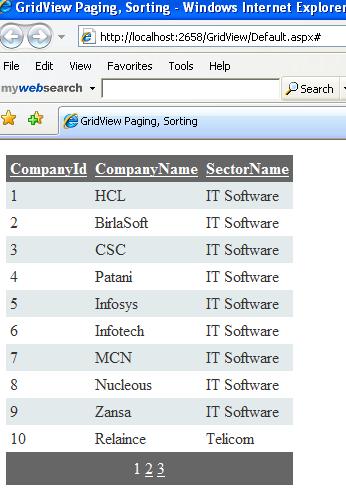
Figure:1
SortExpression and SortDirection is stored in the URL (Page state is encoded in the querystring of the browser,
meaning that visitors can bookmark a particular state of an AJAX application).
When you sort data as companyName wise, data will sort as follows and browser's back button will visible and url will be
http://localhost:2658/GridView/Default.aspx#SortDirection=Ascending&&SortExpression=CompanyName.
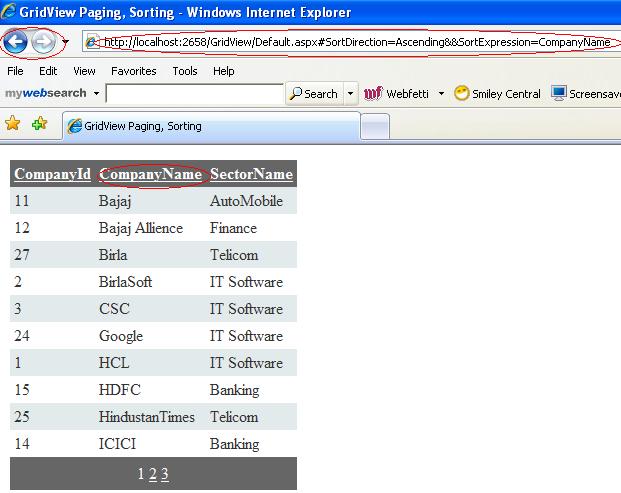
Figure 2:
If you click on back button then you will not get old record but url will change.
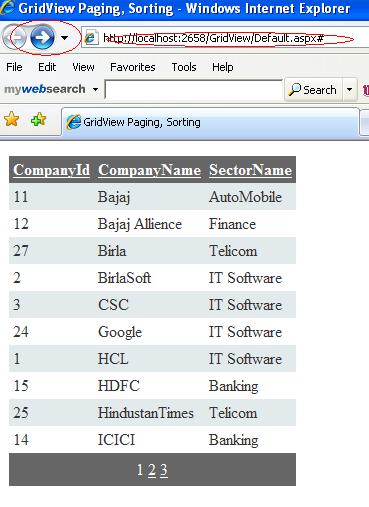
Figure 3: