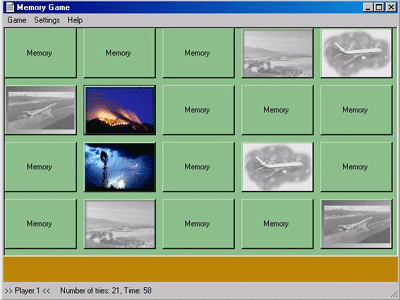
Introduction:
This is a memory game where you can use your favorite pictures (.bmp, jpg, gif). Therefore you specify the directory/ies where the desired images are contained in the settings (Settings/Customize../Add). You can also make some other customizations like how many cards are displayed on the screen, or how the pictures are rendered (clip off an area to fit into the cards or stretch/shrink them). To start the game, choose One or Two Player Game in the Game menu (F1 or F2)
Classes:
GameForm.cs ..
contains the Game Panel and the main code for playing.. For displaying the cards i used normal buttons which are created dynamically (the number is specified in settings).. There are timers for delays (eg. showing a card for about one second when it is opened).. When a new game is started, it selects randomly pictures from the specified directory/ies and loads it using the ImageContainer class
ImageContainer.cs ..
For loading the images on start and storing it in an array. I have implemented three modes for loading..
AddImageClipped .. an area of button size is cut out of the picture.. therefore i used native calls to demonstrate Windows GDI calls in C# (although i'm sure there is a simpler function somewhere in GDI+ which does the same).. the code for clipping is in ClipImage:
private Image ClipImage(Image source, int nDestWidth, int nDestHeight, int x, int y)
{
Image image;
Bitmap bitmap;
int hbitmap1, hbitmap2;
int hDC1, hDC2, screenDC;
int res;
// Convert a loaded image object to a 32 bit handle in order to use it with GDI
bitmap = (Bitmap)source;
hbitmap1 = (int)bitmap.GetHbitmap();
// Create compatible (memory) device contexts
hDC1 = CreateCompatibleDC(0);
res = SelectObject(hDC1, hbitmap1);
hDC2 = CreateCompatibleDC(0);
screenDC = GetDC(0);
// Create target bitmap (in memory)
hbitmap2 = CreateCompatibleBitmap(screenDC, nDestWidth, nDestHeight);
res = SelectObject(hDC2, hbitmap2);
// Copy from source device context to target device context
res = BitBlt(hDC2, x, y, nDestWidth, nDestHeight, hDC1, 0, 0, SRCCOPY);
// Convert back 32-bit handle to image
image = Image.FromHbitmap(new IntPtr(hbitmap2));
// Free resources
res = DeleteObject(hbitmap1);
res = DeleteObject(hbitmap2);
res = DeleteDC(hDC1);
res = DeleteDC(hDC2);
res = ReleaseDC(0, screenDC);
// new Image object
return image;
}
AddImageStretched .. the source picture is stretched or shrinked to button size before it is added to the ImageContainer this i have implemented with GDI+ and it looks much simpler then AddImageClipped
destImage = new Bitmap(destWidth, destHeight); // create new bitmap in memory with button width/height
g = System.Drawing.Graphics.FromImage(destImage); // get a drawing context from this bitmap
g.DrawImage(source, 0,0,destWidth, destHeight); // draw the source image into target bitmap, impicitly stretching it to its size
data.Add(destImage); // add to my image container
AddImageStretched with aspect ratio.. this is intended to remain the relationship between width and height, but it does look strange with some pictures (don't know why)
Player.cs .. just stores some information about the current player
Settings.cs .. its a serializable class to store the customizations you made.. it is used by GameForm to determine which directory/ies to use etc. Loading and Saving works with an object stream:
public static Settings Load(string path)
{
try
{
FileStream s = new FileStream(path, FileMode.Open);
IFormatter f = new BinaryFormatter();
Settings loadedSettings = f.Deserialize(s) as Settings;
s.Close();
return loadedSettings;
}
catch (FileNotFoundException e)
{
string fault = e.GetBaseException().ToString();
return new Settings();
}
}
public bool Save(string path)
{
try
{
FileStream s = new FileStream(path, FileMode.Create);
IFormatter f = new BinaryFormatter();
f.Serialize(s, this);
s.Close();
return true;
}
catch (IOException)
{
return false;
}
}
SettingsForm.cs .. the form where you can make your customizations.. Uses a settings-object to get the settings from a file and store it back. it also calls the DirectoryForm when you choose the Add or Change button
DirectoryForm.cs .. A directory dialog to choose a directory from a local drive.. I have used a tree list view for displaying the directories (i thought it would be better to implement my own dialog because i did not find a DirList control like I knew it from VB6)
Used:
I used Visual Studio. NET Beta 2 for developing it, but recompiled it under Visual Studio.NET Final (the source is compatible with both versions, but the .exe runs only under the final version)
Have fun..