Description
Microsoft has done an outstanding job documenting the .NET Framework and providing a wealth of examples. The majority of all the examples provided will show a developer in detail how to utilize the Framework or concept in question, that is if you're a VB or C# programmer! What about NetCOBOL? Well Fujitsu Software is working on creating samples and making them accessible to the general public. In the meantime however, what's a COBOL developer supposed to do to solve a problem you currently have?
In this article we'll take a look at some C# samples of code and then translate those samples into COBOL.This article is intended to be used as a model for you to follow when you run into a C# example and need to convert it to COBOL.
A really neat trick!
One of the brightest people I know of has assisted Fujitsu Software in creating a dual set of CD's titled "Microsoft .NET for COBOL Programmers". (This set of CD's is currently available from Fujitsu Software). The author of the CD's is Howard Hinman, President and CEO of Hinman Consulting. Howard had a very good suggestion that I used while learning the .NET environment, create a duplicate project in either VB.NET or C#. During your development phase, create an additional project in your solution using either of Microsoft's languages. Howard is more comfortable with VB so he chose VB.NET, I am more comfortable with C# so I use it.
What we both do however is create an additional project in our COBOL solution. If I am creating a WinForm application then I create another WinForm application in C#. As I am going through the COBOL development process if I have any questions on how a specific namespace is implemented I use the other language project to help me out. Now don't worry if you don't know C# at this point. You will only be using it to try and help determine what a certain objects method and properties are. In C# (and VB.NET) a feature called 'intellisense' has been implemented. Intellisense provides a programmer with additional information about an object when they are using that object. We'll get to more of this in a little bit.
Syntactical Differences
C# uses an OBJECT-DOT-PROPERTY syntax. The object in question may be a WinForm, a text box or any of the over 5,000 namespaces within the Framework. The key is when a developer presses the dot (.) . When the dot is pressed a context sensitive window appears showing the developer what options are available for that particular object. The window may contain other objects, properties or methods that are accessible to the object. Instead of remembering where a specific property or method is within an object, by using intellisense a developer can 'drill down' to the property or method they are looking for.
For instance, the following code shows intellisense for a command button object.
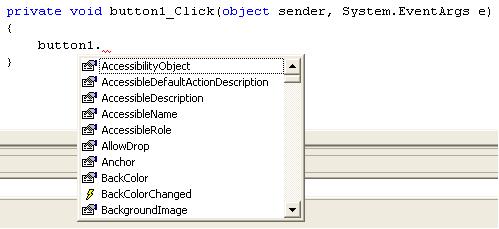
VS.NET is waiting for the developer to select an item or begin typing. When a developer begins typing intellisense will position the list based on the input. So instead of keying say 'Text', the developer would begin keying in 'T' and intellisense will move the list to show all items beginning with 'T'.
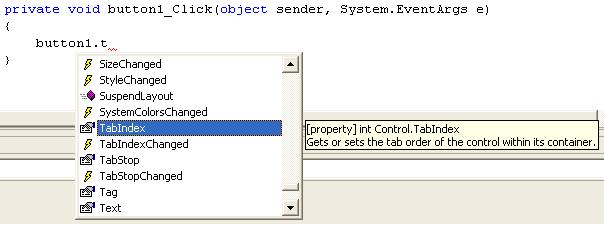
Notice also the presence of tool-tip text to inform the developer of what they are selecting. We are going to modify the text on the face of the command button to be "Call COBOL". To do this we need to select the 'text' property and set it to "Call COBOL". The following image details the code necessary to accomplish this. (We are interested in converting the code to COBOL so we will complete the C# code for you to compare).

COBOL utilizes a different syntax to call a method of an object or update it's properties. The syntax used to set a property to value is
SET PROP-WHATEVER OF OBJECT TO SOMETHING.
The syntax used to invoke a method is
INVOKE OBJECT "METHOD" USING (any parameters) RETURNING (any parameters).
The items in blue are required and are case sensitive. But what if the property or method you are looking for is contained within another object referenced by the current object? Simple, add another 'OF OBJECT' phrase to the statement. We'll assume you are going to update a property of an object that is called from another object. The syntax would be similar to:
SET PROP-WHATEVER OF OBJECT1 OF OBJECT2 TO SOMETHING.
Now let's convert our sample.
Conversion
Following the guidelines detailed in the preceding section, to update a button text in COBOL we would code the following:
SET PROP-TEXT OF button1 TO "CALL COBOL".
The completed method is:
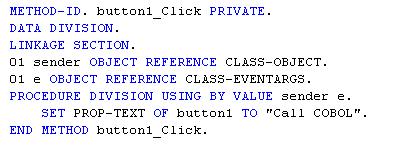
Notice the use of the field PROP-TEXT. PROP-TEXT is a pseudonym for the actual 'Text' property value for the control. This is defined in the repository of the class and has the following syntax:
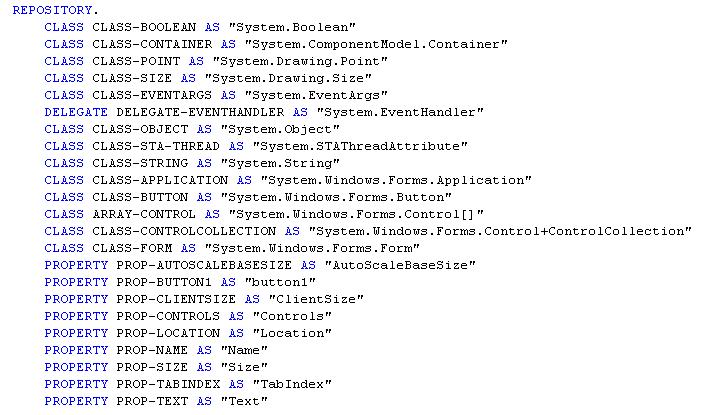
In COBOL, we use the AS clause to create aliases for names that cannot otherwise be written in COBOL. In other words, you create a name friendly to COBOL and put the external name that might not be so COBOL friendly in quotes after AS.
Wrap-Up
While the sample presented is a simple one, the theory behind it flows through to all of the NetCOBOL for .NET environment. Research what you are attempting to accomplish. Locate the objects, property and method you are attempting to use and then create either a C# or VB.NET project, if possible. Create the programming necessary to do what you are attempting and see how it is done in C# if no other sample are available. Next, copy the line of code into your COBOL project (commenting it out of course) and then following the above guidelines, translate it into COBOL. Over time this process will become second nature to you and soon you'll be coding native .NET calls without doing the research. Remember, one has to learn to crawl before you can run a marathon!
Happy Coding!