Blue Theme Orange Theme Green Theme Red Theme
 
Home | Forums | Videos | Photos | Downloads | Blogs | Interviews | Jobs | Beginners | Training
 | Consulting  
Submit an Article Submit a Blog 
 Login Close
User Id:
Password:
 
Forgot Password
Forgot Username
Why Register
 Jump to
Skip Navigation Links
TechnologyExpand Technology
WebsiteExpand Website
 Resources  
Close
 Our Network  
Close
Search :       Advanced Search »
Home » Visual Studio .NET » Enhanced TaskBar in VS 2005 using C# and Windows Forms

Enhanced TaskBar in VS 2005 using C# and Windows Forms

This article shows how to add additional features which are not available in Windows Taskbar.

Author Rank:
Total page views :  8152
Total downloads :  429
   Print Read/Post comments Post a comment  Similar Articles  
   Email to a friend  Bookmark  Author's other articles  
Download Files:
EnhancedTaskBarExplorer.zip
 
Become a Sponsor

For most us, Windows's Taskbar is common one used to switch between applications. But, Windows's Taskbar will make our work of switching little bit hard.

It won't support enhanced iconic view of an application, easy navigation and screenshot capturing etc. I think it's better to design an application that will make switching among applications little bit easier. So, I design this application in VS.NET 2005 using C# and windows forms. I will explain features provided by this application followed by its design and coding.

Features present in this application:

  • It provides enhanced iconic view of active application, which gets updated automatically. 
  • It provides clear view of the running applications.
  • It allows us to take screenshot of required application.
  • It allows us to close the application.
  • It allows us to switch between applications easily.

Now, create a new Windows Application using C# in VS.NET 2005 and name it as EnhancedTaskBarExplorer. Add controls to Main Form (TaskBar) as shown below:
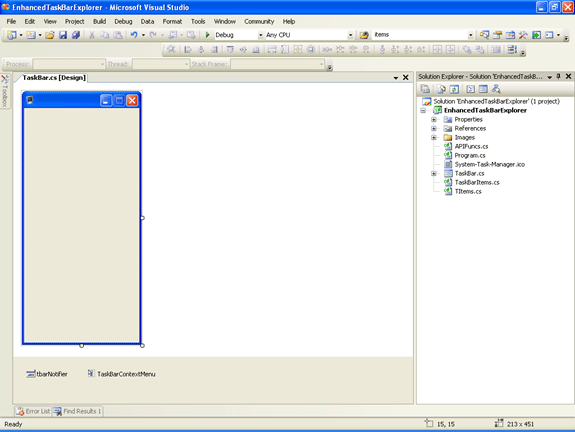
I placed a ContextMenu and NotifyIcon control on the form. Contextmenu is assigned to TaskBar Item (for button displayed on the form for each TaskBar item) and NotifyIcon is assigned to Main Form for controlling visibility of the application.

Following are the menuitems present in Contextmenu (TaskBarContextMenu control, assigned to TaskBar item (Button)):

  • Close --> It is used to kill selected application.
  • Save Screenshot --> It is used to store the screenshot of the application.
  • Save Updated Screenshot --> It is used to store the screenshot of the current application.
  • Enter File Name Textbox --> It is used to set the filename of the application's screenshot to be stored.
  • Clear All --> It is used to clear all TaskBar Items.

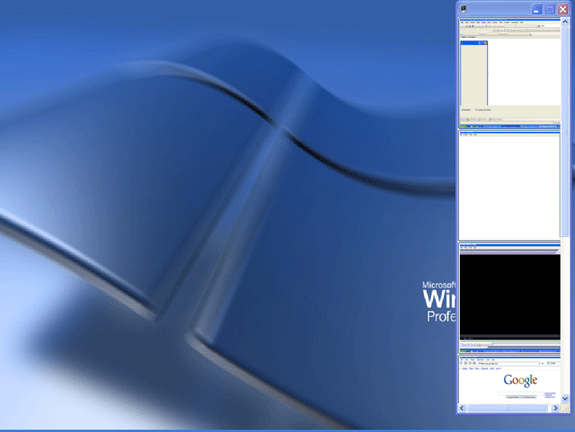
The main functionality of this application is it will create a button with a screenshot of the application as an image on it in main form whenever a new application (Window) is activated and monitors for active window change by using System.Threading.Timer object.

Now, I will explain coding part of this application. I added three class files to the application. I will outline functionality of each class.

TItems.cs is used to handle the properties of a window like Window Handle, Window title, Process ID, Screenshot of the Window etc.

Functionality present in TaskBarItems.cs:

In order to create buttons for each taskbar item, I implemented concept of control array of VB here. Here, I just created a class named TaskBarItems which inherits from System.Collections.CollectionBase and in constructor of this class, I am passing container (Main Form) for this buttons. Than I added three methods to implement add new button (taskbar item), to remove selected taskbar item, to remove all taskbar items from application.

In AddnewTaskBarItem(), I created a new button having following properties:

Name --> WindowHandle of the Application.
Image --> Screenshot of the active Window.

And also some other properties like width, height and onclick event handler etc.

Functionality present in APIFuncs.cs:

In this class, I am using Windows API methods to get active window's screenshot. Actually, I am getting Handle of the active window using GetForegroundWindow() and than that handle is passed to GetWindowProcessID() to get Process ID. Than, this process id is passed to GetProcessById() for getting process. Finally, I am taking screenshot of the active window and created an instance of TItems class with above values added to the TItems's properties. This TItems object will be added to generic list [MyTaskBarItems] for later use.

Functionality present in TaskBar.cs:

Here, we are creating an instance of timer, which will call GetAndDisplayTaskBarData() method and performs following things:

Step 1: It will get active window's title, Handle, process ID etc.

Step 2: Than, it will check whether that window handle is present or not in MyTaskBarItems list.If it doesn't exist,than it is a new window which is not having screenshot of it in the Form.So,it will add it to the Form with a screenshot of it.If that window handle already exists,than it will just finds that handle (button having name as that window handle) and updates its Image property with current screenshot.By this, we can see updation in active window immediately in this Taskbar Form.

Finally, some code is added to save screenshot to a file, close selected application, enhance UI etc. And, the final output will be like this:
We can still enhance this application by improving UI, adding extra functionality like using more WIN32 functions instead of timers etc.

By using this application, we can easily access running applications with a better view on it. I am attaching source code for further reference. I hope this code will be useful for all.


Login to add your contents and source code to this article
 About the author
 
Sateesh Arveti
I hold Bachelors degree in Computer Science along with MCSD,MCTS and MVP for the year 2009. Areas of Interest: C#, WPF, WF, silverlight, ASP.NET, Oracle and SQL Server.

Looking for C# Consulting?
C# Consulting is founded in 2002 by the founders of C# Corner. Unlike a traditional consulting company, our consultants are well-known experts in .NET and many of them are MVPs, authors, and trainers. We specialize in Microsoft .NET development and utilize Agile Development and Extreme Programming practices to provide fast pace quick turnaround results. Our software development model is a mix of Agile Development, traditional SDLC, and Waterfall models.
Click here to learn more about C# Consulting.
 
Introducing MaxV - one click. infinite control. Hyper-V Hosting from MaximumASP.
Finally – a virtual platform that delivers next-generation Windows Server 2008 Hyper-V virtualization technology from a managed hosting partner you can truly depend on. Visit www.maximumasp.com/max for a FREE 30 day trial. Hurry offer ends soon. Climb aboard the MaxV platform and take advantage of High Availability, Intelligent Monitoring, Recurrent Backups, and Scalability – with no hassle or hidden fees. As a managed hosting partner focused solely on Microsoft technologies since 2000, MaximumASP is uniquely qualified to provide the superior support that our business is built on. Unparalleled expertise with Microsoft technologies lead to working directly with Microsoft as first to offer IIS 7 and SQL 2008 betas in a hosted environment; partnering in the Go Live Program for Hyper-V; and product co-launches built on WS 2008 with Hyper-V technology.
Dynamic PDF
ceTE software specializes in components for dynamic PDF generation and manipulation. The DynamicPDF™ product line allows you to dynamically generate PDF documents, merge PDF documents and new content to existing PDF documents from within your applications.
Go.NET
Build custom interactive diagrams, network, workflow editors, flowcharts, or software design tools. Includes many predefined kinds of nodes, links, and basic shapes. Supports layers, scrolling, zooming, selection, drag-and-drop, clipboard, in-place editing, tooltips, grids, printing, overview window, palette. 100% implemented in C# as a managed .NET Control. Document/View/Tool architecture with many properties&events. Optional automatic layout.
Dundas Software
Dundas Chart for .NET is the most advanced .NET charting package available today.  With an extremely complete feature set, elegant architecture and easy implementation, Dundas Chart can quickly add advanced Charting functionality to enhance and transform ASP.NET and Windows Forms applications.  Whether you are implementing charting into internal projects, or building applications for clients, Dundas Chart offers advanced technology and advanced results to get the most out of data.
Clickatell's SMS Gateway
Clickatell's Developer Solutions allow you to SMS enable any website or application via a range of API's. Learn More about our API connections.
Free access to .NET Memory Management video
Everything you need to know about Garbage Collection, Temporary Objects, Fragmentation, Finalization and common causes of memory leaks in .NET. Watch the video here.
Microsoft Visual Studio 2010 Professional
Microsoft Visual Studio 2010 Professional will launch on April 12, but you can beat the rush and secure your copy today by pre-ordering at the affordable estimated retail price of $549 (US). Pre-order now.
Nevron Chart for .NET 2010.1 Now Available
The leading .NET charting control now features PDF, Flash and Silverlight export, visualization of large datasets and more. Deliver true charting functionality to your BI, Scorecard, Presentation or Scientific apps. Download evaluation now.
Developer-Ready ASP.NET 2.0 Web Hosting with 3 MONTHS FREE
Now supporting .NET 3.0 Framework with Windows Workflow Foundation, Windows Communication Foundation (WCF), Windows Presentation Foundation (WPF), windows CardSpace (WCS)! Providing more flexibility for Developers with Web Services Support and a User/Permission Manger. Also supporting MS SQL 2005/2000 with Real-Time Backups, FREE Automated Attach .MDF Tool, FREE SQL Restore and Shrink SQL DB Tools, and SQL
 
   Print Read/Post comments Post a comment  Similar Articles  
   Email to a friend  Bookmark  Author's other articles  
Download Files:
EnhancedTaskBarExplorer.zip
 
 Post a Feedback, Comment, or Question about this article
Subject:  
Comment:  
Become a Sponsor
 Comments
ohhhhhhhhhhhh thanks by maisa On October 19, 2008
thanks alot
Reply | Email | Delete | Modify | 
Doesn't work for games by Andrew On February 5, 2010
Looks greet, but doesn't work for some games (for example LineAge2)

Reply | Email | Delete | Modify | 

 Hosted by MaximumASP  |  Found a broken link?  |  Contact Us  |  Terms & conditions  |  Privacy Policy  |  Site Map  |  Suggest an Idea  |  Media Kit
Current Version: 5.2009.6.2
 © 2010  contents copyright of their authors. Rest everything copyright Mindcracker. All rights reserved.