Blue Theme Orange Theme Green Theme Red Theme
 
Home | Forums | Videos | Photos | Downloads | Blogs | Interviews | Jobs | Beginners | Training
 | Consulting  
Submit an Article Submit a Blog 
 Login Close
User Id:
Password:
 
Forgot Password
Forgot Username
Why Register
 Jump to
Skip Navigation Links
TechnologyExpand Technology
WebsiteExpand Website
 Resources  
Close
 Our Network  
Close
Search :       Advanced Search »
Home » LINQ » Generic Data Access using LINQ to SQL and C#

Generic Data Access using LINQ to SQL and C#

This article discusses the construction of a generic data access layer built on top of a LINQ to SQL implementation.

Author Rank:
Total page views :  22918
Total downloads :  795
   Print Read/Post comments Post a comment  Similar Articles  
   Email to a friend  Bookmark  Author's other articles  
Download Files:
DalTest.zip
 
Become a Sponsor


Download Free Book

Introduction

This article discusses the construction of a generic data access layer built on top of a LINQ to SQL implementation.  I was reading an article written by the "GridviewGuy" (Azam Sharp - http://www.gridviewguy.com/)  a while back and in which the author discussed using Martin Fowler's repository pattern to create a data access layer on top of LINQ to SQL.  In his article, he suggested creating an interface that defined the set of functions necessary to perform basic CRUD operations against a database.  The interface would be then implemented against each table in the database such that, when complete, there would be one class implementing the interface for each existing table (or at least the ones that the user intended to read and write to and from through the application).  All in all, it is a reasonable approach.  The classes implementing the interface could of course contain other functionality as necessary to perform more elaborate operations against multiple tables, performing stored procedures, performing aggregations, etc. 

Considering that, I wanted to see what it would take to dispense with the Interface altogether and just create a single repository class that would handle the basic CRUD functionality for any table; a generic handler that will perform selects, inserts, updates, and deletes without implementing a separate class for each table; further, I wanted the class to handle disconnected data.  Starting with the basic interface defined in the "GridviewGuy" article, I built such a class.  Naturally, it would be necessary to write additional functions to handle more elaborate queries but that is also true if one were following a stricter interpretation of Martin Fowler's repository pattern although in this case one would likely put such additional functions into partial classes rather than into separate classes implementing the interface.

Having said that, if one wanted to create a simple data access layer running against LINQ to SQL as a means of eliminating custom LINQ to SQL queries from the main application's code this approach is viable.  The only caveat to that statement would be that, if one wanted to delete data containing entity sets, it would be necessary to make some simple configuration changes to the database to support that (specifically, one would need to go to the database and define the delete rules for the foreign key constraints to permit the deletes to cascade).  Again, that is also true if one were following the stricter interpretation of Fowler's repository pattern.
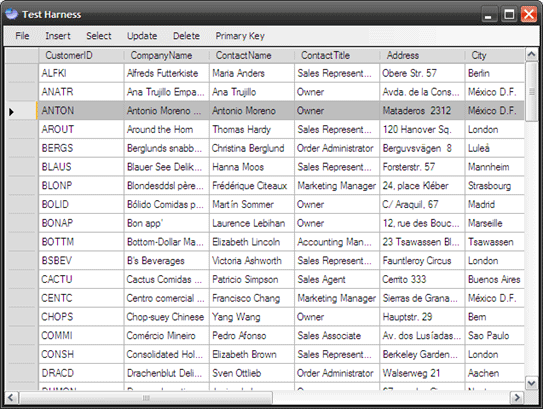
Figure 1:  Application Main Form

The demonstration project included with the article is a simple win forms application; this example contains a datagridview control and a menu; the menu is used to execute each example query contained in the demonstration.

The application provides the following functionality:

  • Insert Data
  • Update Data
  • Delete Data
  • Select Data

Getting Started

There is a single solution containing two projects included with the download.  The first project is class library project named "DalTest"; this project contains the LINQ to SQL model and the repository class code.  The second project is named "TestApp"; that project contains an application used to test the data access layer.

If you open the attached project into Visual Studio 2008; you should see the following in the solution explorer:

Figure 2:  Solution Explorer

The demonstration relies upon an instance of the Northwind database running in SQL Server 2005.  The database can be downloaded from here (http://www.microsoft.com/downloads/details.aspx?FamilyID=06616212-0356-46A0-8DA2-EEBC53A68034&displaylang=en); the database was created for SQL Server 2000 but you can install the database and attach to it using a local instance of SQL Server 2005.

Once the database is installed, you will want to update the connection string found in the project settings.  Open the settings and click on the button (showing an ellipsis) to set the connection string.
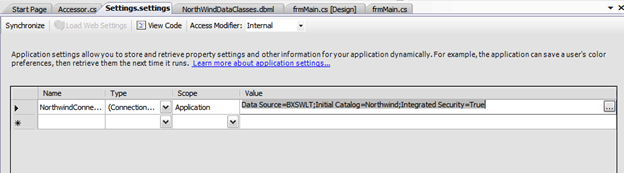
Figure 3:  Settings and the Connection String
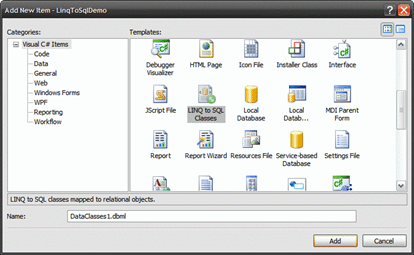
Figure 4:  Adding LINQ to SQL Classes to a Project

When starting from scratch, in order to add LINQ to SQL to a project, open the "Add New Item" dialog and select the LINQ to SQL Classes item (Figure 4); name the data classes and then select the "Add" button to add the item to the project.  Once set, set the connection string for the data classes, then open the server explorer to drag tables and stored procedures onto the designer (dragging the tables into the left hand side of the workspace and stored procedures into the right hand side of the workspace (Figure 5)).  Once that is done, build the project to generate the LINQ to SQL code.
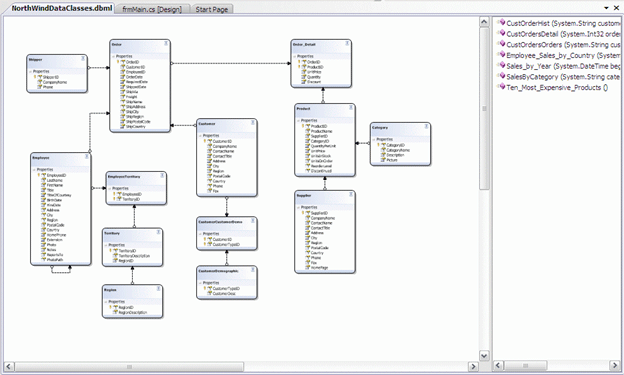
Figure 5: Model of Northwind Data Class (tables on left, stored procedures on right)

This project is intended for Visual Studio 2008 with the .NET framework version 3.5.

DalTest Project Code:  Repository.cs

The Repository class contains all of the code used to communicate with the database through the LINQ to SQL model.  This class was written to be non-specific to any particular table contained in the database; rather the class methods will determine the database table type on the fly and will then perform a select, update, insert, or delete to that table type.

The class begins with the imports:

using System;

using System.Collections;

using System.Collections.Specialized;

using System.Collections.Generic;

using System.Collections.ObjectModel;

using System.Linq;

using System.Data.Linq;

using System.Data.Linq.Mapping;

using System.Text;

using System.ComponentModel;  

The next section contains the namespace and class declarations. 

namespace DalTest

{


    /// <summary>

    /// Generic Interface to Database

    /// using LINQ to SQL

    /// </summary>

          public class Repository

          {

The first method contained in the repository class is used to select a value by its primary key.  The method will accept any table type and primary key value and return the object with a matching primary key value.  The code is annotated to describe the content of the method.

                   /// <summary>

                   /// Select by Primary Key Value

                   /// </summary>

                   /// <typeparam name="T"></typeparam>

                   /// <param name="id">The PK value to search for</param>

                   /// <returns>Single matching PK to id</returns>

                   public static T SelectByPK<T>(String id) where T : class

                   {

                             try

                             {

                                      using (NWindDataContext context = new

                        NWindDataContext())

                                      {

                              // get the table by the type passed in

                                                var table = context.GetTable<T>();


                              // get the metamodel mappings (database to

                              // domain objects)

                                                MetaModel modelMap = table.Context.Mapping;


                              // get the data members for this type

                              ReadOnlyCollection<MetaDataMember> dataMembers

                              = modelMap.GetMetaType(typeof(T)).DataMembers;


                              // find the primary key field name

                              // by checking for IsPrimaryKey

                              string pk = 

                              (dataMembers.Single<MetaDataMember>(m =>

                              m.IsPrimaryKey)).Name;


                              // return a single object where the id argument

                              // matches the primary key field value

                                                return table.SingleOrDefault<T>(delegate(T t)

                                                {

                                                          String memberId =

                                    t.GetType().GetProperty(pk).GetValue(t,

                                    null).ToString();

                                                          return memberId.ToString() ==

                                    id.ToString();

                                                });

                                      }

                             }

                             catch (Exception)

                             {

                                      throw;

                             }

                   }

The next method contained in the repository class is used to return an entire table as a typed list based upon the table type.  It is pretty straight forward and just uses the GetTable method of context to recover the content.

        /// <summary>

        /// Select All by Type

        /// </summary>

        /// <typeparam name="T"></typeparam>

        /// <returns>Matching table as typed list</returns>

        public static IList<T> SelectAll<T>() where T : class

        {

            try

            {

                using (NWindDataContext context = new NWindDataContext())

                {

                    // get the table matching the type

                    // and return all of it as typed list

                    var table = context.GetTable<T>().ToList<T>();

                    return table;

                }

            }

            catch (Exception)

            {

                throw;

            }

        }

The next method up is used to discover the primary key type for any given table.  This method finds the table's primary key, determines the type, and returns that type to the caller.

                   /// <summary>

                   /// Return the primary key type for a table (by table type)

                   /// </summary>

                   /// <typeparam name="T"></typeparam>

                   /// <returns></returns>

                   public static Type GetPrimaryKeyType<T>() where T : class

                   {

                             try

                             {

                                      using (NWindDataContext context = new

                        NWindDataContext())

                                      {

                              // get the table by the type passed in

                                                var table = context.GetTable<T>();


                              // get the metamodel mappings (database to

                              // domain objects)

                                                MetaModel modelMapping = table.Context.Mapping;


                              // get the data members for this type                   

                              ReadOnlyCollection<MetaDataMember> dataMembers

                              = modelMapping.GetMetaType(typeof(T))

                              .DataMembers;


                              // find the primary key and return its type

                              return (dataMembers.Single<MetaDataMember>(m =>

                              m.IsPrimaryKey)).Type;

                                      }

                             }

                             catch (Exception)

                             {

                                      throw;

                             }

                   }

The next bit of code is used to find the name of the primary key for any given table.  The thought was that one could use this along with the previous method to discover the name and type for any given table's primary key.

                   /// <summary>

                   /// Return the primary key name for a table (by table type)

                   /// </summary>

                   /// <typeparam name="T"></typeparam>

                   /// <returns></returns>

                   public static string GetPrimaryKeyName<T>() where T : class

                   {

                             try

                             {

                                      using (NWindDataContext context = new

                        NWindDataContext())

                                      {

                              // get the table by the type passed in

                                                var table = context.GetTable<T>();


                              // get the metamodel mappings (database to

                              // domain objects)

                                                MetaModel modelMapping = table.Context.Mapping;


                              // get the data members for this type

                               ReadOnlyCollection<MetaDataMember> dataMembers

                               = modelMapping.GetMetaType(typeof(T))

                               .DataMembers;


                               // find the primary key field and return its

                               // name

                               return (dataMembers.Single<MetaDataMember>(m

                               => m.IsPrimaryKey)).Name;

                                      }

                             }

                             catch (Exception)

                             {

                                      throw;

                             }

                   }

The following insert method is used to insert a new object into any given table.  The method determines the table type and then inserts the argument's object to that table.

                   /// <summary>

                   /// Insert an Object into a Table

                   /// </summary>

                   /// <typeparam name="T"></typeparam>

                   /// <param name="item"></param>

                   public static void Insert<T>(T item) where T : class

                   {

                             try

                             {

                // get the approapriate table by type and then

                // insert the passed in object and submit

                // that change to the data context

                                      using (NWindDataContext context = new

                        NWindDataContext())

                                      {

                              // get the table by the type passed in

                                                var table = context.GetTable<T>();


                              // pass in the object with insert on submit

                              // and then submit changes

                                                table.InsertOnSubmit(item);

                              context.SubmitChanges();

                                      }

                             }

                             catch (Exception)

                             {

                                      throw;

                             }

                   }

The update method is used to update an existing record; it was written to work with disconnected data.  In order to use disconnected data, it is necessary to create a new instance of the object type passed into this method and to then copy all of the properties from the original object into the new object.  Working with the copy allows the consumer to submit code that might otherwise be rejected if the original object were in fact tied to an existing data context.
 

                   /// <summary>

                   /// Update an Existing Object

                   /// </summary>

                   /// <typeparam name="T"></typeparam>

                   /// <param name="item">The object to update</param>

                   public static void Update<T>(T item) where T : class

                   {

                             try

                             {

                        // create a new instance of the object

                                      Object newObj = Activator.CreateInstance(typeof(T),    

                        new object[0]);


                                      PropertyDescriptorCollection originalProps =

                        TypeDescriptor.GetProperties(item);


                        // set the new object to match the passed in object

                                      foreach (PropertyDescriptor currentProp in

                        originalProps)

                                      {

                                                if (currentProp.Attributes[typeof(

                              System.Data.Linq.Mapping.ColumnAttribute)] !=

                              null)

                                                {

                                                          object val = currentProp.GetValue(item);

                                                          currentProp.SetValue(newObj, val);

                                                }

                                      }


                        // attach the new object to a new data context and

                        // call submit changes on the context

                                      using (NWindDataContext context = new

                        NWindDataContext())

                                      {

                                                var table = context.GetTable<T>();

                                                table.Attach((T)newObj, true);

                                                context.SubmitChanges();

                                      }

                             }

                             catch (Exception)

                             {

                                      throw;

                             }

                   }

The remove method will delete an existing record from the database.

                   /// <summary>

                   /// Remove an object

                   /// </summary>

                   /// <typeparam name="T"></typeparam>

                   /// <param name="item"></param>

                   public static void Remove<T>(T item) where T : class

                   {

                             try

                             {

                        // create a new instance of an object with the

                        // type matching the passed object's type

                                      Type tType = item.GetType();

                                      Object newObj = Activator.CreateInstance(tType, new 

                        object[0]);


                        // get the properties for the passed in object

                                      PropertyDescriptorCollection originalProps =

                        TypeDescriptor.GetProperties(item);


                        // copy over the content of the passed in data

                        // to the new object of the same type –

            // this gives us an object

                        // that is not tied to any existing data context

                                      foreach (PropertyDescriptor currentProp in

                        originalProps)

                                      {

                                                if (currentProp.Attributes[typeof(

                              System.Data.Linq.Mapping.ColumnAttribute)] !=

                              null)

                                                {

                                                          object val = currentProp.GetValue(item);

                                                          currentProp.SetValue(newObj, val);

                                                }

                                      }


                        // to work with disconnected data, attach the new                 

                        // object to the table, call delete

                        // on submit, and then submit changes

                                      using (NWindDataContext context = new

                        NWindDataContext())

                                      {

                                                var table = context.GetTable<T>();

                              table.Attach((T)newObj, true);

                                                table.DeleteOnSubmit((T)newObj);

                                                context.SubmitChanges();

                                      }

                             }

                             catch (Exception)

                             {

                                      throw;

                             }

                   }

Code:  Main Application Form (Form1.cs)

This is the main form of the test application; it is used to provide a test harness for testing each of the functions defined in the repository class and the application provides an example as to how one might build a simple application providing CRUD functionality using the repository class.  Looking at the menu visible in the following figure, note that the menu options include Insert, Select, Update, and Delete options.  
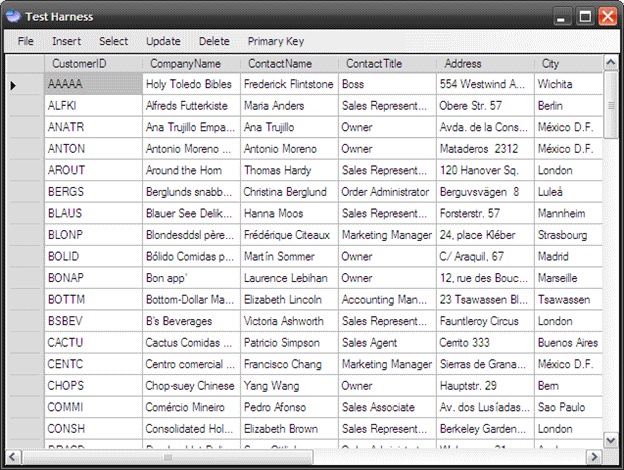
Figure 6:  Main Form

The class begins with the normal and default imports:

using System;

using System.Collections.Generic;

using System.ComponentModel;

using System.Data;

using System.Drawing;

using System.Linq;

using System.Data.Linq;

using System.Text;

using System.Windows.Forms;

using DalTest;

The next section contains the namespace and class declarations. 

namespace TestApp

{


          /// <summary>

          /// Usage Examples

          /// </summary>

          public partial class Form1 : Form

          {

The next block of code in the class contains the constructor.  The constructor calls a function entitled, "UpdateDataGrid" which loads a table into the form's data grid.

                   public Form1()

                   {

                             InitializeComponent();


                             // display the customers in the datagrid

                             UpdateDataGrid();

                   }

The first method defined in the class is the click event handler for the Insert -> Customer menu item.  This method creates a new customer with attached entities and inserts that customer into the Northwind database.  As the customer record is inserted into the database, so are the related entity sets (Order and Order Details); the insert is accomplished using the repository class Insert method.

                   /// <summary>

                   /// Insert a new record

                   /// </summary>

                   /// <param name="sender"></param>

                   /// <param name="e"></param>

                   private void customerToolStripMenuItem_Click(object sender,

EventArgs e)

                   {

                             try

                             {

                                      Customer c = new Customer();

                                      c.CustomerID = "AAAAA";

                                      c.Address = "554 Westwind Avenue";

                                      c.City = "Wichita";

                                      c.CompanyName = "Holy Toledo Bibles";

                                      c.ContactName = "Frederick Flintstone";

                                      c.ContactTitle = "Boss";

                                      c.Country = "USA";

                                      c.Fax = "316-335-5933";

                                      c.Phone = "316-225-4934";

                                      c.PostalCode = "67214";

                                      c.Region = "EA";


                             Order_Detail od = new Order_Detail();

od.Discount = .25f;

                             od.ProductID = 1;

                             od.Quantity = 25;

                             od.UnitPrice = 25.00M;


                             Order o = new Order();

                             o.Order_Details.Add(od);

                             o.Freight = 25.50M;

                             o.EmployeeID = 1;

                             o.CustomerID = "AAAAA";


                             c.Orders.Add(o);


                                      Repository.Insert<Customer>(c);


                                      UpdateDataGrid();

                             }

                             catch (Exception ex)

                             {

                                      MessageBox.Show(ex.Message);

                             }

                   }

The next click event handler deletes an existing record.  To delete an existing record the click event handler calls the repository class Select by PK method to select the record to be deleted and then the selected record is actually removed by passing that record to the repository class Remove method.

                   /// <summary>

                   /// Delete an existing record

                   /// </summary>

                   /// <param name="sender"></param>

                   /// <param name="e"></param>

                   private void customerToolStripMenuItem2_Click(object sender,

EventArgs e)

                   {

                             try

                             {

                             Customer doa = Repository

.SelectByPK<Customer>("AAAAA");

                                      Repository.Remove<Customer>(doa);


                                      UpdateDataGrid();

                             }

                             catch (Exception ex)

                             {

                                      MessageBox.Show(ex.Message);

                             }

                   }

The next click event handler is used to select a record by its primary key value.  The selected record's information is then displayed to the user within a message box.

                   /// <summary>

                   /// Select a Record Where the PK is a String

                   /// </summary>

                   /// <param name="sender"></param>

                   /// <param name="e"></param>

                   private void customerToolStripMenuItem3_Click(object sender,

EventArgs e)

                   {

                             try

                             {

                                      Customer c =

Repository.SelectByPK<Customer>("AAAAA");


                                      StringBuilder sb = new StringBuilder();

                                      sb.Append("Customer ID: " + c.CustomerID +

Environment.NewLine);

                                      sb.Append("Contact Name: " + c.ContactName +

Environment.NewLine);

                                      sb.Append("Company Name: " + c.CompanyName +

Environment.NewLine);

                                      sb.Append("Contact Title: " + c.ContactTitle +

Environment.NewLine);

                                      sb.Append("City: " + c.City + Environment.NewLine);

                                      sb.Append("Country: " + c.Country +

Environment.NewLine);

                                      sb.Append("Phone: " + c.Phone + Environment.NewLine);


                                      MessageBox.Show(sb.ToString(), "Customer AAAAA");

                             }

                             catch (Exception ex)

                             {

                                      MessageBox.Show(ex.Message);

                             }

                   }

The next method is another example of using the Select by PK method to return and display information from the Shipper's table.   As in the previous example, the information returned is displayed to the user in a message box.

                   /// <summary>

                   /// Select a Record where the PK is an Integer

                   /// </summary>

                   /// <param name="sender"></param>

                   /// <param name="e"></param>

                   private void shipperByIntPKToolStripMenuItem_Click(object sender,

EventArgs e)

                   {

                             try

                             {

                                      Shipper s = Repository.SelectByPK<Shipper>("1");

                                      StringBuilder sb = new StringBuilder();

                                      sb.Append("Company Name:  " + s.CompanyName +

Environment.NewLine);


                                      sb.Append("Contact Phone: " + s.Phone +

Environment.NewLine);


                                      MessageBox.Show(sb.ToString(), "Shipper #1");

                             }

                             catch (Exception ex)

                             {

                                      MessageBox.Show(ex.Message);

                             }

                   }

The next click event handler is used to update an existing record.  The method selects a record by its primary key value, modifies the content of that selected record, and then passes the updated record to the repository class Update method.  Once the record has been updated, the data grid view is updated to show the changes.

                   /// <summary>

                   /// Update an Existing Record

                   /// </summary>

                   /// <param name="sender"></param>

                   /// <param name="e"></param>

                   private void customerToolStripMenuItem1_Click(object sender,

EventArgs e)

                   {

                             try

                             {

                                      var q = Repository.SelectByPK<Customer>("AAAAA");


                                      q.City = "Calgary";

                                      q.Country = "Canada";

                                      q.Address = "100 Longhorn Drive";

                                      q.CompanyName = "Holy Moses Bibles";

                                      q.Region = "EE";

                                      q.ContactTitle = "Gopher";

                                      q.ContactName = "Moxie Peroxide";


                                      Repository.Update<Customer>(q);


                                      UpdateDataGrid();

                             }

                             catch (Exception ex)

                             {

                                      MessageBox.Show(ex.Message);

                             }

                   }

The next click event handler is used to obtain the name of the primary key using the repository class Get Primary Key Name method.   The handler will display the primary key for the customer table within a message box.

                   /// <summary>

                   /// Show the PK name for any given table

                   /// </summary>

                   /// <param name="sender"></param>

                   /// <param name="e"></param>

                   private void nameToolStripMenuItem_Click(object sender,

EventArgs e)

                   {

                             string pk = Repository.GetPrimaryKeyName<Customer>();

                             MessageBox.Show(pk.ToString());

                   }

Similar to the previous example, this next handler is used to call the repository class Get Primary Key Type method.  This example will display the type of the primary key for the Customer table.  If one needed to find out the primary key name and type for any given table, this and the previous method would provide both.

                   /// <summary>

                   /// Show the system type for the primary key on any given table

                   /// </summary>

                   /// <param name="sender"></param>

                   /// <param name="e"></param>

                   private void typeToolStripMenuItem_Click(object sender,

EventArgs e)

                   {

                             Type pkType = Repository.GetPrimaryKeyType<Customer>();

                             MessageBox.Show(pkType.ToString());

                   }

The next method is used refresh the contents of the data grid view control.  To update the grid content, the method merely assigns the data grid view control's data source property to the results of the repository class Select All method.  As the type is specified, this example will return and display all of the records contained in the customer table.

                   /// <summary>

                   /// Bind the DataGrid to the Customer Table

                   /// </summary>

                   public void UpdateDataGrid()

                   {

                   dataGridView1.DataSource =

                  Repository.SelectAll<Customer>();

                   }

The last menu click event handler is used to exit the application.

                   /// <summary>

                   /// Quit

                   /// </summary>

                   /// <param name="sender"></param>

                   /// <param name="e"></param>

                   private void quitToolStripMenuItem_Click(object sender,

EventArgs e)

                   {

                             Application.Exit();

                   }

Summary

The article demonstrates an approach to creating a generic data access layer on top of a LINQ to SQL implementation.  The example demonstrates how such a layer can shield application developers from writing any custom LINQ to SQL code within the application itself while retaining the ability to perform standard CRUD operations.  Aside from the standard CRUD operations demonstrated through the repository class, addition methods may be defined and included in the repository class to perform more complex operations against the database.


Login to add your contents and source code to this article
 About the author
 
Scott Lysle
Freelance software developer residing in Alabama. Bachelors, Masters Degrees from Wichita State University. I spent the first half of my career working on aircraft controls and displays and in that time I worked on the cockpits for the OH-58 AHIP, the AH-1W, the V-22, the F-22, the C-130J, the C-5 AMP, AWACS, JPATS, and a few others. Since 1997 I have been largely involved with Windows and web development, GIS application development, consumer electronics development (embedded linux/java), but still sometimes work on aircraft and military projects, the most recent of which was the presidential transport helicopter. I tend to work primarily with C/C++, Java, VB, and C#.
Looking for C# Consulting?
C# Consulting is founded in 2002 by the founders of C# Corner. Unlike a traditional consulting company, our consultants are well-known experts in .NET and many of them are MVPs, authors, and trainers. We specialize in Microsoft .NET development and utilize Agile Development and Extreme Programming practices to provide fast pace quick turnaround results. Our software development model is a mix of Agile Development, traditional SDLC, and Waterfall models.
Click here to learn more about C# Consulting.
 
Introducing MaxV - one click. infinite control. Hyper-V Hosting from MaximumASP.
Finally – a virtual platform that delivers next-generation Windows Server 2008 Hyper-V virtualization technology from a managed hosting partner you can truly depend on. Visit www.maximumasp.com/max for a FREE 30 day trial. Hurry offer ends soon. Climb aboard the MaxV platform and take advantage of High Availability, Intelligent Monitoring, Recurrent Backups, and Scalability – with no hassle or hidden fees. As a managed hosting partner focused solely on Microsoft technologies since 2000, MaximumASP is uniquely qualified to provide the superior support that our business is built on. Unparalleled expertise with Microsoft technologies lead to working directly with Microsoft as first to offer IIS 7 and SQL 2008 betas in a hosted environment; partnering in the Go Live Program for Hyper-V; and product co-launches built on WS 2008 with Hyper-V technology.
Dynamic PDF
ceTE software specializes in components for dynamic PDF generation and manipulation. The DynamicPDF™ product line allows you to dynamically generate PDF documents, merge PDF documents and new content to existing PDF documents from within your applications.
Go.NET
Build custom interactive diagrams, network, workflow editors, flowcharts, or software design tools. Includes many predefined kinds of nodes, links, and basic shapes. Supports layers, scrolling, zooming, selection, drag-and-drop, clipboard, in-place editing, tooltips, grids, printing, overview window, palette. 100% implemented in C# as a managed .NET Control. Document/View/Tool architecture with many properties&events. Optional automatic layout.
Dundas Software
Dundas Chart for .NET is the most advanced .NET charting package available today.  With an extremely complete feature set, elegant architecture and easy implementation, Dundas Chart can quickly add advanced Charting functionality to enhance and transform ASP.NET and Windows Forms applications.  Whether you are implementing charting into internal projects, or building applications for clients, Dundas Chart offers advanced technology and advanced results to get the most out of data.
Clickatell's SMS Gateway
Clickatell's Developer Solutions allow you to SMS enable any website or application via a range of API's. Learn More about our API connections.
Free access to .NET Memory Management video
Everything you need to know about Garbage Collection, Temporary Objects, Fragmentation, Finalization and common causes of memory leaks in .NET. Watch the video here.
Nevron Chart for .NET 2010.1 Now Available
The leading .NET charting control now features PDF, Flash and Silverlight export, visualization of large datasets and more. Deliver true charting functionality to your BI, Scorecard, Presentation or Scientific apps. Download evaluation now.
 
   Print Read/Post comments Post a comment  Similar Articles  
   Email to a friend  Bookmark  Author's other articles  
Download Files:
DalTest.zip
 
 Post a Feedback, Comment, or Question about this article
Subject:  
Comment:  
Powerful ASP.NET Hosting w/ NO Setup Fees. Click Here!
Become a Sponsor
 Comments
Great article by J On September 8, 2008
Scott Thank you very much for this article - I am just now learning LINQ and this is the kind of nice, OO-based use I have been looking for. Many of the quick-and-dirty articles I have seen use way too much database-related code on the client side. This generic DAL approach is more like what I've grown accustomed to in the ADO.Net world. Thanks again for the contribution. Well written and easy to understand your examples.
Reply | Email | Delete | Modify | 
Generic Data Access for ADO .NET Entity Framework by Sanjay On October 3, 2008

Hi Scott,

This generic approach for writing DAL component is really helpful & it's cut down lots of Data Layer Code. Actually I am trying to implement the same concepts using ADO .NET Entity Framework (released in VS 2008 SP1) rather that LINQ but I stuck in some places that I couldn't find out the Entity class at run time since There is no GetTable() method in EntityContext class. So could you pl help me out in implementing the above soln using ADO .NET Entity Framework

Sanjay

Reply | Email | Delete | Modify | 
Error when i delete an item by samar On November 21, 2008
First,I wanna thank you about this wonderful example...I have downloaded this sample to test it.I've tried to insert an item with a customer id "ZOLA " and it worked perfectly but after that,when I try to delete it ,I was prompted by the following error: "object reference not set to an instance of an object" Do you have any ideas to resolve this issue? Thank you again.
Reply | Email | Delete | Modify | 
Re: Error when i delete an item by Scott On November 26, 2008

Are you getting a copy of customer first; if you are using something like this, set a breakpoint on the first line in the try-catch and check the value of matched customer to make sure that it contains a customer:

NorthWindDataClassesDataContext dc = new NorthWindDataClassesDataContext();


var matchedCustomer = (from c in dc.GetTable<Customer>()

                       where c.CustomerID == customerID

                       select c).SingleOrDefault();

try

{

dc.Customers.DeleteOnSubmit(matchedCustomer);

dc.SubmitChanges();

}

catch (Exception ex)

{

throw ex;

}


Reply | Email | Delete | Modify | 
Saved me a lot of time, thanks a lot! NT by v On March 4, 2009
Exactly what I needed, thank you very much.
Reply | Email | Delete | Modify | 
Re: Saved me a lot of time, thanks a lot! NT by Scott On March 12, 2009
I am glad it helped.
Reply | Email | Delete | Modify | 
Generic selection by Yasine On April 3, 2009
Hello, first of all thanks for your interesting article about generic DLINQ. but i didn't found in your article Generic Queries i mean a method that has some parameters concerning the Colomn in the target table and its value and it return a set of objects within generic class of course, i think that 's very interresting and useful for code reuseability. Best Regards Thanks
Reply | Email | Delete | Modify | 
Re: Generic selection by Scott On April 4, 2009
Thanks
Reply | Email | Delete | Modify | 
Some Issues... by v On April 5, 2009
Hello again, Scott. I am using your code with DevExpress XtraGrid, and the SelectAll method wouldn't work with it. I am getting "...datacontext accessed after dispose...". (This probably happens when XtraGrid tries to get data for child views) The only way I found to fix this is by putting: context.DeferredLoadingEnabled = false; immediately after using(..context..) inside SelectAll. That way, all the related data is loaded during SelectAll, which I don’t like, but at least XtraGrid isn’t trying to reuse the disposed DataContext. Second issue was with Remove method - "An entity can only be attached as modified if it declares a version number or does not have an update check policy". I fixed this by replacing: table.Attach((T)newObj, true); with table.Attach((T)newObj, item); I haven't tested this much, but it seems to work for now. Thanks again for the code, it is still very helpful :)
Reply | Email | Delete | Modify | 
Re: Some Issues... by Scott On April 15, 2009

When working with disconnect data, I typically set the update check policy to 'never' (it defaults to always) in the dbml.  Alternatively you can go the timestamp route but I never thought that was terribly attractive when working with an existing database. 

Reply | Email | Delete | Modify | 
Re: Re: Some Issues... by v On April 22, 2009
Hi,

Info about your reply ended up in spam folder, hence the late reply. I played a lot more with what I began to describe in previous comment and... decided to give up on Linq to Sql completely. I moved to ActiveRecord (NHibernate) and feel a lot more comfortable with it than I do with Linq. If I tell you I made this decision 2 weeks before project deadline, you'll know how frustrated I am with linq. Thank you again for your help.
Reply | Email | Delete | Modify | 

 Hosted by MaximumASP  |  Found a broken link?  |  Contact Us  |  Terms & conditions  |  Privacy Policy  |  Site Map  |  Suggest an Idea  |  Media Kit
Current Version: 5.2009.6.2
 © 1999 - 2010  Mindcracker LLC. All Rights Reserved