Introduction:
In this Article we'll see how to use the Calendar Control in a Webform.
The Calendar Control shows the Current Month Dates and the Dates also of the previous and Next Month.
So,
- Firstly, we'll show only the Dates of Current Month and
- Secondly based on the EventDate we'll highlight the Date in the Calendar Control
- On selecting the Date we'll show more information of about the Event on that Day.
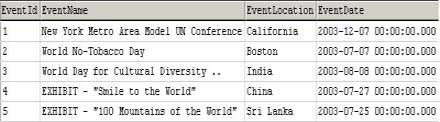
The Database Data is stored as:
To begin with User Interface Drag and drop
- Calendar Control
- DataGrid
<
asp:Calendar id="Calendar1" OnDayRender="CalendarDRender" runat="server" BorderWidth="1px" NextPrevFormat="FullMonth" BackColor="White" Width="350px"ForeColor="Black" Height="190px" Font-Size="9pt" Font-Names="Verdana" BorderColor="White">
<TodayDayStyle BackColor="#CCCCCC"></TodayDayStyle>
<NextPrevStyle Font-Size="8pt" Font-Bold="True" ForeColor="#333333" VerticalAlign="Bottom"></NextPrevStyle>
<DayHeaderStyle Font-Size="8pt" Font-Bold="True"></DayHeaderStyle>
<SelectedDayStyle ForeColor="White" BackColor="#333399"></SelectedDayStyle>
<TitleStyle Font-Size="12pt" Font-Bold="True" BorderWidth="4px" ForeColor="#333399" BorderColor="Black" BackColor="White"></TitleStyle>
<OtherMonthDayStyle ForeColor="#999999"></OtherMonthDayStyle>
</asp:Calendar>
<asp:DataGrid id="DataGrid1" style="Z-INDEX: 102; LEFT: 23px; POSITION: absolute; TOP: 271px" runat="server" Font-Size="XX-Small" Font-Names="Verdana" Visible="False"></asp:DataGrid>
Now our code :
In Page_Load
In Calendar1_PreRender
- Check for it the Date is from OtherMonth
- Navigate through the DataSet if Date is not from other month
- Check if the date is null
- If not Set the BackColor for the Date based on the value in the DataBase
In Calendar1_SelectionChanged
- Based on the date Selected in the Calendar Control display the Data in the Datagrid.
C#
SqlConnection mycn;
SqlDataAdapter myda;
DataSet ds = new DataSet ();
DataSet dsSelDate;
String strConn;
private void Page_Load(object sender, System.EventArgs e)
{
// Put user code to initialize the page here
strConn="Data Source=localhost;uid=sa;pwd=;Initial Catalog=northwind";
mycn = new SqlConnection(strConn);
myda = new SqlDataAdapter ("Select * FROM EventsTable", mycn);
myda.Fill (ds,"Table");
}
protected void CalendarDRender(object sender ,System.Web.UI.WebControls.DayRenderEventArgs e )
{
// If the month is CurrentMonth
if (! e.Day.IsOtherMonth )
{
foreach (DataRow dr in ds.Tables[0].Rows)
{
if ((dr["EventDate"].ToString() != DBNull.Value.ToString()))
{
DateTime dtEvent= (DateTime)dr["EventDate"];
if (dtEvent.Equals(e.Day.Date))
{
e.Cell.BackColor = Color.PaleVioletRed;
}
}
}
}
//If the month is not CurrentMonth then hide the Dates
else
{
e.Cell.Text = "";
}
}
private void Calendar1_SelectionChanged(object sender, System.EventArgs e)
{
myda = new SqlDataAdapter("Select * from EventsTable where EventDate='" + Calendar1.SelectedDate.ToString() + "'", mycn);
dsSelDate = new DataSet();
myda.Fill(dsSelDate, "AllTables");
if (dsSelDate.Tables[0].Rows.Count == 0 )
{
DataGrid1.Visible = false;
}
else
{
DataGrid1.Visible = true;
DataGrid1.DataSource = dsSelDate;
DataGrid1.DataBind ();
}
}
VB.NET
Dim myconnection As SqlConnection
Dim myda As SqlDataAdapter
Dim ds As New DataSet
Dim dsSelDate As DataSet
Private Sub Page_Load(ByVal sender As System.Object, ByVal e As System.EventArgs) Handles MyBase.Load
myconnection = New SqlConnection("Server=localhost;uid=sa;password=;database=northwind;")
myda = New SqlDataAdapter("Select * from EventsTable", myconnection)
myda.Fill(ds, "AllTables")
End Sub
Protected Sub CalendarDRender(ByVal sender As Object, ByVal e As System.Web.UI.WebControls.DayRenderEventArgs)
'If the month is CurrentMonth
If Not e.Day.IsOtherMonth Then
Dim dr As DataRow
For Each dr In ds.Tables(0).Rows
'If EventDate is not Null
If Not dr("EventDate") Is DBNull.Value Then
Dim dtEvent As DateTime = dr("EventDate").ToString
'If EventDate =CalendarDate
If dtEvent.Equals(e.Day.Date) Then
e.Cell.BackColor = Color.PaleVioletRed
End If
End If
Next
'If the month is not CurrentMonth then hide the Dates
Else
e.Cell.Text = ""
End If
End Sub
Private Sub Calendar1_SelectionChanged(ByVal sender As System.Object, ByVal e As System.EventArgs) _Handles Calendar1.SelectionChanged
myda = New SqlDataAdapter("Select * from EventsTable where EventDate='" & _Calendar1.SelectedDate.ToString & "'", myconnection)
dsSelDate = New DataSet
myda.Fill(dsSelDate, "AllTables")
If dsSelDate.Tables(0).Rows.Count = 0 Then
DataGrid1.Visible = False
Else
DataGrid1.Visible = True
DataGrid1.DataSource = dsSelDate
DataGrid1.DataBind()
End If
End Sub
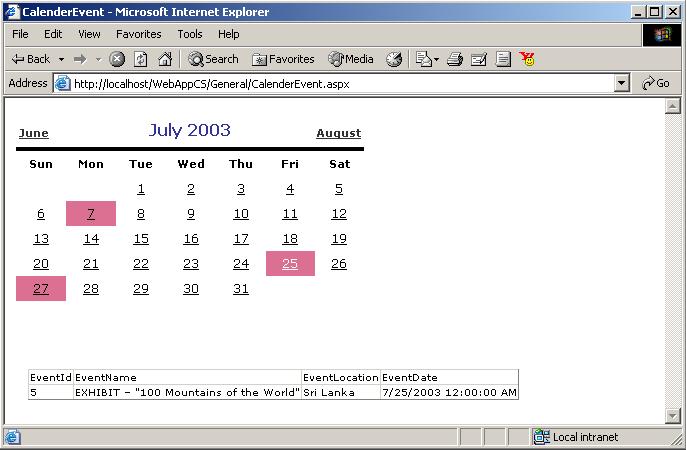
The Output of this code: