Here is a C# Application I developed for calculating the monthly payment for a loan, given the loan amount, interest rate and the loan period.
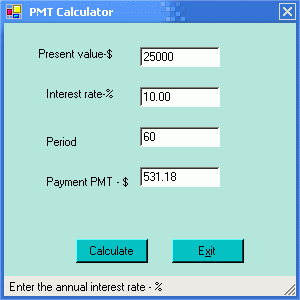
I have used four labels, four text boxes and two buttons on a simple Windows form as shown below. In addition, a status bar along the bottom of the form is used to describe what is expected in each text field. The Calculate button computes the monthly payment and displays the result in the fourth text box. Clicking the Exit button quits the application. Tool tips are also displayed when the mouse hovers over each text box. A timer control is used to display the right message in the status bar.
The text boxes prevent non-numeric entry, by filtering out characters other than 0-9 and the decimal point. The user is not allowed to edit the fourth text box (Payment). See the event handler under the textBox1.KeyPress for details of how non-numeric keys are handled. The KeyPressEventHandler takes care of this. The calculation for monthly payments is performed by the static method calcPayment that is invoked by the click event of the Calculate button. The use of both the status bar and tooltips may appear to be an overkill. However, I left them both in simply to illustrate the use of the tooltips and the status bar messages for helping the user with data input. Comments are welcome.
//C# Code for the Financial Loan Calculation Application
using System;
using System.Drawing;
using System.Windows.Forms;
namespace PMTApp
{
public class Form1 : System.Windows.Forms.Form
{
private System.Windows.Forms.Label label1;
private System.Windows.Forms.TextBox textBox1;
private System.Windows.Forms.Label label2;
private System.Windows.Forms.TextBox textBox2;
private System.Windows.Forms.Label label3;
private System.Windows.Forms.TextBox textBox3;
private System.Windows.Forms.Label label4;
private System.Windows.Forms.TextBox textBox4;
private System.Windows.Forms.Button button1;
private System.Windows.Forms.Button button2;
private System.Windows.Forms.StatusBar statusBar1;
private System.Windows.Forms.Timer timer1;
private System.Windows.Forms.ToolTip toolTip1;
private System.ComponentModel.IContainer components;
public Form1()
{
InitializeComponent();
}
protected override void Dispose( bool disposing )
{
if( disposing )
{
if (components != null)
{
components.Dispose();
}
}
base.Dispose( disposing );
}
private void InitializeComponent()
{
this.components = new System.ComponentModel.Container();
this.textBox4 = new System.Windows.Forms.TextBox();
this.label1 = new System.Windows.Forms.Label();
this.label2 = new System.Windows.Forms.Label();
this.label3 = new System.Windows.Forms.Label();
this.button1 = new System.Windows.Forms.Button();
this.button2 = new System.Windows.Forms.Button();
this.textBox2 = new System.Windows.Forms.TextBox();
this.textBox3 = new System.Windows.Forms.TextBox();
this.label4 = new System.Windows.Forms.Label();
this.textBox1 = new System.Windows.Forms.TextBox();
this.statusBar1 = new System.Windows.Forms.StatusBar();
this.timer1 = new System.Windows.Forms.Timer(this.components);
this.toolTip1 = new System.Windows.Forms.ToolTip(this.components);
this.SuspendLayout();
//
// textBox4
//
this.textBox4.BackColor = System.Drawing.Color.Gainsboro;
this.textBox4.Location = new System.Drawing.Point(136, 144);
this.textBox4.Name = "textBox4";
this.textBox4.ReadOnly = true;
this.textBox4.Size = new System.Drawing.Size(80, 20);
this.textBox4.TabIndex = 4;
this.textBox4.TabStop = false;
this.textBox4.Text = "";
this.toolTip1.SetToolTip(this.textBox4, "Monthly payment");
//
// label1
//
this.label1.Location = new System.Drawing.Point(32, 24);
this.label1.Name = "label1";
this.label1.Size = new System.Drawing.Size(96, 24);
this.label1.TabIndex = 0;
this.label1.Text = "Present value-$";
//
// label2
//
this.label2.Location = new System.Drawing.Point(40, 64);
this.label2.Name = "label2";
this.label2.Size = new System.Drawing.Size(96, 24);
this.label2.TabIndex = 0;
this.label2.Text = "Interest rate-%";
//
// label3
//
this.label3.Location = new System.Drawing.Point(40, 112);
this.label3.Name = "label3";
this.label3.Size = new System.Drawing.Size(96, 24);
this.label3.TabIndex = 0;
this.label3.Text = "Period";
//
// button1
//
this.button1.BackColor = Color.FromArgb(((System.Byte)(0)),
((System.Byte)(192)), ((System.Byte)(192)));
this.button1.Location = new System.Drawing.Point(72, 216);
this.button1.Name = "button1";
this.button1.Size = new System.Drawing.Size(72, 24);
this.button1.TabIndex = 5;
this.button1.Text = "Calculate";
this.toolTip1.SetToolTip(this.button1, "Calculate the monthly payment");
this.button1.Click += new System.EventHandler(this.button1_Click);
//
// button2
//
this.button2.BackColor = Color.FromArgb(((System.Byte)(0)), ((System.Byte)(192)), ((System.Byte)(192)));
this.button2.Location = new System.Drawing.Point(168, 216);
this.button2.Name = "button2";
this.button2.Size = new System.Drawing.Size(72, 24);
this.button2.TabIndex = 6;
this.button2.Text = "E&xit";
this.button2.Click += new System.EventHandler(this.button2_Click);
//
// textBox2
//
this.textBox2.BackColor = System.Drawing.Color.White;
this.textBox2.Location = new System.Drawing.Point(136, 64);
this.textBox2.Name = "textBox2";
this.textBox2.Size = new System.Drawing.Size(80, 20);
this.textBox2.TabIndex = 2;
this.textBox2.Text = "10.00";
this.toolTip1.SetToolTip(this.textBox2, "Interest rate per year");
this.textBox2.KeyPress += new System.Windows.Forms.KeyPressEventHandler(this.txt_KeyPress);
this.textBox2.TextChanged += new System.EventHandler(this.txt_TextChanged);
//
// textBox3
//
this.textBox3.BackColor = System.Drawing.Color.White;
this.textBox3.Location = new System.Drawing.Point(136, 104);
this.textBox3.Name = "textBox3";
this.textBox3.Size = new System.Drawing.Size(80, 20);
this.textBox3.TabIndex = 3;
this.textBox3.Text = "60";
this.toolTip1.SetToolTip(this.textBox3, "Period in months");
this.textBox3.KeyPress += new System.Windows.Forms.KeyPressEventHandler(this.txt_KeyPress);
this.textBox3.TextChanged += new System.EventHandler(this.txt_TextChanged);
//
// label4
//
this.label4.Location = new System.Drawing.Point(40, 152);
this.label4.Name = "label4";
this.label4.Size = new System.Drawing.Size(96, 24);
this.label4.TabIndex = 0;
this.label4.Text = "Payment PMT - $";
//
// textBox1
//
this.textBox1.BackColor = System.Drawing.Color.White;
this.textBox1.Location = new System.Drawing.Point(136, 24);
this.textBox1.Name = "textBox1";
this.textBox1.Size = new System.Drawing.Size(80, 20);
this.textBox1.TabIndex = 1;
this.textBox1.Text = "25000";
this.toolTip1.SetToolTip(this.textBox1, "Loan amount");
this.textBox1.KeyPress += new System.Windows.Forms.KeyPressEventHandler(this.txt_KeyPress);
this.textBox1.TextChanged += new System.EventHandler(this.txt_TextChanged);
//
// statusBar1
//
this.statusBar1.Location = new System.Drawing.Point(0, 253);
this.statusBar1.Name = "statusBar1";
this.statusBar1.Size = new System.Drawing.Size(292, 20);
this.statusBar1.TabIndex = 8;
this.statusBar1.Text = "Ready";
//
// timer1
//
this.timer1.Enabled = true;
this.timer1.Tick += new System.EventHandler(this.timer1_Tick);
//
// Form1
//
this.AutoScaleBaseSize = new System.Drawing.Size(5, 13);
this.BackColor = System.Drawing.Color.FromArgb(((System.Byte)(176)), ((System.Byte)(231)), ((System.Byte)(216)));
this.ClientSize = new System.Drawing.Size(292, 273);
this.Controls.Add(textBox1);
this.Controls.Add(textBox2);
this.Controls.Add(textBox3);
this.Controls.Add(textBox4);
this.Controls.Add(label1 );
this.Controls.Add(label2);
this.Controls.Add(label3);
this.Controls.Add(label4);
this.Controls.Add(button1);
this.Controls.Add(button2);
this.Controls.Add(statusBar1);
this.MaximizeBox = false;
this.MinimizeBox = false;
this.Name = "Form1";
this.StartPosition = System.Windows.Forms.FormStartPosition.CenterScreen;
this.Text = "PMT Calculator";
this.ResumeLayout(false);
}
// The main entry point for the application.
static void Main()
{
Application.Run(new Form1());
}
private void button2_Click(object sender, System.EventArgs e)
{
Application.Exit();
}
static bool CheckForNumeric(char ch)
{
//allow only numbers and a decimal point and backspace key
int keyInt = (int)ch ;
if (( keyInt < 48 || keyInt > 57) && keyInt != 46 && keyInt != 8)
return false;
else
return true ;
}
private void txt_TextChanged(object sender, EventArgs e)
{
textBox4.Text ="" ;
}
private void txt_KeyPress(object sender, KeyPressEventArgs e)
{
//allow only numbers and a decimal point and backspace key
if (CheckForNumeric(e.KeyChar) == false)
e.Handled = true ;
}
private void button1_Click(object sender, System.EventArgs e)
{
double pv = Convert.ToDouble(textBox1.Text);
double intrate = Convert.ToDouble(textBox2.Text) ;
double period = Convert.ToDouble(textBox3.Text) ;
double pmt = calcPayment( pv,period, intrate) ;
string str = pmt.ToString( "f2" );
textBox4.Text = str ;
}
public static double calcPayment(double presentValue, double financingPeriod,double interestRatePerYear)
{
double a, b, x;
double monthlyPayment;
a = (1 + interestRatePerYear / 1200);
b = financingPeriod;
x = Math.Pow(a, b);
x = 1 / x;
x = 1 - x;
monthlyPayment = (presentValue ) * (interestRatePerYear / 1200) / x;
return(monthlyPayment);
}
private void timer1_Tick(object sender, System.EventArgs e)
{
if(textBox1.Focused == true)
{
statusBar1.Text =" Enter the annual interest rate - %" ;
else if(textBox3.Focused == true)
statusBar1.Text =" Enter the number of months financed" ;
else if(textBox4.Focused == true)
statusBar1.Text =" Calculated Monthly Loan Payment -$" ;
else
statusBar1.Text =" " ;
}
}
}
//End of namespace PMTApp