Description
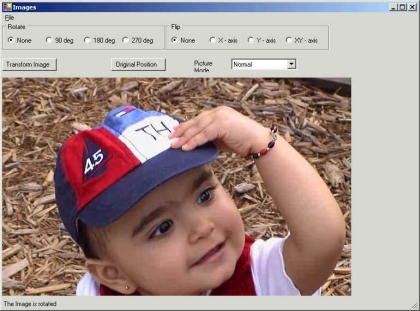
This program allows you to open and view image files including JPEG, GIF, WMF and other images. Program also provides options to stretch and shrink them, rotate at different angles through all axes and save them in different formats.
This example uses menus, radio buttons, group boxes, open and save dialog boxes, picture box and status bar controls.
Compiling Code with Visual Studio .NET
To compile and execute code with VS.NET, create a Windows application and copy and paste this code in Form1.cs class. Replace all code from Form1.cs accept namespace includes.
using System;
using System.Windows.Forms;
using System.Drawing;
using System.Text;
using System.Drawing.Imaging;
using System.IO;
public class win:Form
{
Stream stm;
Panel pnlTop;
StatusBar stbBtm;
Label lblPicMode;
MainMenu mnuMain;PictureBox pbxImg;
bool blnPicLoaded;
ComboBox cmbPicMode;
OpenFileDialog dlgFile;
Button btnTransform,btnOrg;
GroupBox gpbRotate,gpbFlip;
MenuItem mnuFile, mnuOpen, mnuSave, mnuExit, mnuSep;
String strImgName,strRot,strFlip,strRotFlip,strStatus;
RadioButton bnRotNone,rbnRotX,rbnRotY,rbnRotXY,rbnFlipNone,rbnFlip90,rbnFlip180,rbnFlip270,rbnTemp;
public win()
{
try
{
this.Text="Images";
pnlTop=new Panel();
this.Size=new Size(770,570);
this.Controls.Add(pnlTop);
this.Menu=fncBuildMenus();
setControls();
strRot=rbnRotNone.Name;
strFlip=rbnFlipNone.Name;
pnlTop.Location = new Point(0,0);
pnlTop.Size = new Size(750,500);
}
catch (Exception e)
{
Console.WriteLine("error .... " + e.StackTrace);
}
}
private static void Main()
{
Application.Run(new win());
}
private MainMenu fncBuildMenus()
{
/* build the menu's */
mnuMain=new MainMenu();
mnuFile=new MenuItem();
mnuOpen=new MenuItem();
mnuSave=new MenuItem();
mnuExit=new MenuItem();
mnuSep=new MenuItem();
mnuFile.Text="&File";
mnuOpen.Text="&Open";
mnuSave.Text="Save &As";
mnuExit.Text="E&xit";
mnuSep.Text="-";
mnuFile.MenuItems.Add(mnuOpen);
mnuFile.MenuItems.Add(mnuSave);
mnuFile.MenuItems.Add(mnuSep);
mnuFile.MenuItems.Add(mnuExit);
mnuMain.MenuItems.Add(mnuFile);
mnuOpen.Click+=new EventHandler(fncOpen);
mnuSave.Click+=new EventHandler(fncSave);
mnuExit.Click+=new EventHandler(fncExit);
return mnuMain;
}
private void setControls()
{
/* initialize and add the controls to the form. */
gpbRotate = new GroupBox();
gpbRotate.Location = new Point(0,0);
gpbRotate.Size=new Size(300,50);
gpbRotate.Text = "Rotate";
gpbFlip = new GroupBox();
gpbFlip.Location = new Point(300,0);
gpbFlip.Size = new Size(300,50);
gpbFlip.Text = "Flip";
rbnRotNone = fncRadBtns("None","None",50,10,20);
rbnFlipNone = fncRadBtns("None","None",50,10,20);
rbnRotX = fncRadBtns("90 deg","90",70,80,20);
rbnRotY = fncRadBtns("180 deg","180",70,150,20);
rbnRotXY = fncRadBtns("270 deg","270",70,220,20);
rbnFlip90 = fncRadBtns("X - axis","X",70,80,20);
rbnFlip180 = fncRadBtns("Y - axis","Y",70,150,20);
rbnFlip270 = fncRadBtns("XY - axis","XY",70,220,20);rbnRotNone.Checked = true;
rbnFlipNone.Checked = true;
btnTransform = new Button();
btnTransform.Text="Transform Image";
btnTransform.Location = new Point(0,65);
btnTransform.Width=100;
btnOrg = new Button();
btnOrg.Text = "Original Position";
btnOrg.Location = new Point(200,65);
btnOrg.Width = 100;
lblPicMode = new Label();
lblPicMode.Text = "Picture Mode ";
lblPicMode.Location = new Point(350,67);
lblPicMode.Width = 70;
cmbPicMode = new ComboBox();
cmbPicMode.Location = new Point(420,65);
cmbPicMode.DropDownStyle=ComboBoxStyle.DropDownList;
cmbPicMode.Items.Add("Auto Size");
cmbPicMode.Items.Add("Center Image");
cmbPicMode.Items.Add("Normal");
cmbPicMode.Items.Add("Stretch Image");
cmbPicMode.SelectedIndex=2;
pbxImg = new PictureBox();
pbxImg.Location = new Point(0,100);
pbxImg.Size = new Size(750,400);
stbBtm=new StatusBar();
stbBtm.Text = "Normal mode - Image is clipped if it is bigger than the Picture Box.";
stbBtm.BackColor=Color.Green;
stbBtm.Size=new Size(750,20);
stbBtm.Location = new Point(0,550);
gpbRotate.Controls.Add(rbnRotNone);
gpbRotate.Controls.Add(rbnRotX);
gpbRotate.Controls.Add(rbnRotY);
gpbRotate.Controls.Add(rbnRotXY);
gpbFlip.Controls.Add(rbnFlipNone);
gpbFlip.Controls.Add(rbnFlip90);
gpbFlip.Controls.Add(rbnFlip180);
gpbFlip.Controls.Add(rbnFlip270);
pnlTop.Controls.Add(gpbRotate);
pnlTop.Controls.Add(gpbFlip);
pnlTop.Controls.Add(btnTransform);
pnlTop.Controls.Add(btnOrg);
pnlTop.Controls.Add(lblPicMode);
pnlTop.Controls.Add(cmbPicMode);
Controls.Add(stbBtm);
pnlTop.Controls.Add(pbxImg);
blnPicLoaded=false;
strStatus=stbBtm.Text;
}
private RadioButton fncRadBtns(string strText,string strName,int intWidth,int intX,int intY)
{
RadioButton rbnTmp;
rbnTmp = new RadioButton();
rbnTmp.Text = strText;
rbnTmp.Name = strName;
rbnTmp.Width = intWidth;
rbnTmp.Location = new Point(intX,intY);
return rbnTmp;
}
private void fncOpen(object obj,EventArgs ea)
{
/* load the picture. */
try
{
dlgFile=new OpenFileDialog();
dlgFile.Filter="JPEG Images (*.jpg,*.jpeg)|*.jpg;*.jpeg|Gif Images (*.gif)*.gif|Bitmaps (*.bmp)|*.bmp";
dlgFile.FilterIndex=1;
if (dlgFile.ShowDialog()== DialogResult.OK)
{
if((stm=dlgFile.OpenFile())!=null)
{
strImgName=dlgFile.FileName;
stm.Close();
pbxImg.Image=Image.FromFile(strImgName);
blnPicLoaded=true;
}
}
if (blnPicLoaded)
{
/* if the picture is loaded then enable the events. */
rbnRotNone.Click+=new EventHandler(fncRot);
rbnRotX.Click+=new EventHandler(fncRot);
rbnRotY.Click+=new EventHandler(fncRot);
rbnRotXY.Click+=new EventHandler(fncRot);
rbnFlipNone.Click+=new EventHandler(fncFlip);
rbnFlip90.Click+=new EventHandler(fncFlip);
rbnFlip180.Click+=new EventHandler(fncFlip);
rbnFlip270.Click+=new EventHandler(fncFlip);
btnTransform.Click+= new EventHandler(fncTransform);
btnOrg.Click += new EventHandler(fncTransform);
cmbPicMode.SelectionChangeCommitted += new EventHandler(fncPicMode);
}
}
catch(Exception e)
{
Console.WriteLine(e.StackTrace);
}
}
private void fncSave(object sender, EventArgs ea)
{
try
{
/* save the image in the required format. */
SaveFileDialog dlgSave = new SaveFileDialog();
dlgSave.Filter="JPEG Images (*.jpg,*.jpeg)|*.jpg;*.jpeg|Gif Images (*.gif)*.gif|Bitmaps (*.bmp)|*.bmp";
if (dlgSave.ShowDialog()==DialogResult.OK)
{
strImgName=dlgSave.FileName;
if (strImgName.EndsWith("jpg"))
pbxImg.Image.Save(strImgName,ImageFormat.Jpeg);
if (strImgName.EndsWith("gif"))
pbxImg.Image.Save(strImgName,ImageFormat.Gif);
if (strImgName.EndsWith("bmp"))
pbxImg.Image.Save(strImgName,ImageFormat.Bmp);
}
}
catch(Exception e)
{
Console.WriteLine(e.StackTrace);
}
}
private void fncRot(object obj,EventArgs ea)
{
rbnTemp = (RadioButton)obj;
strRot=rbnTemp.Name;
setStatus();
}
private void fncFlip(object obj,EventArgs ea)
{
rbnTemp = (RadioButton)obj;
strFlip = rbnTemp.Name;
setStatus();
}
private void fncTransform(object obj,EventArgs ea)
{
Button btnTemp=(Button)obj;
if (btnTemp.Text=="Transform Image")
{
strRotFlip=strRot + strFlip;
switch (strRotFlip)
{
case "180None" :
pbxImg.Image.RotateFlip(RotateFlipType.Rotate180FlipNone);
break;
case "180X" :
pbxImg.Image.RotateFlip(RotateFlipType.Rotate180FlipX);
break;
case "180Y" :
pbxImg.Image.RotateFlip(RotateFlipType.Rotate180FlipY);
break;
case "180XY" :
pbxImg.Image.RotateFlip(RotateFlipType.Rotate180FlipXY);
break;
case "270None" :
pbxImg.Image.RotateFlip(RotateFlipType.Rotate270FlipNone);
break;
case "270X" :
pbxImg.Image.RotateFlip(RotateFlipType.Rotate270FlipX);
break;
case "270Y" :
pbxImg.Image.RotateFlip(RotateFlipType.Rotate270FlipY);
break;
case "270XY" :
pbxImg.Image.RotateFlip(RotateFlipType.Rotate270FlipXY);
break;
case "90None" :
pbxImg.Image.RotateFlip(RotateFlipType.Rotate90FlipNone);
break;
case "90X" :
pbxImg.Image.RotateFlip(RotateFlipType.Rotate90FlipX);
break;
case "90Y" :
pbxImg.Image.RotateFlip(RotateFlipType.Rotate90FlipY);
break;
case "90XY" :
pbxImg.Image.RotateFlip(RotateFlipType.Rotate90FlipXY);
break;
case "NoneNone" :
pbxImg.Image.RotateFlip(RotateFlipType.RotateNoneFlipNone);
break;
case "NoneX" :
pbxImg.Image.RotateFlip(RotateFlipType.RotateNoneFlipX);
break;
case "NoneY" :
pbxImg.Image.RotateFlip(RotateFlipType.RotateNoneFlipY);
break;
case "NoneXY" :
pbxImg.Image.RotateFlip(RotateFlipType.RotateNoneFlipXY);
break;
default :
pbxImg.Image.RotateFlip(RotateFlipType.RotateNoneFlipNone);
break;
}
}
else if (btnTemp.Text=="Original Position")
{
pbxImg.Image=Image.FromFile(strImgName);
pbxImg.Refresh();
}
pbxImg.Refresh();
}
private void fncPicMode(object obj,EventArgs ea)
{
ComboBox objTemp = (ComboBox)obj;
switch (objTemp.SelectedIndex)
{
case 0 :
pbxImg.SizeMode=PictureBoxSizeMode.AutoSize;
strStatus="AutoSize mode - The PictureBox is sized equal to the size of the image
that it contains.";
break;
case 1 :
pbxImg.SizeMode=PictureBoxSizeMode.CenterImage;
strStatus="CenterImage mode - Image is placed in the center of the Picture Box.";
strStatus=strStatus + "If the image is big then outside edges of Image is clipped.";
break;
case 2 :
pbxImg.SizeMode=PictureBoxSizeMode.Normal;
strStatus="Normal mode - Image is clipped if it is bigger than the Picture Box.";
break;
case 3 :
pbxImg.SizeMode=PictureBoxSizeMode.StretchImage;
strStatus="Stretch mode - Image is stretched or shrunk to fit the Picture Box.";
break;
}
pbxImg.Refresh();
stbBtm.Text=strStatus;
}
private void setStatus()
{
strStatus="The Image is rotated ";
if (strRot != null && strRot != "None")
strStatus=strStatus + strRot + " degrees";
if (strFlip !=null && strFlip != "None")
strStatus=strStatus +" around " + strFlip + " axis.";
stbBtm.Text=strStatus;
}
private void fncExit(object obj,EventArgs ea)
{
Application.Exit();
}
}