Blue Theme Orange Theme Green Theme Red Theme
 
Home | Forums | Videos | Photos | Downloads | Blogs | E-Books | Interviews | Jobs | Beginners | Training
 | Consulting  
Submit an Article Submit a Blog 
 Login Close
User Id:
Password:
 
Forgot Password
Forgot Username
Why Register
 Jump to
Skip Navigation Links
TechnologyExpand Technology
WebsiteExpand Website
World Class ASP.NET Hosting - 3 Month Free Hosting, Click Here!
 Resources  
Close
 Our Network  
Close
Search :       Advanced Search »
Home » Visual Studio .NET » How to use Login Control in Visual Studio 2005

How to use Login Control in Visual Studio 2005

In the recent version of Visual Studio 2005, Microsoft has taken care of a very common functionality of the web applications. In the following article we will see that how to use login control using C#.Net.

Author Rank:
Technologies: .NET 1.0/1.1, ASP.NET 1.0, Controls,Visual C# .NET
Total downloads : 2845
Total page views :  159625
Rating :
 4.67/5
This article has been rated :  9 times
   Print Read/Post comments Post a comment  Rate  
   Email to a friend  Bookmark  Similar Articles  Author's other articles  
Download Files:
WebSite2.zip
 
Become a Sponsor


Related EbooksTop Videos


As a web developer we know that most of the time our application is having a login as well as the forget password kind of requirement.

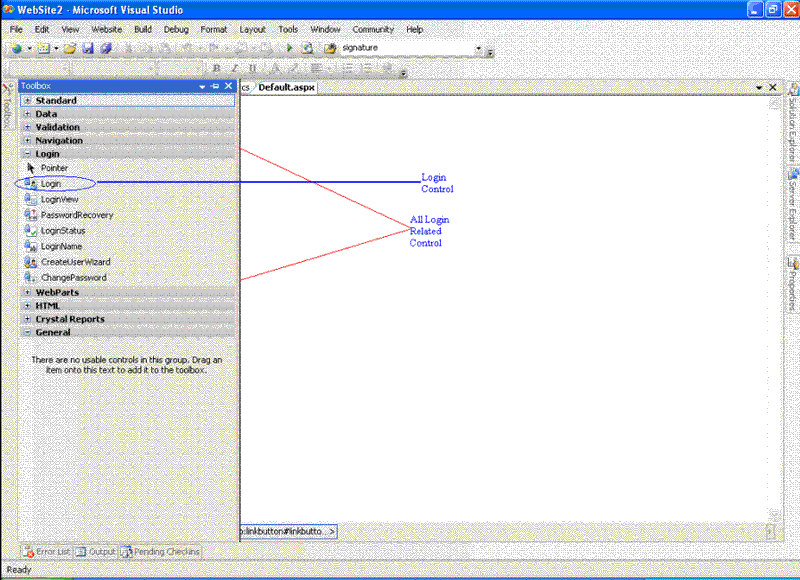
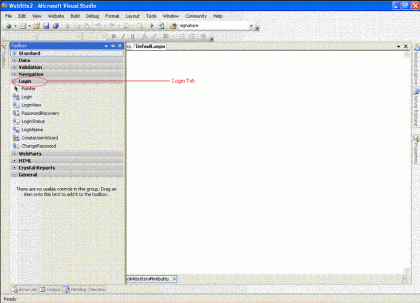
Now, using visual studio 2005 it's very easy to design a login page because the inbuilt login tab has been added into the toolbox of VS 2005 editor, which has different types of control related to login functional.
 L1.gif

Fig 1.1: New tab for login

L2.gif

Fig 1.2: All the controls of Login Tab
 
In the following article we will see that how to use login control using C#.Net. The following code will explain that how to authenticate the user against the database.

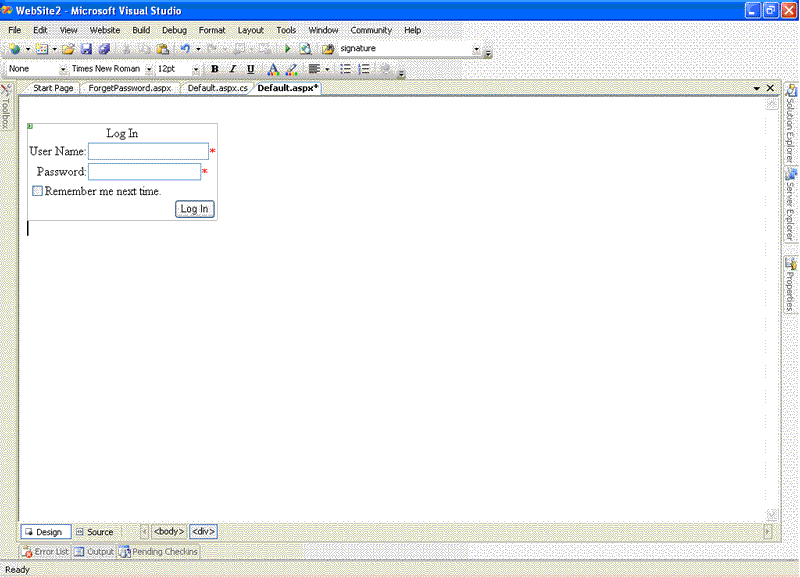
Step 1:- Drag and drop the login control on the page then the control will look like a login page at design time.
L3.gif

Fig 1.3: Login control at design time

Step 2: Once the UI is ready then will go ahead with the coding part to see how to write the code for this control.

To write the code for this code we need to handle the Login1_Authenticate event.

So, double click on the Login control it will generate the following code:-

protected void Login1_Authenticate(object sender, AuthenticateEventArgs e)
{
          bool Authenticated = false;
          Authenticated = SiteLevelCustomAuthenticationMethod(Login1.UserName, Login1.Password);
          e.Authenticated = Authenticated;
          if (Authenticated == true)
          {
                    Response.Redirect("Home.aspx");
          }
}
private bool SiteLevelCustomAuthenticationMethod(string UserName, string Password)
{
          bool boolReturnValue = false;
          // Insert code that implements a site-specific custom 
          // authentication method here.
          // This example implementation always returns false.
          string strConnection  = "server=dtpxp-skumari;database=master;uid=sa;pwd=;";
          SqlConnection Connection = new SqlConnection(strConnection);
          String strSQL = "Select * From Employee";
          SqlCommand command =new SqlCommand(strSQL, Connection);
          SqlDataReader Dr;
          Connection.Open();
          Dr=command.ExecuteReader();
          while (Dr.Read())
          { 
                    if ((UserName == Dr["name"].ToString()) & (Password == Dr["Password"].ToString()))
                    {
                             boolReturnValue = true;
                   
                    Dr.Close();
                    return boolReturnValue;
          }
}

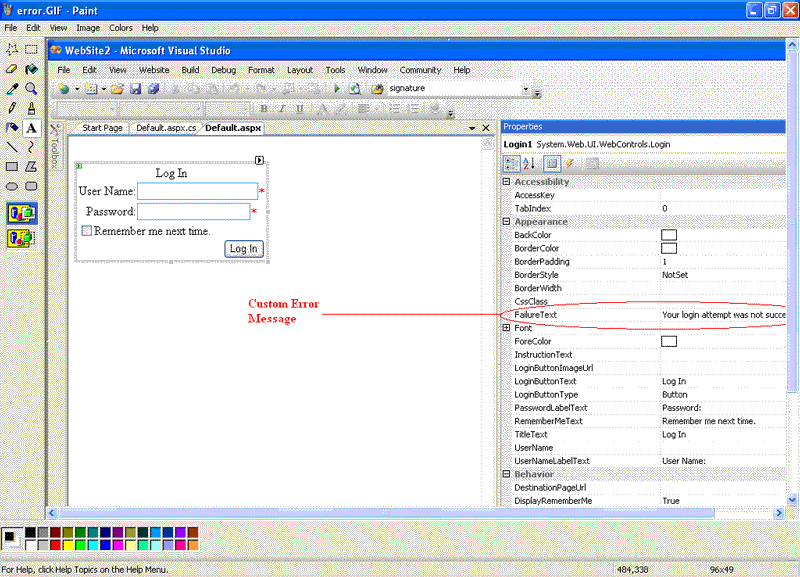
Login control is having a property called FailureText where you can write your own message.
L4.gif

Fig 1.4: Custom Error Message
 
Once you have passed the correct login credential then you will be redirected to the home page using the DestinationPageUrl property. DestinationPageUrl is the property of login control which is used to redirect the user to desination page after a successful login. If incorrect login credential it will show the message like "Your login attempt was not successful. Please try again". This is a custom message specified by the user through the FailureText property.
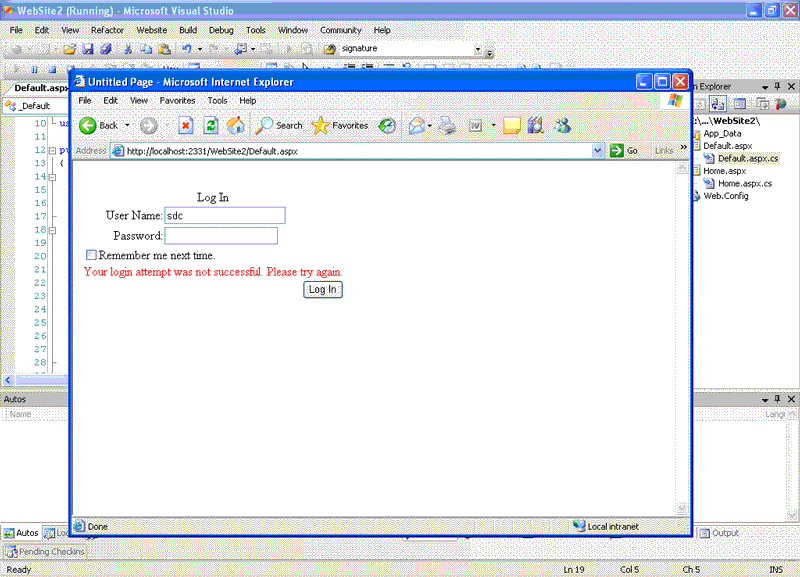
 L5.gif

Fig 1.5: Logion Error

About inbuilt validation:- Login control is having a inbuilt validation feature which is available as a property for programmer. When you will drag-drop the control at design time you will see that the username and password textboxes are marked with star (*) sign which means these fields are required fields.
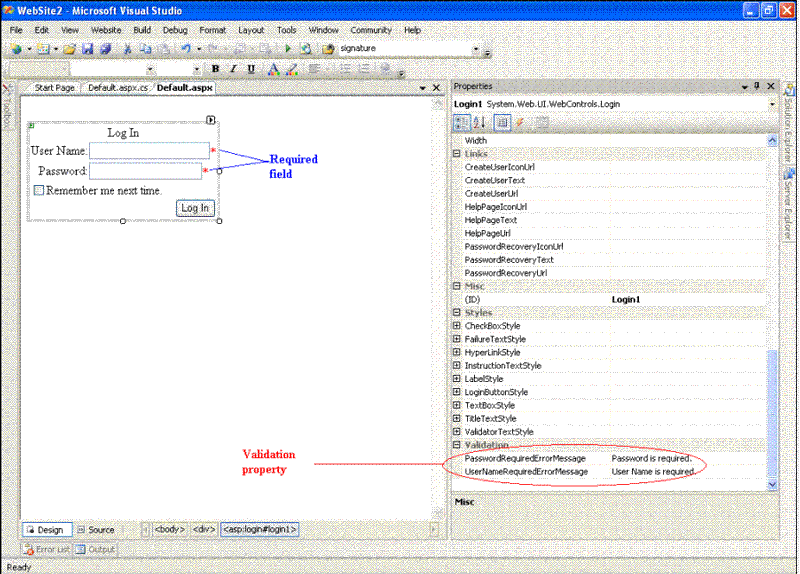
 L6.gif

Fig 1.6: Validation

Login control is having some more features like specifying .CSS property, Button style etc.
 
Steps to use the sample:-

  1. Download a zip file --> Unzip the file
  2. Go to Start-->RUN-->inetmgr.exe
  3. Go to Websites-->Default web sites
  4. Right click on it-->NewVirtual Directory-->it will start the wizard
  5. Map the unzip folder with the virtual directory-->finish
  6. Run the application/Open the solution file.


Login to add your contents and source code to this article
 [Top] Rate this article
 About the author
 
Sushmita Kumari
Sushmita kumari holds  Computer Science degree.She is Brain Bench and Microsoft certified professional. Presently she is working  as a software engineer. She has good hands on experience with .NET technologies. Other than .NET, she has worked with Microsoft Commerce Server, and Microsoft Content Management server.
Looking for C# Consulting?
C# Consulting is founded in 2002 by the founders of C# Corner. Unlike a traditional consulting company, our consultants are well-known experts in .NET and many of them are MVPs, authors, and trainers. We specialize in Microsoft .NET development and utilize Agile Development and Extreme Programming practices to provide fast pace quick turnaround results. Our software development model is a mix of Agile Development, traditional SDLC, and Waterfall models.
Click here to learn more about C# Consulting.
 
Introducing MaxV - one click. infinite control. Hyper-V Hosting from MaximumASP.
Finally – a virtual platform that delivers next-generation Windows Server 2008 Hyper-V virtualization technology from a managed hosting partner you can truly depend on. Visit www.maximumasp.com/max for a FREE 30 day trial. Hurry offer ends soon. Climb aboard the MaxV platform and take advantage of High Availability, Intelligent Monitoring, Recurrent Backups, and Scalability – with no hassle or hidden fees. As a managed hosting partner focused solely on Microsoft technologies since 2000, MaximumASP is uniquely qualified to provide the superior support that our business is built on. Unparalleled expertise with Microsoft technologies lead to working directly with Microsoft as first to offer IIS 7 and SQL 2008 betas in a hosted environment; partnering in the Go Live Program for Hyper-V; and product co-launches built on WS 2008 with Hyper-V technology.
Dynamic PDF
ceTE software specializes in components for dynamic PDF generation and manipulation. The DynamicPDFâ„¢ product line allows you to dynamically generate PDF documents, merge PDF documents and new content to existing PDF documents from within your applications.
Go.NET
Build custom interactive diagrams, network, workflow editors, flowcharts, or software design tools. Includes many predefined kinds of nodes, links, and basic shapes. Supports layers, scrolling, zooming, selection, drag-and-drop, clipboard, in-place editing, tooltips, grids, printing, overview window, palette. 100% implemented in C# as a managed .NET Control. Document/View/Tool architecture with many properties&events. Optional automatic layout.
Dundas Software
Dundas Chart for .NET is the most advanced .NET charting package available today.  With an extremely complete feature set, elegant architecture and easy implementation, Dundas Chart can quickly add advanced Charting functionality to enhance and transform ASP.NET and Windows Forms applications.  Whether you are implementing charting into internal projects, or building applications for clients, Dundas Chart offers advanced technology and advanced results to get the most out of data.
Clickatell's SMS Gateway
Clickatell's Developer Solutions allow you to SMS enable any website or application via a range of API's. Learn More about our API connections.
Free access to .NET Memory Management video
Everything you need to know about Garbage Collection, Temporary Objects, Fragmentation, Finalization and common causes of memory leaks in .NET. Watch the video here.
Microsoft Visual Studio 2010
Microsoft Visual Studio 2010 offers more to developers than any other Visual Studio release. Work more productively and collaboratively-with greater control over your work at every step. The Beta 2 can give you a head start on achieving efficiency.
 
   Print Read/Post comments Post a comment  Rate  
   Email to a friend  Bookmark  Similar Articles  Author's other articles  
Download Files:
WebSite2.zip
 
 Post a Feedback, Comment, or Question about this article
Subject:  
Comment:  
Become a Sponsor
 Comments
hi. your post is so good. by chunsang On February 16, 2006

I read your How to use Login Control in Visual Studio 2005.

thank you very much.

but your article has bad download file.

there are tow WebSite3.sln, WebSite3.suo files.

no aspx, cs files.

please check the other files.

and I must say Thank you. ^^.

- chun sang -

Reply | Email | Delete | Modify | 
Download file by Douglas On May 24, 2006

I tried to open your example to see the Web.Config because my application don't deny user access to the pages, but the ZIP don't have the files of the project. Can you display the Web.Config?

tanks


Reply | Email | Delete | Modify | 
Re: Download file by Sushmita On June 21, 2006

Long back i have uploaded this file.Now i don't know where is the actual copy in my machine.U just follow the steps and the programe will work if not you ask me i will help u.

Sushmita

Reply | Email | Delete | Modify | 
How to disable Remember Me Check box? by Srinivas On August 13, 2006

Hi

I don't need the Remember Me option. How to disable 'Remember Me Check box'?

Thanks

Reply | Email | Delete | Modify | 
Re: How to disable Remember Me Check box? by Hima Bindu On October 5, 2006

Set DisplayRememberMe property of the Login Control to false.

Then Check box along with text would be invisible

Reply | Email | Delete | Modify | 
any more login code? by Pettrer On October 23, 2006

Hi,

Thank you very much for your neat article on using the login control! I made a VB version of it, here it is (in case someone sees this post and needs it in VB): http://forums.asp.net/thread/1431652.aspx

I'm trying to create more of the login controls programatically, as you have been doing (it's the only way - except for rewriting the membership providers that is - to skip the cluttered default db solution provided by Visual Web Developer and to use the login stuff to one's own, existing, db). However, I've run into problems creating the CreateUserWizard (I haven't tried the other controls yet). Do you by any chance have some code for this (or the other controls)?

I think posting code for these controls would benefit a LOT of coders, by judging of the vast amount of questions on this subject on forums.asp.net.

In any case, thanks again for your code + tutorial!

Pettrer, Sweden


Reply | Email | Delete | Modify | 
it is giving error by venkat On October 27, 2006

Hi susmita kumari,

ur article is good,

iam trying to run this application but it is giving error like..

"Not all code paths return a value"

error is rising T,,,

SiteLevelCustomAuthenticatedMethod(string UserName,string Password)

so plz help me..

thanks...


Reply | Email | Delete | Modify | 
thank you, a small typing error by david On November 16, 2006

very nice.

thank you very much.

though you have a small error.

if i run the code the way it is written, i get an error:

"Not All Code Paths Return A Value"  message

that is simply because your :

 return boolReturnValue;

statement is inside the while loop and therefore not all possible values are returned.

simply take this piece of code and place it outside the while loop.


p.s : i am sure that it was a typing error.


thanks again.


Reply | Email | Delete | Modify | 
Re: thank you, a small typing error by pawan On August 13, 2007

hi


use this code , there is minor mistake of not returning false condition ..


so i written in the below code ....


private bool SiteLevelCustomAuthenticationMethod(string UserName, string Password)

{

bool boolReturnValue = false;

string strConnection = "server=(local);database=Northwind;uid=sa;pwd=;";

SqlConnection Connection = new SqlConnection(strConnection);

String strSQL = "Select * From Login1";

SqlCommand command = new SqlCommand(strSQL, Connection);

SqlDataReader Dr;

Connection.Open();

Dr = command.ExecuteReader();

while (Dr.Read())

{

if ((UserName == Dr["username"].ToString()) & (Password == Dr["password"].ToString()))

{

boolReturnValue = true;

}

Dr.Close();

return boolReturnValue;

}

return false;

}

Reply | Email | Delete | Modify | 
Re: thank you, a small typing error by pawan On August 13, 2007

apply this code , it will run successfully


private bool SiteLevelCustomAuthenticationMethod(string UserName, string Password)

{

bool boolReturnValue = false;

string strConnection = "server=(local);database=Northwind;uid=sa;pwd=;";

SqlConnection Connection = new SqlConnection(strConnection);

String strSQL = "Select * From Login1";

SqlCommand command = new SqlCommand(strSQL, Connection);

SqlDataReader Dr;

Connection.Open();

Dr = command.ExecuteReader();

while (Dr.Read())

{

if ((UserName == Dr["username"].ToString()) & (Password == Dr["password"].ToString()))

{

boolReturnValue = true;

}

Dr.Close();

return boolReturnValue;

}

return false;

}

Reply | Email | Delete | Modify | 
how to add our own database in the asp.net configuration provider setting. by rajesh On February 12, 2007
if we set roles an users in the asp.net cofiguration,it creates its own data base an store the user an roles.how to add ourown data base an acess the role an user(in login control)
Reply | Email | Delete | Modify | 
the zip file empty by mmm On February 26, 2007
and the code not working
Reply | Email | Delete | Modify | 
hi by Ashwani On March 1, 2007
How to use properly if we simply drag and drop login control it will not work for that we have to use Asp.net configuration so how do use that process please give the detail my id is ashwani.dwivedi@rediffmail.com
Reply | Email | Delete | Modify | 
Login problem by Hawkmoth On March 20, 2007
I am using the Login contol and everything is working great when I use it localy. When I access the same sight from another pc the login control seems to accept my login but I am unable to get to a authenticated members only page and the loginstatus control suggests I'm not loged in. I guess i have a problem with the way my site is set up or the web.config file is maybe wrong. can anyone help?
Reply | Email | Delete | Modify | 
Good Article by Chetan On April 9, 2007
Hi Sushmita, This is very good article. I am was very confused regarding how to user login control. This article helped me a lot to start with. Thanks and regards, Chetan Ranpariya.
Reply | Email | Delete | Modify | 
Error by asp On April 11, 2007

hi there is error when i run the code

while (Dr.Read())

Invalid attempt to Read when reader is closed.


please help

Reply | Email | Delete | Modify | 
Error by asp On April 11, 2007
Reply | Email | Delete | Modify | 
i am getting an error on this code by Sridhar On April 14, 2007
this is the error - Login.SiteLevelCustomAuthenticationMethod(string , string)':not all code paths return a value
Reply | Email | Delete | Modify | 
i am getting an error on this code by Sridhar On April 14, 2007
this is the error - Login.SiteLevelCustomAuthenticationMethod(string , string)':not all code paths return a value
Reply | Email | Delete | Modify | 
Re: i am getting an error on this code by Jayyde On April 18, 2007

Change the code to:

private bool SiteLevelCustomAuthenticationMethod(string UserName, string Password)

{

bool boolReturnValue = false;

// Insert code that implements a site-specific custom

// authentication method here.

// This example implementation always returns false.

string strConnection = "server=dtpxp-skumari;database=master;uid=sa;pwd=;";

SqlConnection Connection = new SqlConnection(strConnection);

String strSQL = "Select * From Employee";

SqlCommand command = new SqlCommand(strSQL, Connection);

SqlDataReader Dr;

Connection.Open();

Dr = command.ExecuteReader();

while (Dr.Read())

{

if ((UserName == Dr["name"].ToString()) & (Password == Dr["Password"].ToString()))

{

boolReturnValue = true;

break;

}

}

Dr.Close();

return boolReturnValue;

}


and you'll be fine on the code paths returning a value and the datareader being closed.

Reply | Email | Delete | Modify | 
Re: Re: i am getting an error on this code by doland On August 11, 2009
hi.. i use this code for our website project... and it work but i have some problems in getting or viewing the userID or the Name of the person who login in the other webform...

applying this code, is there also a c# code that you can view the userID or your name of the user in the texbox in the other webform?...
Reply | Email | Delete | Modify | 
Re: i am getting an error on this code by mayooran On April 19, 2007
Hi Sridhar, just try with this code. because previous coding have some error and change this sqlconnection string and table name for ur requirements. Here modification on that method for ur error private bool SiteLevelCustomAuthenticationMethod(string UserName, string Password) { bool boolReturnValue = false; // Insert code that implements a site-specific custom // authentication method here. // This example implementation always returns false. string strConnection = "Data Source=MAYOORAN;Initial Catalog=HRMS;Integrated Security=True"; SqlConnection Connection = new SqlConnection(strConnection); String strSQL = "Select * From Login_Table_Ex"; SqlCommand command = new SqlCommand(strSQL, Connection); SqlDataReader Dr; Connection.Open(); Dr = command.ExecuteReader(); while (Dr.Read()) { if ((UserName == Dr["Name"].ToString()) & (Password == Dr["Password"].ToString())) { boolReturnValue = true; break; } } Dr.Close(); return boolReturnValue; } regards, mayooran.
Reply | Email | Delete | Modify | 
Thanks for your post by Xiaoyan On April 20, 2007
I try to add a query string in the redirect. it works at my local machine, but it did not work after I publish it into our web server. Thanks, June
Reply | Email | Delete | Modify | 
hi sushmtha by nandha On April 25, 2007
i could not open the source code thanks
Reply | Email | Delete | Modify | 
Re: hi sushmtha by anji On October 8, 2007

What is the reason for the following code is not working:

Ur's Code:                                                       My Code:            

if (Authenticated == true)        if (Authenticated == true)          

{                                     {  Response.Write("Success"); }

Response.Redirect("Home.aspx");

}


Reply | Email | Delete | Modify | 
Thanks by dost On May 7, 2007
Thanks darling
Reply | Email | Delete | Modify | 
Disabling Cut/Copy/Paste on Password field by Piyush On May 18, 2007
Hi its very nice article. I want to disable Cut/Copy/Paste into Password field whereas keep enable it into Username field How could i achieve this?
Reply | Email | Delete | Modify | 
Nice...... by rejaneesh On June 11, 2007
This is something realy very nice 2 understand... U had done a great job.. Congrates...
Reply | Email | Delete | Modify | 
Regarding Button in Login Control by DVR On June 15, 2007
Hi Sushmita, We are using ASP.NET Login Control. I want to fire a javascript function on click of button in the Login Control. I am unable to attach OnClick Event to that button which is available in Login Control. If u can please help me it will greateful. Thanks DVR Prasad
Reply | Email | Delete | Modify | 
good job by murugenthiran On June 30, 2007
Hi,It can be easily understandable for those who are new to .net2.0
Reply | Email | Delete | Modify | 
good job by murugenthiran On June 30, 2007
Hi,It can be easily understandable for those who are new to .net2.0
Reply | Email | Delete | Modify | 
here is the right bug free code :) by Martin On July 6, 2007
protected void Login1_Authenticate(object sender, AuthenticateEventArgs e) { bool Authenticated = false; Authenticated = SiteLevelCustomAuthenticationMethod(Login1.UserName, Login1.Password); e.Authenticated = Authenticated; if (Authenticated == true) { Response.Redirect("editing.aspx"); } } private bool SiteLevelCustomAuthenticationMethod(string UserName, string Password) { bool ReturnValue = false; string strConnection = "Data Source=.\\SQLEXPRESS;AttachDbFilename=|DataDirectory|\\Data.mdf;Integrated Security=True;User Instance=True"; SqlConnection Conn = new SqlConnection(strConnection); String strSQL = "Select * from Users"; SqlCommand Comm = new SqlCommand(strSQL, Conn); SqlDataReader DReader; Conn.Open(); DReader = Comm.ExecuteReader(); while (DReader.Read()) { if ((UserName == DReader["Uname"].ToString()) & (Password == DReader["Pword"].ToString())) { ReturnValue = true; } } return ReturnValue; DReader.Close(); }
Reply | Email | Delete | Modify | 
Re: here is the right bug free code :) by Poongundran On August 22, 2007
hi Martin I m new to ASP.NET and i used ur code snippet for Login creation in VS 2005, but still i m getting error,in USER table what r all the fields(columns)should be specified ?I m getting the error as " Unable to open the physical file "C:\Program Files\Microsoft SQL Server\MSSQL.1\MSSQL\Data\poongs.mdf".Also another error "An attempt to attach an auto named database with the same name exists or specified is located on UNC .
Reply | Email | Delete | Modify | 
Thanks Sushmita by arshad On July 12, 2007
i was worried how can i use this control ur article looks can u please send the final code after correction to my email arsmcasa@yahoo and i need the code for sending email in c#.net plz thanks you Arshad
Reply | Email | Delete | Modify | 
hi by sathish On August 27, 2007
i use login control code.. but here is error... help me how to use login controls in asp.net. give step by step procedure... please
Reply | Email | Delete | Modify | 
Re: hi by deepa On August 27, 2007

Hi

I am new to dotnet and i am currently working in a web application. So for that i used login control tool from visual studio 2005. But I would like to make each textbox(username and password) to be null when login fails. But right now when login fails, password field becomes null but not the username. So can you please tell me how to do this? i would really appreciate for any kind of help


deepa


Reply | Email | Delete | Modify | 
getting error on codes by mukesh On September 6, 2007
hi, i have gone through this. but i got an error while trying the codes. its like this.."Error 1 '_Default.SiteLevelCustomAuthenticationMethod(string, string)':