Overview
This article continues the 4-parts series of Multi-threaded Web Applications. In the first part, I have demonstrated how you can use multi-threading with ASP.NET to make a web based search engine more responsive, and to reduce the time required to compose the result. In this article, I will demonstrate how you can apply the same technique to a web based port scanner.
Description
This articles assume some basic understanding of multi-threading in .NET. You can refer back to the first part for more information on it at:
http://www.c-sharpcorner.com/UploadFile/tinlam/MultithreadedWebApplications11172005002508AM/
MultithreadedWebApplications.aspx?ArticleID=fbdb99db-ef57-47b7-bba6-7ab9bd6a1001.
The function of the port scanner we will be seeing shortly is simple. It determines rather a given port on a given IP address is open or closed, by initiating a connection to it. If a connection to the port can be made successfully, then its open. But if the connection to the port is rejected, unreachable, or timed out, then its closed. With some additional logic to parse the IP/host names and the ports, the logic of the port scanner is almost identical to the search engine in Part I. The port scanner will create a thread for each port and IP/host. Then each thread will be started, and connect to their assigned port and IP independently from all the rest. When all the threads are started, then the port scanner will wait for all of them to return.
The port scanner consists of only 2 files. (1) portscanner.aspx, which contains the form for entering the ip/hosts and ports, and a repeater control to display the result. And depending on the state of the page, one of the other will be hidden while the other one is displayed. (2) portscanner.aspx.cs, which is the code-behind file behind portscanner.aspx. It contains the classes and methods that perform the port scanning logic. Both files were developed and tested in the VS.NET (RTM edition), and the final edition of the .NET Framework SDK.
Lets look at the portscanner.aspx first:
<%@ Page Language="C#" AutoEventWireUp="false"
Inherits="MultiThreadedWebApp.PortScanner" Src="portscanner.aspx.cs" %>
<script language="c#" runat="server">
protected void scan(Object sender, EventArgs e) {
if ( Scan( urls.Text ) ) {
info.Text = "Scan result:";
ScanForm.Visible = false;
ResultList.DataSource = ScanResults;
ResultList.DataBind();
}
}
</script>
<html>
<head>
<title>Multi-threaded Port Scanner</title>
<style>.BodyText { font-family: verdana; font-size: 12px; color: 333333; } </style>
</head>
<body>
<asp:label id="info" class="BodyText" text="ip/host to scan, one url per entry."
runat="server" /><br />
<asp:Repeater id="ResultList" runat="server">
<HeaderTemplate>
<table class="BodyText" border="0" cellpadding="3" cellspacing="3">
<tr>
<td><b>Status</b></td>
<td><b>IP</b></td>
<td><b>Port</b></td>
<td><b>Responsed / Timed out</b></td>
</tr>
</HeaderTemplate>
<ItemTemplate>
<tr>
<td><%# DataBinder.Eval(Container.DataItem, "status") %></td>
<td><%# DataBinder.Eval(Container.DataItem, "ip") %></td>
<td><%# DataBinder.Eval(Container.DataItem, "port") %></td>
<td><%# DataBinder.Eval(Container.DataItem, "timeSpent") %></td>
</tr>
</ItemTemplate>
<FooterTemplate>
</table>
</FooterTemplate>
</asp:Repeater>
<form id="ScanForm" runat = "server" >
<table class="BodyText">
<tr>
<td valign="top">urls:</td>
<td><asp:textbox class="BodyText" text="" id="urls" rows="10" columns="50" textmode="MultiLine" runat="server" /></td>
</tr>
<tr><td align="right" colspan="2">
<asp:button class="BodyText" text="scan!" type="submit" onclick="scan" runat="server" ID="Button1"/>
</td></tr>
</table>
</form>
</body>
</html>
Its pretty simple. The C# code block contains the method Scan(), which will be called when the user click the scan button. Theres a repeater control, which we will be binding scan result data to. Then theres a form, which we will be using to enter ip/host and port information. It will be hidden by the Scan() method, when we display the scan result via the repeater control.
Now comes some fancy stuff:
using
System;
using System.Collections;
using System.Threading;
using System.Net.Sockets;
namespace MultiThreadedWebApp
{
/// <summary>
/// this class inherits from the Page class.
/// the portscanner.aspx diverts from this class.
/// </summary>
public class PortScanner : System.Web.UI.Page
{
private string _ipPorts;
private ArrayList _ports;
/// <summary>
/// The ArrayList of ScanPort objects.
/// </summary>
public ArrayList ScanResults
{
get { return _ports; }
}
/// <summary>
/// This method is called to parse the string containing the ip and port information.
/// and creates An ArrayList of ScanPort objects.
/// </summary>
/// <param name="ipPorts">the string containing the ip and port information</param>
public void parse(string ipPorts)
{
string lPort = "";
string lIP = "";
int[] lPorts;
string[] lPortRange;
string[] lIPs = ipPorts.Split('\n');
int ipIdx, portRangeIdx, portIdx;
_ports = new ArrayList();
// each ip/host, ex: www.microsoft.com:10-20,21,25,80,105-115
for ( ipIdx = 0; ipIdx < lIPs.Length; ipIdx ++ )
{
string[] ipInfo = lIPs[ipIdx].Split(':');
lIP = ipInfo[0];
lPortRange = ipInfo[1].Split(',');
// each port range, ex: 10-20,21,25,80,105-115
for ( portRangeIdx = 0; portRangeIdx < lPortRange.Length; portRangeIdx ++ )
{
// ex: 10-20
if ( lPortRange[portRangeIdx].IndexOf("-") != -1 )
{
string[] lBounds = lPortRange[portRangeIdx].Split('-');
int lStart = int.Parse( lBounds[0] );
int lEnd = int.Parse( lBounds[1] );
lPorts = new int[ lEnd - lStart + 1] ;
int lIdx = 0;
for ( portIdx = lStart; portIdx <= lEnd; portIdx ++ )
lPorts[lIdx++] = portIdx;
}
else // ex: 80
lPorts = new int[] { int.Parse( lPortRange[portRangeIdx] ) };
// create a ScanPort object for each port,
// then add the object to the _ports ArrayList
for ( int lIdx = 0; lIdx < lPorts.Length; lIdx ++ )
_ports.Add( new ScanPort( lIP, lPorts[lIdx] ) );
}
}
}
/// <summary>
/// This method creates, starts and manages the threads
/// </summary>
/// <param name="pIPs">The string containing the ip and port information passed from the portscanner.aspx</param>
/// <returns></returns>
public bool Scan(string pIPs)
{
try
{
// parse the string to ips and ports
parse(pIPs);
// create the threads
Thread[] lThreads = new Thread[ _ports.Count ];
int lIdx = 0;
// add the ScanPort objects' scan method to the threads, then run them.
for ( lIdx = 0; lIdx < _ports.Count; lIdx ++ )
{
lThreads[lIdx] = new Thread( new ThreadStart( ((ScanPort)_ports[lIdx]).Scan ) );
lThreads[lIdx].Start();
}
// wait for all of them to finish
for ( lIdx = 0; lIdx < lThreads.Length; lIdx ++ )
lThreads[lIdx].Join();
return true;
}
catch
{
return false;
}
}
}
/// <summary>
/// This class does the work of connecting to the port.
/// </summary>
public class ScanPort
{
private string _ip = "";
private int _port = 0;
private TimeSpan _timeSpent;
private string _status = "Not scanned";
public string ip
{
get { return _ip; }
}
public int port
{
get { return _port; }
}
public string status
{
get { return _status; }
}
public TimeSpan timeSpent
{
get { return _timeSpent; }
}
private ScanPort() {}
public ScanPort(string ip, int port)
{
_ip = ip;
_port = port;
}
/// <summary>
/// initiate a connection to the port.
/// </summary>
public void Scan()
{
TcpClient scanningIpPort = new TcpClient();
DateTime lStarted = DateTime.Now;
try
{
scanningIpPort.Connect( _ip, _port );
scanningIpPort.Close();
_status = "Open";
}
catch
{
_status = "Closed";
}
_timeSpent = DateTime.Now.Subtract( lStarted );
}
}
}
This code-behind file contains the namespace MultiThreadedWebApp. And there are 2 classes in this namespace: (1) PortScanner, which inherits the System.Web.UI.Page class. Its also the page portscaner.aspx diverts from. (2) ScanPort, which contains information about a given port and ip, as well as performing the scanning task.
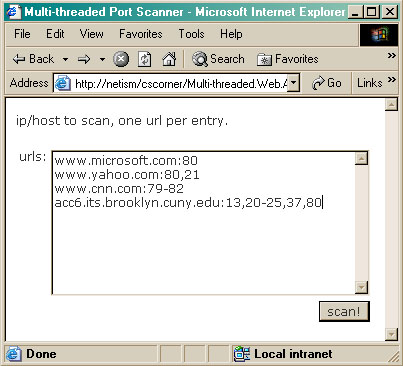
The PortScanner contains 2 methods: (1) parse(), it accepts a string we passed to the class from the form. It then parse the string, extracting the ip/host and port information and construct the private member field _ports holding an ArrayList of ScanPort objects. _ports is accessed by the public property ScanResults. Note that in order for this method to parse the string properly, the string must be entered in a recognizable format. The format is: <ip | host>:<a port number | starting port numberending port number[,]>. It starts with the ip address or the host, then a :, then a list of individual port number, or a range of port numbers. Port numbers are separated by ,. And each ip/host entry is separated by the new line character. So for example: www.yahoo.com:80,100-11-,443, will mean to scan the ports 80, 100 to 110 and 443 on the host www.yahoo.com. (2) Scan(), it accepts a string we obtained from the form in portscanner.aspx. It then pass the string to parse() to parse it, and construct the _ports object. Once the parse() has done its part, and we have the _ports object containing the ip/host and port information, we can start scanning them. The method loops through the _ports ArrayList, creates a thread for each ScanPort object. As soon as the thread is created, its started. When it started all the threads, it then waits for them to finish before it itself returns to its caller (the portscanner.aspx).
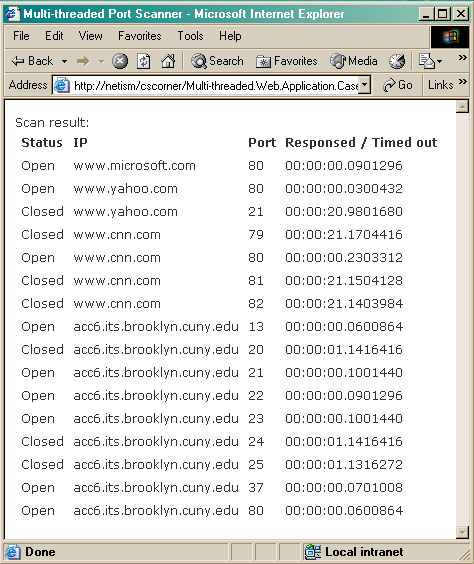
The ScanPort contains just one method, Scan(). Its where the actual scanning task is performed. It first creates an object of type TcpClient in the System.Net.Socket namespace. It then passes the ip/host and port information that we has extracted by the parse() method, to its Connect() method. If a connection is made, we close it immediately, and set its status to Open. However, due to god knows what reasons, if the connection cannot be made, then the status is set to Closed. Note that if the scanning ip/host has the port opened behind a firewall, and only accessible from within its internal LAN, then its still closed to our port scanner, and we still determine its closed.
Port Scanner in action
Fire up the form, and type in some host/URLs:
Sit back, relax and wait for a few seconds:
Conclusion
Imagine if the port scanner does not have the multi-threading capability, and you have to scan all the ports one by one. Depending on how fast it can response to you, and rather its open or close, or how you set the timeout on the connection, each one might take up to 20 seconds. If you just have 15 ports to scan, it might take up to 5 minutes! Imagine if you want to do a full scan (some 60,000 ports) on an IP However, as mentioned in the last part, starting and running too many threads (like around 60,000 ports for a full scan) is also not good. But this is where the thread pooling comes in. More information on thread pooling can be found in the MSDN Library at:
http://msdn.microsoft.com/library/default.asp?url=/library/en-us/cpguide/html/cpconthreadpooling.asp?frame=true
Source Code
Copy and paste your source code if its not big, otherwise leave it blank and discuss about code in the description.