

So, let’s explore Azure ML Studio.
What is it?
Azure Machine Learning Studio is a GUI-based integrated development environment for constructing and operationalizing Machine Learning workflow on Azure.
According to Microsoft-
“Microsoft Azure Machine Learning Studio is a collaborative, drag-and-drop tool you can use to build, test, and deploy predictive analytics solutions on your data. Machine Learning Studio publishes models as web services that can easily be consumed by custom apps or BI tools such as Excel.”
Machine Learning Studio is where data science, predictive analytics, visualization, cloud resources, and your data meet.
What you can do?
Suppose you want to build up a prescient analysis model. Sounds good doesn't it?
Now for that you are going to ordinarily utilize information from one or more sources, change and break down that information through different information control and factual capacities, and produce an arrangement of results based on that information and data.
But do you think, it’s that easy in theory?
Actually “NO”. It’s a hectic set of processes based on success or failure of the previous process. Building up a model using this approach is an iterative and never ending procedure. As you alter the different capacities and their parameters, your outcomes unite until you are fulfilled that you have a prepared, successful model.
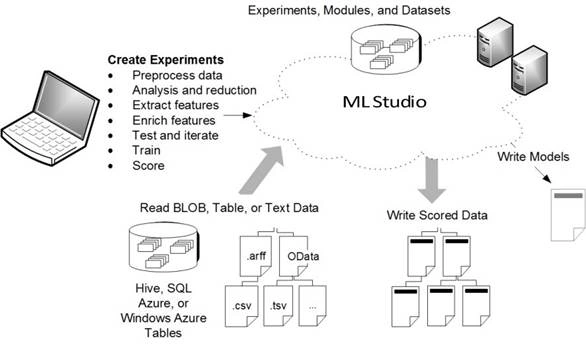
Here comes the savior, which is nothing but Azure Machine Learning Studio. Which gives you an interactive, visual workspace to easily build, test, and iterate on a predictive analysis model. You can simply drag-and-drop datasets, models and required analysis modules onto an interactive canvas. Afterwards connecting them together to form an experiment, which you run in Azure ML Studio.
To iterate on your model design, you edit the experiment, save a copy if desired, and run it again. When you're ready, you can convert your training experiment to a predictive experiment, and then publish it as a web service so that your model can be accessed by others.
Sounds good and easy isn’t!
Skills Required
You will be amazed to know that you neither need any hardcore programming skills nor information about some complex rocket science. Azure ML Studio is way too simple. You, just need to visually connect datasets and modules to construct your predictive analysis model and move on. That’s it.
How it Works?
Here’s a pictorial diagram that explains it all. Have a look-
(Image Source: Microsoft Azure ML)
Getting Started
Just visit sing-up things for a new account or you can go anonymously. After this it will take you the Home screen (Screen where you started earlier). But this time it will appear with more functionalities and options, as you singed in. These options are-
- Home (Where you Started)
- Studio (Where you’re going to perform Experiments)
- Gallery (Cortana Intelligence Gallery)
Inside Azure ML Studio
When you click Studio you are going to see a window like this..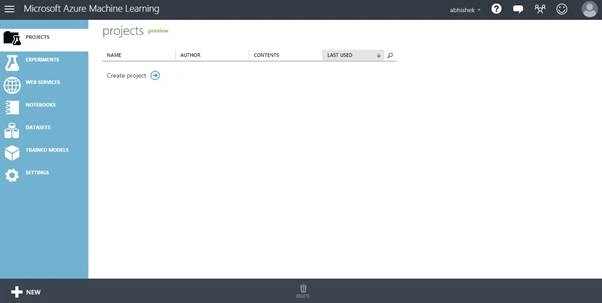
Azure ML studio you gotta see lots of options like..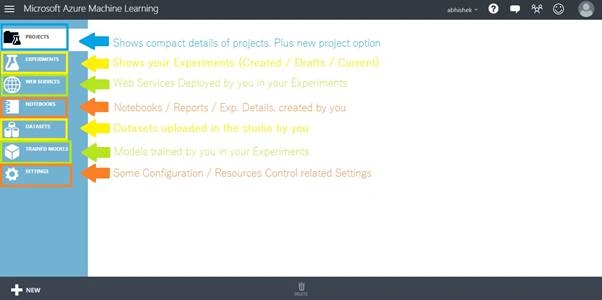
- Projects
It shows the compact details of projects like Name, Author, Content, Last Used. plus, option for creating a new project.
- Experiments
This tab shows every experiment created by you. It can be any ongoing, saved or drafted experiment.
- Web Services
The concept of web services here is almost same like in case of some programming stuff. But in this tab it only shows the web services deployed by you in all your experiments.
- Notebooks
This tab is type of info sharing. Here it shows notebooks, reports, details, information about any experiment created by you.
- DataSets
You need to upload some data to perform your desired operation on it. So this particular tab is all about your datasets. You can upload your datasets in studio in here.
- Trained Models
This tab shows the lists of all the models trained by you in your experiments.
- Settings
As the name suggests, this tab contains settings related to account configuration, authorization, resources control etc.
At last it also shows a NEW option for creating a fresh experiment for you. (At the bottom)
Wrapping Up
That’s all for the introductory parts. In the next part I’ll try to explain other things in studio in detail.
Abhishek JaiswalPosted May 7, 2016, 1:17 PM
I hope you guys enjoyed reading it. Cheers!!
Bhushan GawalePosted May 7, 2016, 6:21 AM
Thanks for sharing!
Debasis SahaPosted May 6, 2016, 5:25 AM
Good One..
Sr KarthigaPosted May 6, 2016, 3:38 AM
good one
Anbu ManiPosted May 6, 2016, 2:34 AM
Nice one
Kuppurasu NagarajPosted May 5, 2016, 1:04 PM
Nice Sharing..