

Introduction
In this article, we will explain how to create a QR Code Generator in ASP.NET Core 1.0, using Zxing.Net.
Background
I tried to create a QR Code Generator in ASP.NET Core, using third party libraries but in most of the cases codes are not fully supported in ASP.NET Core because of some version issues etc. I searched a lot in Google but finally I found "Zxing.Net" and it is a library, which supports decoding and generating of the barcodes. I had a discussion with MicJahn and came up with a great solution.
Before reading this article, you must read the articles given below for ASP.NET Core knowledge.
- Getting Started With ASP.NET CORE 1.0
- Project Layout In ASP.NET Core 1.0
- Middleware And Staticfiles In ASP.NET Core 1.0 - Part One
- Middleware And Staticfiles In ASP.NET Core 1.0 - Part Two
Zxing.Net
A library, which supports decoding and generating of the barcodes (Example: QR Code, PDF 417, EAN, UPC, Aztec, Data Matrix, Codabar) within the images.
Assemblies required
The assemblies given below are required for QR Code Generator.
- using Microsoft.AspNetCore.Razor.TagHelpers;
- using System;
- using System.IO;
- using ZXing.QrCode;
Packages required
We need the packages given below for drawing and creating QR Code Generator.
- "CoreCompat.System.Drawing": "1.0.0-beta006",
- "ZXing.Net": "0.15.0"
C#
QRCodeTagHelper class given below contains QR Code Generator methods etc.
- namespace QRCodeApp {
- [HtmlTargetElement("qrcode")]
- public class QRCodeTagHelper: TagHelper {
- public override void Process(TagHelperContext context, TagHelperOutput output) {
- var QrcodeContent = context.AllAttributes["content"].Value.ToString();
- var alt = context.AllAttributes["alt"].Value.ToString();
- var width = 250; // width of the Qr Code
- var height = 250; // height of the Qr Code
- var margin = 0;
- var qrCodeWriter = new ZXing.BarcodeWriterPixelData {
- Format = ZXing.BarcodeFormat.QR_CODE,
- Options = new QrCodeEncodingOptions {
- Height = height, Width = width, Margin = margin
- }
- };
- var pixelData = qrCodeWriter.Write(QrcodeContent);
- // creating a bitmap from the raw pixel data; if only black and white colors are used it makes no difference
- // that the pixel data ist BGRA oriented and the bitmap is initialized with RGB
- using(var bitmap = new System.Drawing.Bitmap(pixelData.Width, pixelData.Height, System.Drawing.Imaging.PixelFormat.Format32bppRgb))
- using(var ms = new MemoryStream()) {
- var bitmapData = bitmap.LockBits(new System.Drawing.Rectangle(0, 0, pixelData.Width, pixelData.Height), System.Drawing.Imaging.ImageLockMode.WriteOnly, System.Drawing.Imaging.PixelFormat.Format32bppRgb);
- try {
- // we assume that the row stride of the bitmap is aligned to 4 byte multiplied by the width of the image
- System.Runtime.InteropServices.Marshal.Copy(pixelData.Pixels, 0, bitmapData.Scan0, pixelData.Pixels.Length);
- } finally {
- bitmap.UnlockBits(bitmapData);
- }
- // save to stream as PNG
- bitmap.Save(ms, System.Drawing.Imaging.ImageFormat.Png);
- output.TagName = "img";
- output.Attributes.Clear();
- output.Attributes.Add("width", width);
- output.Attributes.Add("height", height);
- output.Attributes.Add("alt", alt);
- output.Attributes.Add("src", String.Format("data:image/png;base64,{0}", Convert.ToBase64String(ms.ToArray())));
- }
- }
- }
- }
Index.chtml
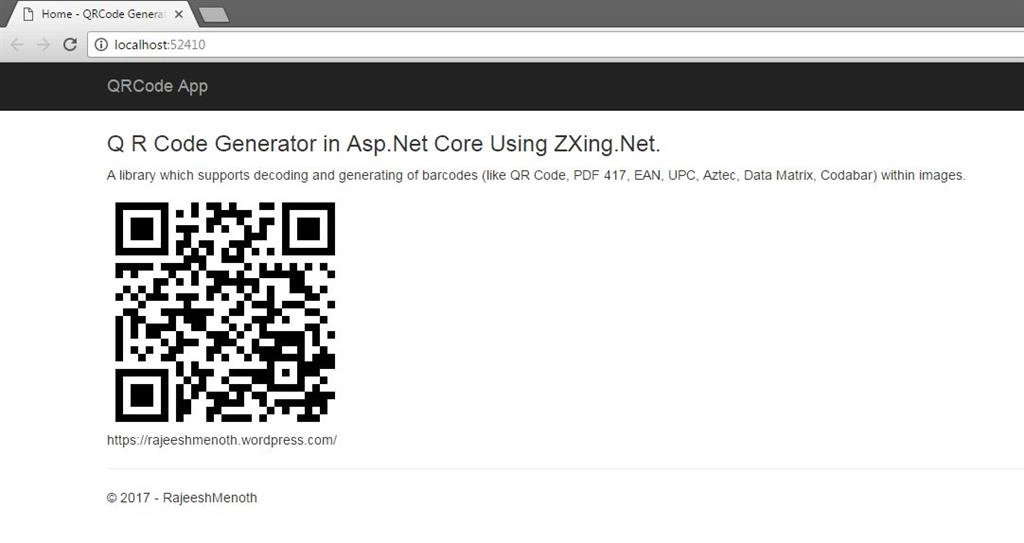
The code given below will display QR Code Generator.
- @{
- ViewData["Title"] = "Home";
- }
- <h2>@ViewData["Title"].</h2>
- <h3>@ViewData["Message"]</h3>
- A library which supports decoding and generating of barcodes (like QR Code, PDF 417, EAN, UPC, Aztec, Data Matrix, Codabar) within images.
- <qrcode alt="QR Code" content="https://rajeeshmenoth.wordpress.com/" />
- https://rajeeshmenoth.wordpress.com/
The code Injecting TagHelper given below is in the entire Application.
- @addTagHelper "*, QRCodeApp"
The dependencies given below are required to create QR Code Application.
- {
- "dependencies": {
- "Microsoft.AspNetCore.Diagnostics": "1.0.0",
- "Microsoft.AspNetCore.Mvc": "1.1.2",
- "Microsoft.AspNetCore.Mvc.Core": "1.1.2",
- "Microsoft.AspNetCore.Server.IISIntegration": "1.0.0",
- "Microsoft.AspNetCore.Server.Kestrel": "1.0.1",
- "Microsoft.AspNetCore.StaticFiles": "1.1.1",
- "Microsoft.Extensions.Logging.Console": "1.0.0",
- "CoreCompat.System.Drawing": "1.0.0-beta006",
- "ZXing.Net": "0.15.0"
- },
- "tools": {
- "Microsoft.AspNetCore.Server.IISIntegration.Tools": "1.0.0-preview2-final"
- },
- "frameworks": {
- "net452": { }
- },
- "buildOptions": {
- "emitEntryPoint": true,
- "preserveCompilationContext": true
- },
- "publishOptions": {
- "include": [
- "wwwroot",
- "web.config"
- ]
- },
- "scripts": {
- "postpublish": [ "dotnet publish-iis --publish-folder %publish:OutputPath% --framework %publish:FullTargetFramework%" ]
- }
- }
Reference
See Also
You can download other ASP.NET Core 1.0 source codes from MSDN Code, using the link, mentioned below.
Conclusion
We learned how to create a QR Code Generator in ASP.NET Core 1.0, using Zxing.Net. I hope you liked this article. Please share your valuable suggestions and the feedback.
Neelesh RawalPosted May 26, 2020, 6:36 AM
HI Rajeesh Can we use this library to scan QR code/Barcode using webcam (laptop)??
Former memberPosted May 4, 2020, 9:09 AM
Hello, I have two questions. Is it possible to download a generated qr code as png ? Is it possible to generate a qr code as svg or convert it from png to svg (and download it) ? If it is possible, can you help me ? Thanks in advanced, Alessio