
Introduction
JavaScript is the language of the Web. This series of articles will talk about my observations learned during my decade of software development experience with JavaScript.
Before moving further let us look at the previous articles of the series:
- Voice of a Developer: JavaScript Data Types - Part One
- Voice of a Developer: JavaScript Objects - Part Two
- Voice of a Developer: JavaScript Engines - Part Three
- Voice of a Developer: JavaScript Common Mistakes - Part Four
- Voice of a Developer: Editors - Part Five
- Voice of a Developer: VSCode - Part Six
- Voice of a Developer: Debugging Capabilities of VSCode - Part Seven
- Voice of a Developer: Part Eight - JavaScript OOP
- Voice of a Developer: Part Nine - JavaScript Useful Reserved Keywords
In JavaScript, functions are the 1st class citizens of language. These are the bread and butter of JavaScript. Go in deep now:
Function keyword, followed by a name, followed by parentheses (). You can get function definition or invoke the function, ex:
Functions in-depth
- function myFunction(a, b) {
- return a * b; // Function returns the multiplication of a and b
- }
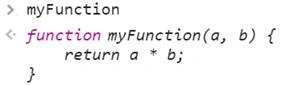
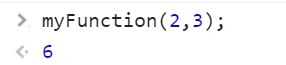
Properties of function
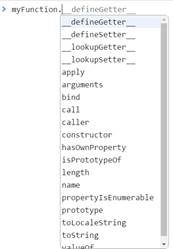
-
Call v/s Apply
If you want to assign the value of a function we use straight forward way, i.e.,There are two other way to achieve it using call or apply property,- var val = myFunction (2,3); // val = 6
- var val = 0;
- myFunction.apply(val, [2, 3]); // 6 as output
- myFunction.call(val, 2, 3); // 6 as output
The call requires the parameters be listed explicitly Apply lets you invoke the function with arguments as an array. -
The "constructor" property
Every object has a built-in property named constructor. It refers to the function which created it. Let us understand in detail:- function myFunction(a, b) {
- return a * b; // Function returns the multiplication of a and b
- }
- var m = new myFunction();
- console.log(m.constructor == myFunction); // true
- console.log(m.__proto__.constructor == myFunction); // true, the other way to check is
-
Defining Your Own Function Properties
Many times we need a unique number say GUID or identifies which increments with each call made to function. In such a scenario, it is recommended to attach a property with a function. It is acting like a static property to keep track of the last value returned.- function myFunction(a, b) {
- ++myFunction.p1;
- return a * b; // Function returns the multiplication of a and b
- }
- myFunction.p1 = 1;
- myFunction();
- myFunction.p1; // will print 2
-
Length property
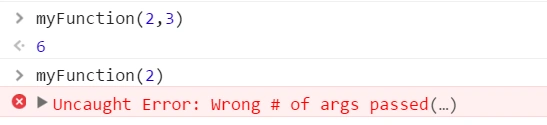
In a function, we pass arguments to process input, and sometimes we don’t pass the correct number of arguments. Therefore, it is good practice to check the required number of arguments needed for a particular function.- function myFunction(a, b) {
- return a * b;
- }
- myFunction(2); // will give NaN because b is undefined
- Its time to fix above
- function by using property length
- function myFunction(a, b) {
- var argsRequired = arguments.length;
- var argsActual = arguments.callee.length;
- if(argsRequired != argsActual) {
- throw new Error("Wrong # of args passed");
- }
- return a * b;
- }
Summary
Read more articles on JavaScript
Guest UserPosted May 3, 2016, 12:25 PM
Thanks guys!!
Amit DavePosted May 3, 2016, 10:30 AM
Keep up the Good work!
Amit DavePosted May 3, 2016, 10:30 AM
Keep up the Good work!
Kuppurasu NagarajPosted May 2, 2016, 1:50 PM
Nice Sharing..
Bhuvanesh MohankumarPosted May 2, 2016, 6:55 AM
Good one
Sonu ChaudharyPosted May 2, 2016, 5:53 AM
Thanks for sharing
NitinPosted May 2, 2016, 3:34 AM
Thanks for sharing
Gowtham RajamanickamPosted May 2, 2016, 2:45 AM
good one..
Thiruppathi RPosted May 2, 2016, 12:10 AM
Nice info