

Windows TabControl is a useful control that allows you display multiple dialogs tabs on a single form by switching between the tabs. A tab acts as another Form that can host other controls. Figure 1 shows an example of TabControl in Visual Studio .NET, which allows you to switch among multiple files using the tabs.
In this tutorial, I will explain how to create and use a TabControl in your Windows applications with C#.
Adding a TabControl to Form
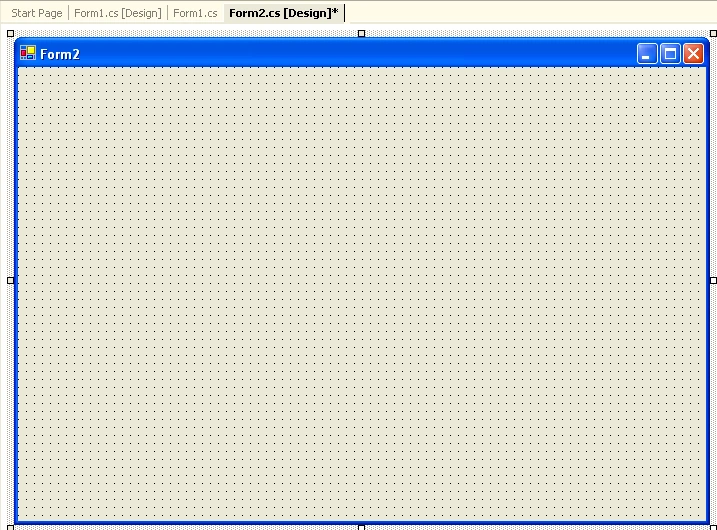
The simplest way to create a TabControl is using Visual Studio .NET. I create a Windows Form application using Visual Studio .NET and add a TabControl from Toolbox to the Form by dragging the TabControl to the Form. After that I resize and reposition TabControl according to the Form size. The Form Designer adds the code for TabControl for you. If you see the code, you will notice once private variable of type System.Windows.Forms.TabControl as following:
- private System.Windows.Forms.TabControl tabControl1;
- private void InitializeComponent()
- {
- this.tabControl1 = new System.Windows.Forms.TabControl();
- this.SuspendLayout();
- //
- // tabControl1
- //
- this.tabControl1.Location = new System.Drawing.Point(8, 16);
- this.tabControl1.Name = "tabControl1";
- this.tabControl1.SelectedIndex = 0;
- this.tabControl1.Size = new System.Drawing.Size(352, 248);
- this.tabControl1.TabIndex = 0;
- //
- // Form1
- //
- this.AutoScaleBaseSize = new System.Drawing.Size(5, 13);
- this.ClientSize = new System.Drawing.Size(368, 273);
- this.Controls.Add(this.tabControl1);
- this.Name = "Form1";
- this.Text = "Form1";
- this.ResumeLayout(false);
- }
Understanding the TabControl and TabPage class
A TabControl is a collection of tab pages and a tab page is the actual control that hosts other child controls. TabPage class represents a tab page.
TabControl class represents a TabControl. This class provides members (properties, methods, and events) to work with the TabControls. Table 1 lists the TabControl properties.
| Property | Description |
| Alignment |
Area of the control where the tabs are aligned. |
| Appearance |
Visual appearance of the control's tabs. |
| DrawMode |
A way that the control's tab pages are drawn. |
| HotTrack | Value indicating whether the control's tabs change in appearance when the mouse passes over them. |
| ImageList |
The images to display on the control's tabs. |
| ItemSize |
Size of the control's tabs. |
| Multiline |
A value indicating whether more than one row of tabs can be displayed. |
| Padding |
Amount of space around each item on the control's tab pages. |
| RowCount |
Returns the number of rows that are currently being displayed in the control's tab strip. |
| SelectedIndex |
The index of the currently-selected tab page. |
| SelectedTab | Currently selected tab page. |
| ShowToolTips |
The value indicating whether a tab's ToolTip is shown when the mouse passes over the tab. |
| SizeMode |
The way that the control's tabs are sized. |
| TabCount |
Number of tabs in the tab strip. |
| TabPages |
Returns the collection of tab pages in this tab control. |
Adding TabPage to a TabControl
Now I will add few tabs to the TabControl with the help of Properties window of TabControl. The Properties window has a property called TabPages, which is a collection of TabPage controls (see Figure 2). A TabPage represents a page of the TabControl that can host child controls.
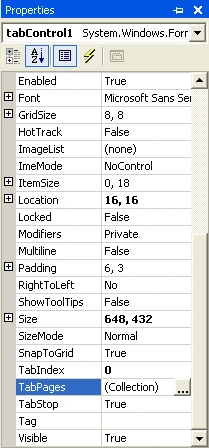
Figure 2. TabPages property of TabControl
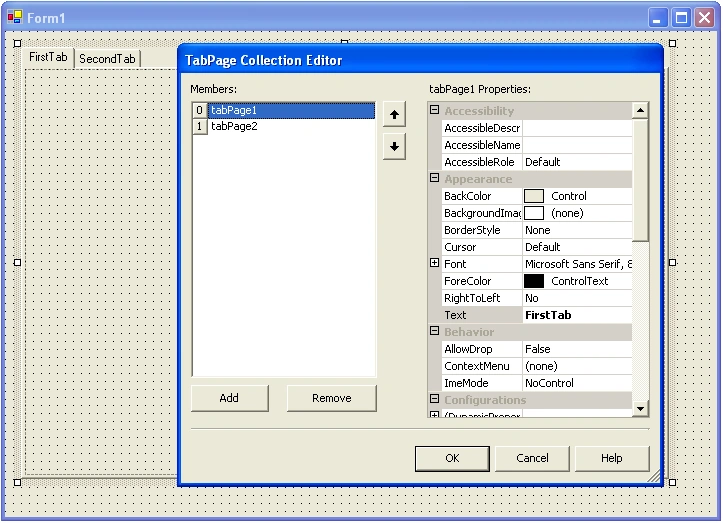
Now if you click on TabPages property in Property window, it launches TabPage Collection Editor (see Figure 3) where you can add a new page or remove existing pages by using Add and Remove buttons. You can also set the properties of pages by using the right side properties grid. As you can see from Figure 3, I add two pages and set their properties.
After adding two pages to TabControl, the final Form looks like Figure 4.
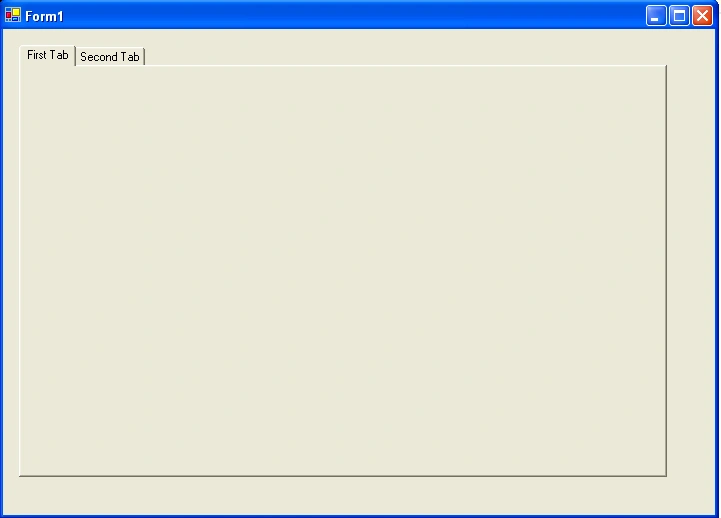
Figure 4. A Form with two Tab pages
Adding and Removing a TabPage to TabControl Programmatically
You can add and remove Tab pages to a TabControl using the TabControl.TabPages.Add and TabControl.TabPages.Remove methods. The following code snippet adds a new page to the TabControl programmatically:
- TabPage newPage = new TabPage("New Page");
- tabControl1.TabPages.Add(newPage);
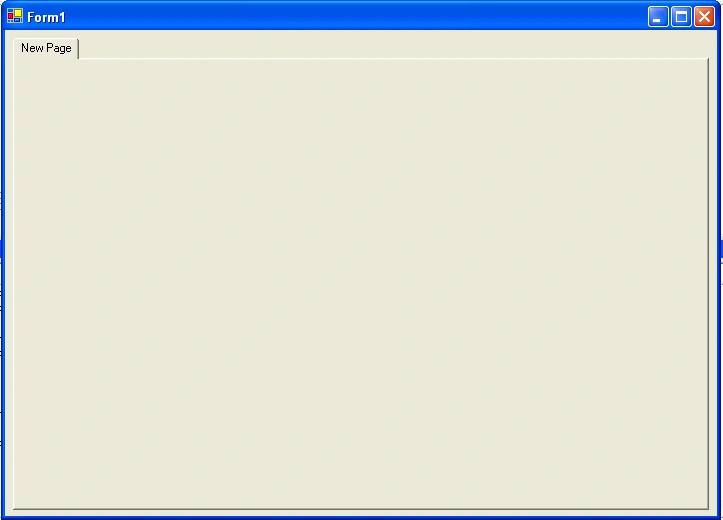
Figure 5. Adding a Tab page programmatically.
The Remove method of TabPageCollection class (through TabControl.TabPages) removes a page by name or index from the page collection. The following code snippet removes "New Page" from the collection:
- TabPage newPage = new TabPage("New Page");
- tabControl1.TabPages.Remove(newPage);
Adding Controls to a TabPage
Adding controls to a TabPage is similar to adding controls to a Form. Make a page active in the Form Designer and drag and drop controls from Toolbox to the page. I add a Label, a TextBox, and a Button control to Settings page of TabControl and change their properties. The final page looks like Figure 6.
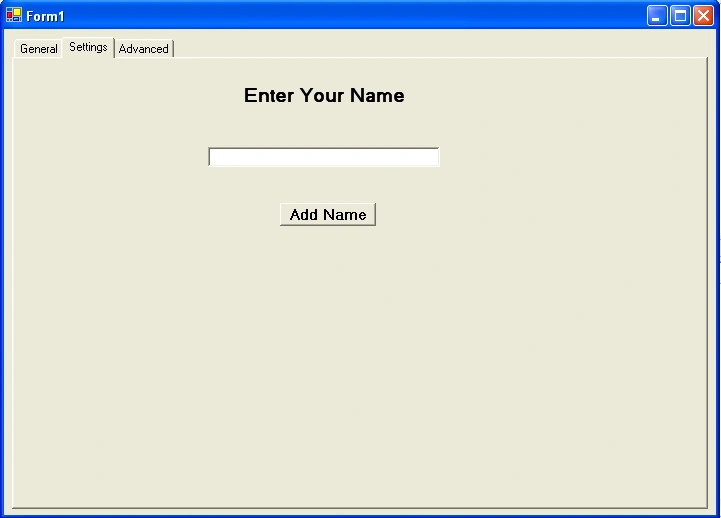
Figure 6. Adding controls to a Tab page
Controls are added to a page by using TabPage.Controls.Add method. Now if you see the code generated by the designer, you will notice the following code:
- this.SettingsPage.Controls.Add(this.BrowseBtn);
- this.SettingsPage.Controls.Add(this.textBox1);
- this.SettingsPage.Controls.Add(this.label1);
Access Controls of a TabPage
All controls of a TabPage are local to a Form and accessible from the Form without adding any additional functionality. For example, the following code sets the Text property of the TextBox on Preferences Tab page:
- this.textBox1 =@"C:\";
Getting and Setting Active Tab Programmatically
You can get and set an active tab of a TabControl programmatically using the SelectedTab property of TabControl. For example, the following code snippet sets PreferencePage as active tab:
- this.tabControl1.SelectedTab = this.PreferencesPage;
mohamed nawabPosted Mar 5, 2020, 5:39 AM
How can i access other form tabpage
Muhammad NadeemPosted Sep 26, 2017, 2:39 AM
Hi, Mashesh Chand I have a confusion in the tab controls why we add iTabControl in our project as component class. And how to just hide not remove headers of tab control tabpages from the tab control. I shall be very thankful to you for this kindness.
Tom Mc CarrickeditedPosted Nov 2, 2011, 5:56 AMEdited Nov 2, 2011, 12:03 PM
Hi Mahesh I started a new C# Windows Forms application (using Visual C# 2010 Express) and added a TabControl to the form. But my code is very different to yours. My code is: using System; using System.Collections.Generic; using System.ComponentModel; using System.Data; using System.Drawing; using System.Linq; using System.Text; using System.Windows.Forms; namespace Tabtest { public partial class Form1 : Form { public Form1() { InitializeComponent(); } } } Why is it so different to yours? Am I missing something? Tom
deepu josePosted May 10, 2011, 12:16 AM
hai.. i want to nagivate to particular tab from menu.I can provide more information. Suppose in Menu i have Add Manage View If the user click on the add,it should navigate to tabpage1,if manage then to tabPage2 else tabPage3. How can i get this?Please Help ME
shahzad rehmanPosted Jan 20, 2011, 3:07 AM
i have 2 forms. 1- having tabcnotrol and pages in it and all are disabled programmatically at tab's selectedindexchanged event. this is the code (this.tbpItemCorrection as Control).Enabled = false; now i want to enable the tabpage from 2nd form by clicking the button. what i have done so for is this i made all form one and tbacontrol,pages public and used the following code (this.tbpItemCorrection as Control).Enabled = true; but it is not enabling tabpage. Help me please
Pavan RaiPosted Jan 18, 2011, 7:08 AM
Sir, This document help me a lot. I want to use several tab in tabs. Is it possible?
Sid SPosted Nov 16, 2010, 1:40 PM
I'm trying to add a scrollbar for right-aligned tabs so the tabs don't start stacking in another line after they fill one line. If the tabs are top or bottom aligned I can set multiline to false and I get the scroll buttons, but this doesn't work for right-aligned tabs. Any suggestions or help would be greatly appreciated :) Thanks
kaliappan RavikumarPosted Oct 7, 2010, 2:19 AM
Is there a way to fix the scrollbar problem when you open a form with a tab control on it. Seems it wants to scroll down and hide the tabs. Any suggestions?
vimal prakashPosted Sep 14, 2010, 5:30 AM
hi Mahesh Chand how to call manualy the tabpages without clicking the tabbar?
Lennie KuahPosted Jun 15, 2010, 1:07 AM
Hi there, How to switch on to other TABPAGE when the TABCONTROL TABPAGE button is clicked on ? This coding is not working: private void tabControl1_SelectedIndexChanged(object sender, EventArgs e) { Select Case true { Case tabControl1.SelectedTab is this.tabPageDisplay; tabControl1.SelectedTab = this.tabPageDisplay; Case tabControl1.SelectedTab is this.tabEditSales; tabControl1.SelectedTab = this.tabEditSales; } }
thiamPosted Apr 15, 2010, 9:07 AM
hi,how to jump to another tabpage from a tabpage by click a button?? thanks
veeraPosted Feb 19, 2010, 4:46 AM
how to use tab control on top in smart device
JosePosted May 18, 2009, 9:01 PM
Hi.. can you please tell us what is the tab control equivalent for web forms? thanks Jose
George CornerPosted May 4, 2009, 11:19 PM
I'm building an Outlook FormRegion with a tabControl, with about 40 tabs (Outlook 2007, VSTO 2008, and I'll probably "hide" a bunch of them in production). As a result of a button click on one tab I need to switch to another tab. This didn't seem to be such an obstacle until every solution I tried resulted in a "... does not exist in the current context." That context being the button_Click. You seen to know alot about this control so I thought I might trouble you for any insights you might have. Regards,
mikePosted May 2, 2009, 9:05 AM
Thank you for setting this site up. Your lessons are second to none. Every well explained !!
Vani ChughPosted Mar 30, 2009, 4:13 PM
while doing File handling I am not able to create a new file..the code i am using is " FileStream fs=new FileStream(openFileDialog1.FileName, FileMode.Create, FileAccess.ReadWrite); " But its opening the existing File only..When i try to create a new file.It prints a message .file path is not correct. i dont know where i creating a mistake. Please clarify my doubts
Vani ChughPosted Mar 30, 2009, 4:07 PM
My application involves adding the control RichTextBox to the tab page in one method and accessing this RichTextBox that is the control in the TabPage in some other method. I am trying it as "tabControl1.SelectedTab.Controls(0).Text". But its Not working.this function works when used in VB.Net...please let me know where I am doing it Wrong...
Vani ChugheditedPosted Mar 30, 2009, 4:06 PMEdited Mar 30, 2009, 4:14 PM
My application involves adding the control RichTextBox to the tab page in one method and accessing this RichTextBox that is the control in the TabPage in some other method. I am trying it as tabControl1.SelectedTab.Controls(0).Text But its Not working.this function works when used in VB.Net...please let me know where I am doing it Wrong...
Mark FarrisPosted Feb 2, 2009, 6:28 PM
I am converting an application written for windows pocket pc (windows Mobile) that supports tab controls to a smartphone application. The smartphone does not support tab controls. Wondering if there is some way to remove the tab controls and get all of the form fields on one scrollable page. Not sure this is doable or not. Thanks !
srikanthPosted Nov 21, 2008, 1:02 AM
How to change tab pages with key board without using mouse in c# tab controls?
chandru kumarPosted Feb 11, 2008, 5:15 AM
How to use tab control in web based application + C#??
ElnaPosted Jan 21, 2008, 1:24 PM
I have used a tabcontrol with 8 tabsheets in a project and the problem is that the file containing the eventhandlers for all the controls on the different tabsheets as well as the functions I have written, is very big, almost 6000 lines of code. Is there a way that I can create different code files so that the code for each tabsheet (event handlers and funcions) is in a different file?
shoaibPosted Sep 4, 2007, 6:33 AM
When i change the alignment of tab control to left/right, the text in the tab pages are not seen at run time also. Am i missing something??
Priscila BrittoPosted Aug 22, 2007, 10:25 AM
I would kike to select an another tab for me to write code. For example, I need to write as this: if (tabSelected == tab1) ...... else if (tabSelected == tab2) ..... Question: What to put in "tabSelected"
manju nathPosted Jul 12, 2007, 4:27 AM
I have a tabpage holding a button,on click of this button i want to open another tabpage. please help me out in doing this
Harry JellPosted May 14, 2007, 5:10 PM
i have set my software up to add a tab, but i want it to add some controls to it. The tab is automatically named "TabPage" then +1 to the Tabcount. so if there is 5 tabs already and u add a new 1, it becomes TabPage6. Now how do i add controls to the page that has automatically been added?
Spiti LahaulPosted Feb 28, 2007, 2:33 AM
I have piece of code in which the tab pages are set progrmatically using selectedtab property. This should trigger selctedIndexchanged event. I have an event handler to handle this event. In 2.0 this event does not seem to be triggered! whereas in 1.1 it is working fine. Any thoughts?
FletcherPosted Feb 20, 2007, 10:22 AM
As you've no doubt seen, the visible property has no meaning to a tab page. If you wish to disable a page, create an event handler for the "Selecting" event. This event is fired when a user clicks on a new tab. You can identify the new tab with e.TabPage as so: switch(e.TabPage.TabIndex) //gives you the index of the //tab that was clicked { case 0: //do something break; case 2: //we don't want this one to be selected, so we cancel it e.Cancel = true; break; } Now, if you want to make a tab page disappear completely, you have to physically remove it from the TabPages collection in the tabControl control: tabControl1->TabPages->Remove(tabPage2); Adding it back is just as easy, using the Add() or Insert() method instead of the Remove() method. Choose the one that best suits your needs. Here, I'm using Insert so that I can specify where in the list I wish to insert the tab page: tabControl1->TabPages->Insert(1,tabPage2); Hope This helps!
Ravi JoshiPosted Jan 30, 2006, 1:22 AM
Please let me know How to disable Tabs?