

Introduction
Today, in this article let's play around with one of the interesting and most useful concept in XML.
Question: What are joins using LINQ-to-XML?
In simple terms "It enables perform a join between two XML files and retrieve the value into grid as a result set".
Step 1: Create a new WebForm project
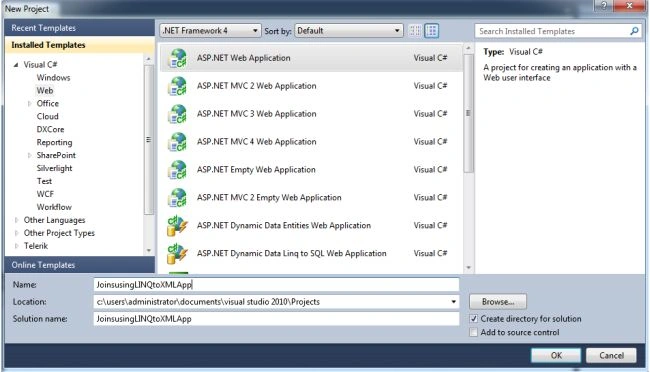
Step 2: The complete code of Employee.xml looks like this:
<?xml version="1.0" encoding="utf-8" ?>
<Employees>
<Employee Id="1">
<FirstName>Vijay</FirstName>
<LastName>Prativadi</LastName>
<Age>26</Age>
</Employee>
<Employee Id="2">
<FirstName>Swetha</FirstName>
<LastName>Prativadi</LastName>
<Age>23</Age>
</Employee>
<Employee Id="3">
<FirstName>Ram</FirstName>
<LastName>Reddy</LastName>
<Age>30</Age>
</Employee>
</Employees>
Step 3: The complete code of Department.xml looks like this:
<?xml version="1.0" encoding="utf-8" ?>
<Departments>
<Department DepartmentId="1" EmpId="1">
<DepartmentName>Admin</DepartmentName>
</Department>
<Department DepartmentId="2" EmpId="1">
<DepartmentName>HR</DepartmentName>
</Department>
<Department DepartmentId="3" EmpId="2">
<DepartmentName>IT</DepartmentName>
</Department>
</Departments>
Step 4: The complete code WebForm1.aspx looks like this:
<%@ Page Language="C#" AutoEventWireup="true" CodeBehind="WebForm1.aspx.cs" Inherits="JoinsusingLINQtoXMLApp.WebForm1" %>
<!DOCTYPE html PUBLIC "-//W3C//DTD XHTML 1.0 Transitional//EN" "http://www.w3.org/TR/xhtml1/DTD/xhtml1-transitional.dtd">
<html xmlns="http://www.w3.org/1999/xhtml">
<head id="Head1" runat="server">
<style type="text/css">
.grid
{
margin-top: 50px;
}
</style>
<title></title>
</head>
<body>
<form id="form1" runat="server">
<center>
<div>
<table>
<tr>
<td colspan="2" align="center">
<asp:Label ID="Label1" runat="server" Text="Joins using LINQ-to-XML" Font-Bold="true"
Font-Size="Large" Font-Names="Verdana" ForeColor="Maroon"></asp:Label>
</td>
</tr>
<tr>
<td colspan="2" align="center">
<asp:Button ID="Button1" runat="server" Text="Select Data" Font-Names="Verdana" Width="213px"
BackColor="Orange" Font-Bold="True" OnClick="Button1_Click" />
</td>
</tr>
<tr>
<td colspan="2" align="center">
<asp:GridView ID="GridView1" runat="server" CssClass="grid" BackColor="LightGoldenrodYellow"
BorderColor="Tan" BorderWidth="1px" CellPadding="2" ForeColor="Black" GridLines="None">
<AlternatingRowStyle BackColor="PaleGoldenrod" />
<FooterStyle BackColor="Tan" />
<HeaderStyle BackColor="Tan" Font-Bold="True" />
<PagerStyle BackColor="PaleGoldenrod" ForeColor="DarkSlateBlue" HorizontalAlign="Center" />
<SelectedRowStyle BackColor="DarkSlateBlue" ForeColor="GhostWhite" />
<sortedascendingcellstyle backcolor="#FAFAE7" />
<sortedascendingheaderstyle backcolor="#DAC09E" />
<sorteddescendingcellstyle backcolor="#E1DB9C" />
<sorteddescendingheaderstyle backcolor="#C2A47B" />
</asp:GridView>
</td>
</tr>
</table>
</div>
</center>
</form>
</body>
</html>
Step 5: The complete code WebForm1.aspx.cs looks like this:
using System;
using System.Collections.Generic;
using System.Linq;
using System.Web;
using System.Web.UI;
using System.Web.UI.WebControls;
using System.Xml.Linq;
namespace JoinsusingLINQtoXMLApp
{
public partial class WebForm1 : System.Web.UI.Page
{
protected void Page_Load(object sender, EventArgs e)
{
}
protected void Button1_Click(object sender, EventArgs e)
{
XElement department = XElement.Load(@"c:\users\administrator\documents\visual studio 2010\Projects\JoinsusingLINQtoXMLApp\JoinsusingLINQtoXMLApp\Department.xml");
XElement employee = XElement.Load(@"c:\users\administrator\documents\visual studio 2010\Projects\JoinsusingLINQtoXMLApp\JoinsusingLINQtoXMLApp\Employee.xml");
var joinQuery = from r in department.Descendants("Department")
join s in employee.Descendants("Employee") on (int)r.Attribute("EmpId") equals (int)s.Attribute("Id")
select new
{
EmpId = (int)s.Attribute("Id"),
FirstName = (string)s.Element("FirstName"),
LastName = (string)s.Element("LastName"),
Age = (int)s.Element("Age"),
DepartmentName = (string)r.Element("DepartmentName")
};
GridView1.DataSource = joinQuery;
GridView1.DataBind();
}
}
}
Step 6: The output of application looks like this

Step 7: The data retrieved output of application looks like this

Join the conversation! Your thoughts help the community grow.