

Introduction
This blog describes the procedure of sorting in a list box by using the expression in QlikView. Given below are the steps to do sorting in a list box by using the expression.
In the previous article, I discussed how to create a list box in the QlikView application.
Create list box in QlikView
After that, start these steps.
Step 1: Go to properties of the list box and select sort tab in the property window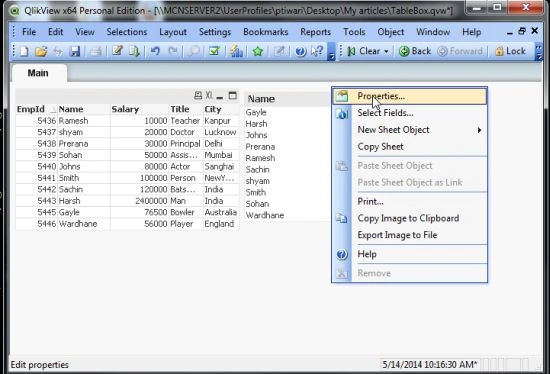
After doing that this window will open, here set these settings and click on the OK button.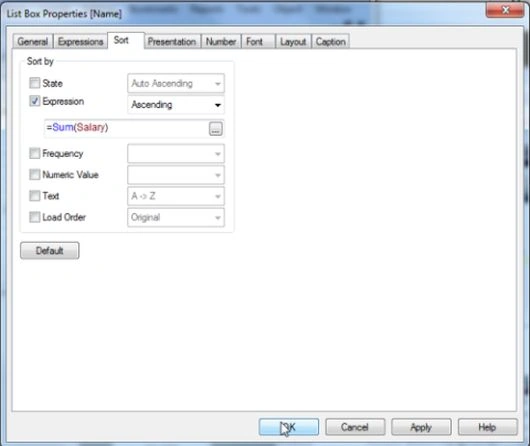
Then, if you select any data in the list box then in an ascending order the sorting starts.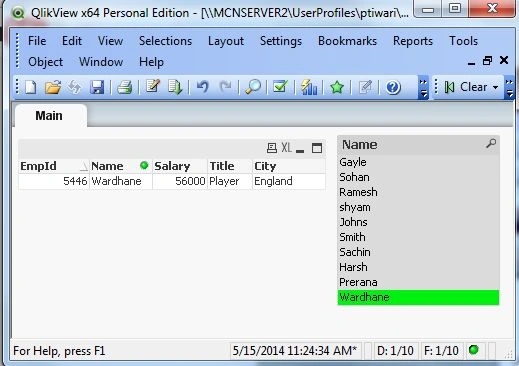
Summary
This blog describes a simple way of setting sorting using an expression.
alvin davidPosted Jul 4, 2014, 9:37 AM
Thank you for sharing such concise information. Further, you can also watch this video :- https://www.youtube.com/watch?v=8olMt2AOUJ8 it is very informative and to the point and also highlight the applications and alternate scenarios very well. Also you can access this link for latest update of qlikview :- http://intellipaat.com/blog/whats-new-in-qlikview-11/