

This is a sample way of doing it. In this you can find how we can export DataGridView to Word and Excel documents.
I added some dynamic data as needed, whatever data it may be, the process is the same for all.
Initially I added some dynamic data to DataGridView; for this I referred to the example from here.
http://www.dotnetperls.com/datatable
Initially after binding data to a DataGridView it will look as follows:
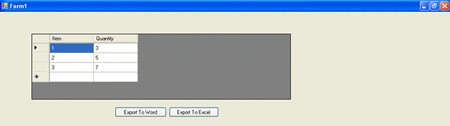
By clicking on the respective button, it will export the data to the respective format.
The code which I used to export this is as follows:
private void ToCsV(DataGridView dGV, string filename)
{
string stOutput = "";
// Export titles:
string sHeaders = "";
for (int j = 0; j < dGV.Columns.Count; j++)
sHeaders = sHeaders.ToString() + Convert.ToString(dGV.Columns[j].HeaderText) + "\t";
stOutput += sHeaders + "\r\n";
// Export data.
for (int i = 0; i < dGV.RowCount - 1; i++)
{
string stLine = "";
for (int j = 0; j < dGV.Rows[i].Cells.Count; j++)
stLine = stLine.ToString() + Convert.ToString(dGV.Rows[i].Cells[j].Value) + "\t";
stOutput += stLine + "\r\n";
}
Encoding utf16 = Encoding.GetEncoding(1254);
byte[] output = utf16.GetBytes(stOutput);
FileStream fs = new FileStream(filename, FileMode.Create);
BinaryWriter bw = new BinaryWriter(fs);
bw.Write(output, 0, output.Length); //write the encoded file
bw.Flush();
bw.Close();
fs.Close();
}
Call this method in your button click with the respective DataGridView name as per you taken.
For example:
private void btnWord_Click(object sender, EventArgs e)
{
SaveFileDialog sfd = new SaveFileDialog();
sfd.Filter = "Word Documents (*.doc)|*.doc";
sfd.FileName = "export.doc";
if (sfd.ShowDialog() == DialogResult.OK)
{
//ToCsV(dataGridView1, @"c:\export.xls");
ToCsV(dataGridView1, sfd.FileName); // Here dataGridview1 is your grid view name
}
}
Download the code and try it your self.
khurram khanPosted Nov 3, 2015, 4:53 AM
thank you bro
warren weePosted Jan 8, 2012, 10:17 PM
Hi, I am trying your code now. But I found out that after exporting to excel, I am facing a error. It stated that, the excel file is not in a correct format. Do you have any idea what is going on ???
Sam HobbsPosted Aug 4, 2011, 9:39 PM
That sure looks easy. In my opinion, it is better to export the data from the data source, not the control (DataGridView). In other words, the data can be written from wherever the data comes from that goes into the DataGridView. I admit that it is not so easy to explain how to do it that way, but it is more flexible.