

Unlike most ping utilities, this one is intended to notify us when a ping is successful, but this sample can easily be modified to notify us when a ping fails. This sample also shows use of a timer control in a form and of toggling a ToolStripMenuItem.
Most ping utilities are intended to notify us when something has stopped working. I wrote this utility because I needed something to notify me when my host has started working. This sample can certainly be used in a utility that does the reverse; that is, does something when a host stops responding.
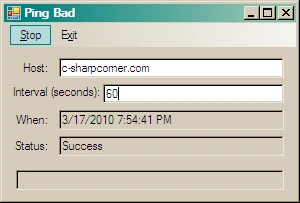
In the sample program, there is a TextBox for a host and a TextBox for an interval of time in seconds. There are three output TextBoxes; one for the time of the last ping, one for the status of the ping and a third for an error message. The one for the time of the last ping is more for diagnostic purposes and is not really useful otherwise.
Ping and PingReply Classes
The Ping class can be very easy to use. The following is a simplified version of what the sample does.
const int Timeout = 120;
String Data = "[012345678901234567890123456789]";
byte[] Buffer = Encoding.ASCII.GetBytes(Data);
Ping Sender = new Ping();
PingReply Reply = Sender.Send(Host, Timeout, Buffer);
The PingReply.Status field will be either IPStatus.Success or one of many values indicating a problem. The PingReply.RoundtripTime Property is another useful item to show.
Hashim ShafiqPosted Aug 21, 2015, 10:17 PM
Nice
Vithal WadjePosted Nov 3, 2014, 2:17 PM
good one thanks for sharing
nonu singhPosted May 8, 2012, 4:52 AM
Thanks
L KPosted Jul 20, 2010, 4:37 PM
Many thanks for this tool. Its work like charm :)