
After searching for a MultiColumn ComboBox with configurable view columns, configurable display & value members, I decided to create my own control.
The Multi-Column ComboBox is a combination of TextBox, Button & DataGridView control. Since I had a need to create a control like a ComboBox and with search functionality, I decided to use DataGridView & it's filter criteria for fast search functionality.
One of the harder things to figure out was what container to show on key press of the combo control. I used ToolStripDropDown as a host control for DataGridView to show the ComboBox popup on key press.
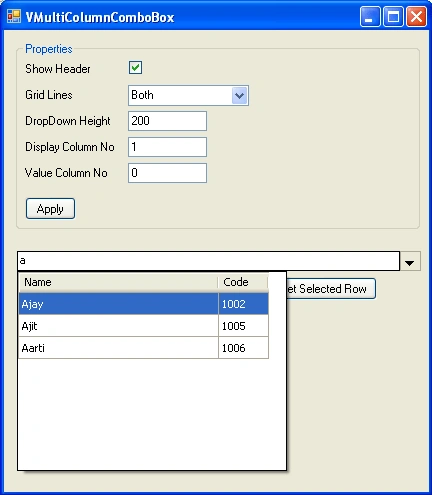
Common Properties:
- Show Header: Set column header visibility.
- Grid Lines: Set grid lines as None, Vertical, Horizontal or Both.
- DropDown Height: Configurable dropdown height. It will show scrollbar if more items present.
- DataSource: DataSource will be a DataTable.
- SourceDataString: Mapping Properties which will be shown as Columns.
- SourceDataHeader: Column Headers which will be shown if Show Header property is true.
- ColumnWidth: Width for each column.
- Display Column No: Column number which will be work as a DisplayMember.
- Value Column No: Column number which will be work as a ValueMember.
Usage
The Control usage is very simple & straight forward. Set the following properties to configure the control:
private void InitializeComboBox()
{
multiColumComboBox1.Clear();
multiColumComboBox1.SourceDataString = new string[3] { "ID", "Name", "Code" };
multiColumComboBox1.ColumnWidth = new string[3] { "0", "200", "50" };
multiColumComboBox1.DataSource = GetDataSource();
}
private DataTable GetDataSource()
{
DataTable dtSource = new DataTable();
DataColumn dtColID = new DataColumn("ID");
dtColID.DataType = System.Type.GetType("System.String");
dtSource.Columns.Add(dtColID);
DataColumn dtColName = new DataColumn("Name");
dtColName.DataType = System.Type.GetType("System.String");
dtSource.Columns.Add(dtColName);
DataColumn dtColCode = new DataColumn("Code");
dtColCode.DataType = System.Type.GetType("System.String");
dtSource.Columns.Add(dtColCode);
//Add rows
DataRow row = dtSource.NewRow();
row[dtColID] = "1";
row[dtColName] = "Vijay";
row[dtColCode] = "1001";
dtSource.Rows.Add(row);
//Add rows
row = dtSource.NewRow();
row[dtColID] = "2";
row[dtColName] = "Ajay";
row[dtColCode] = "1002";
dtSource.Rows.Add(row);
. . . . .
. . . . .
return dtSource;
}
Heritier LuthalaPosted Mar 28, 2016, 11:05 AM
i want to use the property .Text to add avalue to the combobox
Sabna NPosted Mar 16, 2015, 7:16 AM
How can I create event "SelectedIndexChanged" ?
Sudhindra BAPosted Aug 28, 2013, 9:01 AM
Hi Sunil, Can you please help me where should i register the event? Kindly help. I have same problem. Also Great work by the editor. Awesome code.
Sunil DeshalahrePosted May 30, 2012, 7:12 AM
hi.... George's problem is same as my problem.. But I found the solution for this.U just need to add code for the popup in Deactivate event at the time of initialization. just like this. private popup_Deactivated(object sender,EventEargs e) { //You just need to close popup here... } enjoyyyyyyyyyyyyyyyy......:)
George GarvasisPosted May 5, 2012, 7:36 AM
Hi, good work but i found a small problem.popup is not closing if we click on the form.so popup control is still showing the original location.can you guide me to solve this problem.
George GarvasisPosted May 5, 2012, 7:36 AM
Hi, good work but i found a small problem.popup is not closing if we click on the form.so popup control is still showing the original location.can you guide me to solve this problem.
George GarvasisPosted May 5, 2012, 7:36 AM
Hi, good work but i found a small problem.popup is not closing if we click on the form.so popup control is still showing the original location.can you guide me to solve this problem.
George GarvasisPosted May 5, 2012, 7:36 AM
Hi, good work but i found a small problem.popup is not closing if we click on the form.so popup control is still showing the original location.can you guide me to solve this problem.
George GarvasisPosted May 5, 2012, 7:36 AM
Hi, good work but i found a small problem.popup is not closing if we click on the form.so popup control is still showing the original location.can you guide me to solve this problem.
Scott FasoeditedPosted Mar 30, 2011, 1:25 PMEdited Mar 30, 2011, 1:32 PM
Clean code. But, there appear to be a couple of problems (missing some common combobox features). 1) No mouse hover which auto hilights the line the mouse is over 2) After user selects an item, all items in the list dissapear except for the one selected.